Fabric Lakehouse Tutorial — Complete 2026 Guide
Architecture, Medallion design, Materialized Lake Views cross-workspace extended lineage, OneLake storage tiers, Direct Lake, security, optimization, and every June 2026 update — all verified against Microsoft Learn.
A Microsoft Fabric Lakehouse stores data in OneLake using open Delta Parquet format, combining data lake flexibility with warehouse-style query performance. Every Lakehouse gets a SQL analytics endpoint (read-only T-SQL over Delta tables) automatically at creation time. Note: as of mid-2026, Microsoft no longer auto-creates a default Power BI semantic model alongside every Lakehouse — you now create one manually (via “New semantic model” in the Lakehouse toolbar) when you’re ready to build reports. As of June 2026, the two biggest additions are OneLake storage tiers and lifecycle management (Preview — automatically move historical data to Cool or Cold storage to cut costs) and extended lineage for Materialized Lake Views (define one refresh schedule in your Gold Lakehouse that cascades through Silver and Bronze automatically, even across workspaces).
What Creates When You Create a Lakehouse
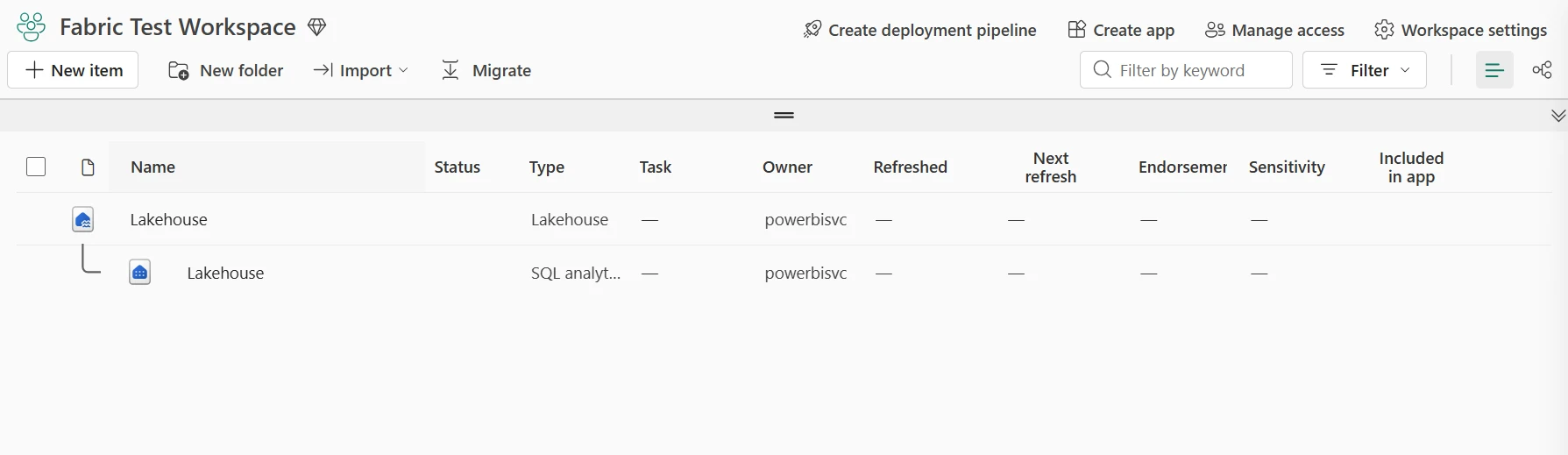
When you create a Fabric Lakehouse, the platform automatically provisions two connected items. Understanding this prevents the most common beginner confusion about why tables appear in some interfaces but not others.
| Item Created | What It Is | Who Uses It |
|---|---|---|
| Lakehouse | The storage item — Delta tables under Tables/, raw files under Files/, both in OneLake | Data engineers, Spark notebooks, pipelines |
| SQL analytics endpoint | Read-only T-SQL interface over the Lakehouse’s Delta tables. Supports views, functions, column-level security | SQL developers, Azure Data Studio, Power BI Desktop |
Earlier in Fabric’s rollout, a default Power BI semantic model was created automatically alongside every Lakehouse. As of mid-2026, this is no longer the default behavior in new tenants — the Lakehouse home screen now shows a “New semantic model” option in the toolbar that you trigger explicitly once you’re ready to build reports. Functionally nothing is lost: the manually-created model still connects over the SQL analytics endpoint the same way, and Power BI Direct Lake works identically once it exists. This just removes an object that many teams never used from Lakehouses created purely for engineering workloads.
Files stored under the Files section as raw CSV, JSON, or Parquet are not exposed in the SQL analytics endpoint and do not appear in any semantic model built on top of it. Only managed Delta tables (under the Tables section, or created via spark.write.format("delta").saveAsTable()) are queryable via T-SQL and available to Power BI Direct Lake. This is the most common reason a table “doesn’t show up” after ingestion.
June 2026 Updates — What Changed
Advertisements
The June 2026 Fabric release (published June 2, 2026) added two significant Lakehouse-specific features and several OneLake platform improvements that affect cost management and cross-workspace engineering patterns.
Extended Lineage for Materialized Lake Views June 2026
MLVs now span Lakehouse boundaries. Define views in a Gold Lakehouse that reference Silver and Bronze tables in other Lakehouses, even across workspaces. One schedule in Gold cascades through the entire lineage in dependency order automatically. Faulted nodes in the lineage graph flag missing or inaccessible dependencies before the run starts. Source: Microsoft Learn.
OneLake Storage Tiers & Lifecycle Management Preview
Three tiers: Hot (standard), Cool (lower storage cost, higher transaction cost), Cold (lowest storage cost, archival). Lifecycle management policies move files between tiers automatically based on creation date, last modified date, or last access date. Configure in Workspace Settings → OneLake → Lifecycle Management. Source: Microsoft Learn.
OneLake Item-Size Reporting Preview
Workspace admins can now see storage usage for every Lakehouse item — visible data, system data, and soft-deleted data — from a single page with sort, search, and on-demand refresh. Previously required Azure Storage Explorer or Capacity Metrics app estimation. Source: June 2026 Feature Summary.
Refresh Materialized Lake View — Pipeline Activity Preview
Refresh a Materialized Lake View as a native step inside a Data Factory pipeline. Coordinate view refreshes with the upstream ingestion pipelines that feed them without separate scheduling infrastructure. Source: June 2026 Feature Summary.
GitHub Enterprise Cloud with Data Residency GA
Git integration for Fabric now supports ghe.com Enterprise Cloud instances with data residency requirements — Lakehouse notebooks, pipelines, and semantic models version-controlled within specific geographic boundaries for regulatory compliance. Source: June 2026 Feature Summary.
GPU-Accelerated Fabric Data Warehouse
Not Lakehouse-specific, but relevant for architectures using Lakehouse + Warehouse together. Fabric Data Warehouse now supports GPU acceleration via NVIDIA compute integration. Internal benchmarking (May 2026) showed up to 7× faster performance versus comparable external vendors for reporting workloads. Recognised as ACM SIGMOD Best Industry Paper of 2026.
Architecture & Medallion Design
Fabric Lakehouse architecture centres on OneLake — a single, tenant-wide logical data lake backed by Azure Data Lake Storage Gen2 with a hierarchical namespace. Every workspace appears as a container, and every Lakehouse appears as a folder inside that container. Spark, T-SQL, Power BI, and pipelines all read the same underlying Parquet files without copying data between engines.
Core Components
OneLake
Single tenant-wide logical lake. Supports ADLS Gen2 APIs and SDKs — Azure Databricks, Synapse, and custom ADLS applications connect without modification. Shortcuts reference data in other Lakehouses, ADLS, S3, or Dataverse without moving it.
Delta Tables
ACID transactions, schema evolution, time travel. Stored as Parquet files with Delta transaction logs. SQL endpoint exposes them as relational tables. Power BI Direct Lake reads Parquet files directly without import. V-Order write-time optimisation (enabled by default) improves read performance across all Fabric engines.
Spark Runtime
Fabric Runtime 1.3 (Spark 3.5, Delta Lake 3.x). Starter Pools reduce cold start to 5–15 seconds. High Concurrency mode (January 2026) allows up to 5 independent Lakehouse jobs to share one Spark session — reduces wait time and cost on smaller F-SKU capacities.
Medallion Architecture in Fabric Lakehouse
Microsoft recommends organising Lakehouse data into Bronze, Silver, and Gold layers inside a single Lakehouse using Lakehouse schemas (available when Lakehouse schemas are enabled) or across multiple Lakehouses connected by OneLake shortcuts and Materialized Lake Views.
| Layer | Purpose | Fabric Tools | Practical Example |
|---|---|---|---|
| Bronze | Raw ingested data. Preserve original structure for replay and audit. Minimal transformation. | Data Pipelines, Copy Job, Eventstream, Data Mirroring, Notebooks | Raw POS transactions written hourly from SQL Server via Copy Job CDC. |
| Silver | Cleaned, conformed, de-duplicated. Business keys applied. Data quality rules enforced. | Notebooks (Delta MERGE), Materialized Lake Views (SQL or PySpark), Dataflow Gen2 | Orders joined to customer dimension, invalid rows quarantined to an errors table. |
| Gold | Curated, business-ready models optimised for BI, Direct Lake, AI, and API consumption. | Materialized Lake Views, SQL endpoint, Power BI Direct Lake semantic models | Sales by region, product, channel with row-level security applied at semantic model level. |
A single Lakehouse with Lakehouse schemas (bronze schema, silver schema, gold schema) works well for small-to-medium teams where all engineers share the same workspace. Multiple Lakehouses per layer — Bronze Lakehouse, Silver Lakehouse, Gold Lakehouse — works better for large teams with separate ownership boundaries, different security policies per layer, or when Gold data needs to be shared across multiple downstream workspaces via shortcuts. Extended MLV lineage (June 2026) makes the multi-Lakehouse pattern much easier to orchestrate: one schedule in the Gold Lakehouse refreshes the entire chain.
The question of single Lakehouse versus multiple Lakehouses for Medallion comes down to security boundaries and team ownership, not performance. A Gold Lakehouse shared with a Reporting workspace via shortcut gives the reporting team read access to Gold tables without giving them any access to Bronze or Silver. That separation is not possible inside a single Lakehouse — workspace RBAC is at the workspace level, not the schema level. Design the Lakehouse topology around who owns what and who needs to see what, then let shortcuts and MLV lineage handle the cross-Lakehouse refresh orchestration.
Materialized Lake Views — GA & June 2026 Updates
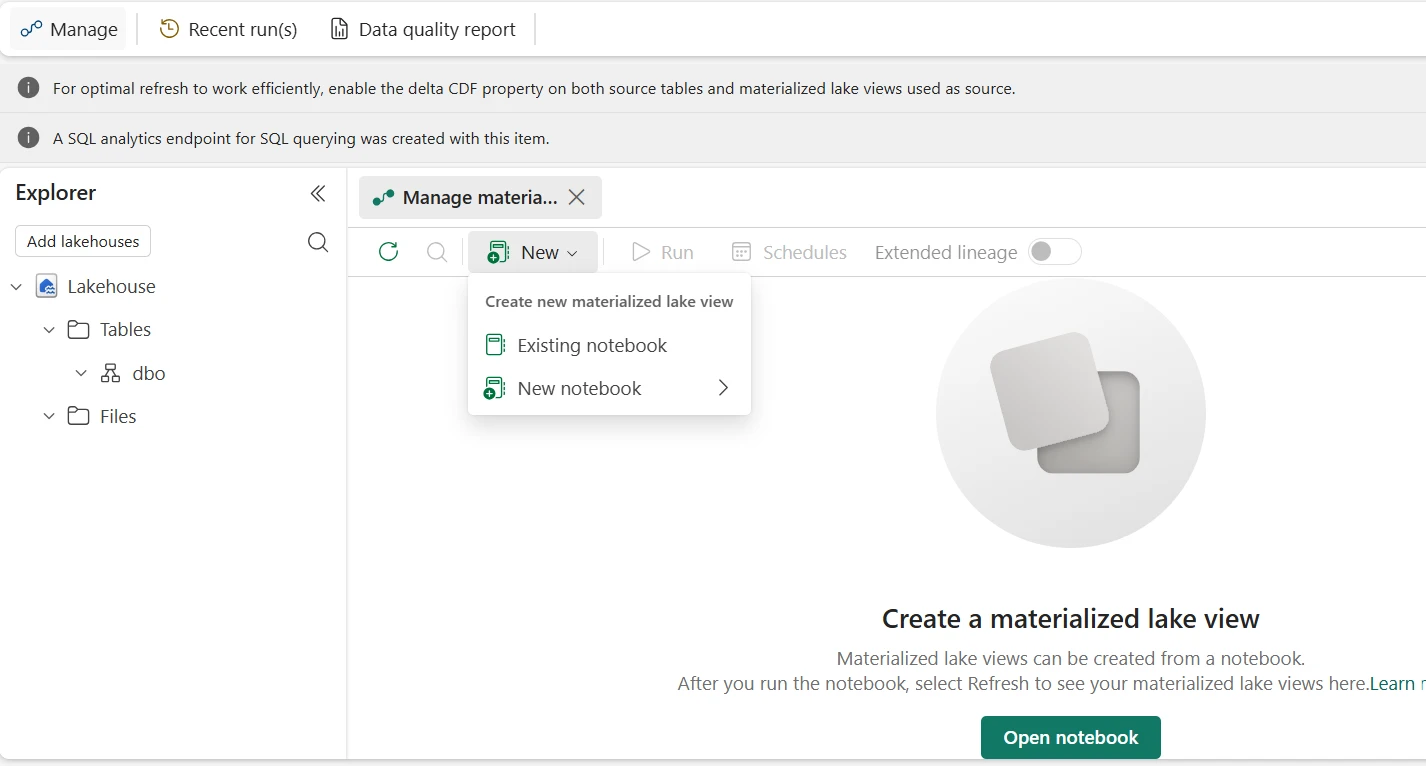
Materialized Lake Views reached General Availability in March 2026. They let you define transformation logic in SQL or PySpark — Fabric materialises the result as a Delta table and manages incremental refresh, dependency tracking, and retry automatically. The June 2026 release added cross-workspace extended lineage, changing how multi-Lakehouse Medallion orchestration works.
What MLVs Replace
Before MLVs, a Silver-to-Gold transformation required a Spark notebook triggered by a pipeline, with manual dependency management between tables. An engineer had to know that Gold table A depends on Silver table B which depends on Bronze table C, and schedule three separate pipelines in the right order. MLVs declare these dependencies as SQL or PySpark, and Fabric resolves the execution order automatically — including across Lakehouses as of June 2026.
Key Capabilities (Post-GA, March 2026)
SQL and PySpark Authoring
- Write MLV definitions in SQL or PySpark inside a notebook
- Requires Lakehouse schemas enabled and Fabric Runtime 1.3
- Replace an MLV definition in place — Fabric validates the new logic, swaps it, and preserves refresh history and lineage
- Downstream dependencies remain intact after a Replace
Incremental and Dependency-Aware Refresh
- Partition-aware incremental refresh — only changed partitions are reprocessed
- Dependency graph auto-generated from view definitions
- Three refresh modes: current view only, current view + intra-Lakehouse dependencies, current view + cross-Lakehouse extended lineage
- Multiple independent schedules per Lakehouse (not just one global schedule)
Extended Lineage — June 2026
- MLVs now reference source tables in other Lakehouses across workspaces
- Enable Extended Lineage toggle in Schedules pane, select upstream Lakehouses to include
- Fabric resolves full dependency order across Lakehouses and refreshes in sequence
- Faulted nodes flag missing or inaccessible dependencies before execution
- One Gold Lakehouse schedule cascades Bronze → Silver → Gold automatically
Data Quality Constraints
- Define constraints directly in MLV definitions — rows failing constraints are quarantined automatically
- Quality metrics visible in the lineage graph per view node
- Managed MLVs provide automatic monitoring, retries, and centralised visibility — notebook-triggered refreshes do not
Gold Sales Summary — Materialized Lake View Definition
-- Create a Gold-layer summary MLV
-- Source tables live in Silver schema (same or other Lakehouse via shortcut)
CREATE MATERIALIZED LAKE VIEW gold.sales_summary
AS
SELECT
    c.region,
    p.category,
    SUM(f.sales_amount)            AS total_sales,
    COUNT(*)                       AS txn_count,
    COUNT(DISTINCT f.order_id)    AS unique_orders
FROM   silver.fact_sales     f
JOIN   silver.dim_customer   c  ON f.customer_id = c.customer_id
JOIN   silver.dim_product    p  ON f.product_id  = p.product_id
GROUP BY c.region, p.category;

-- After creation: appears as a Delta table in the Lakehouse explorer
-- Queryable via SQL endpoint and Power BI Direct Lake
-- Refresh schedule: Lakehouse → Materialized lake views → Schedules
Use Materialized Lake Views when the transformation logic is expressible in SQL or PySpark DataFrame API and you want automatic dependency tracking, incremental refresh, and quality monitoring without orchestration overhead. Use Spark notebooks (with explicit Delta MERGE patterns) when you need complex iterative logic, custom Python libraries, ML feature generation, or CDC patterns that require row-level upsert control. Both output Delta tables consumable by the SQL endpoint and Direct Lake.
Loading Data into Fabric Lakehouse
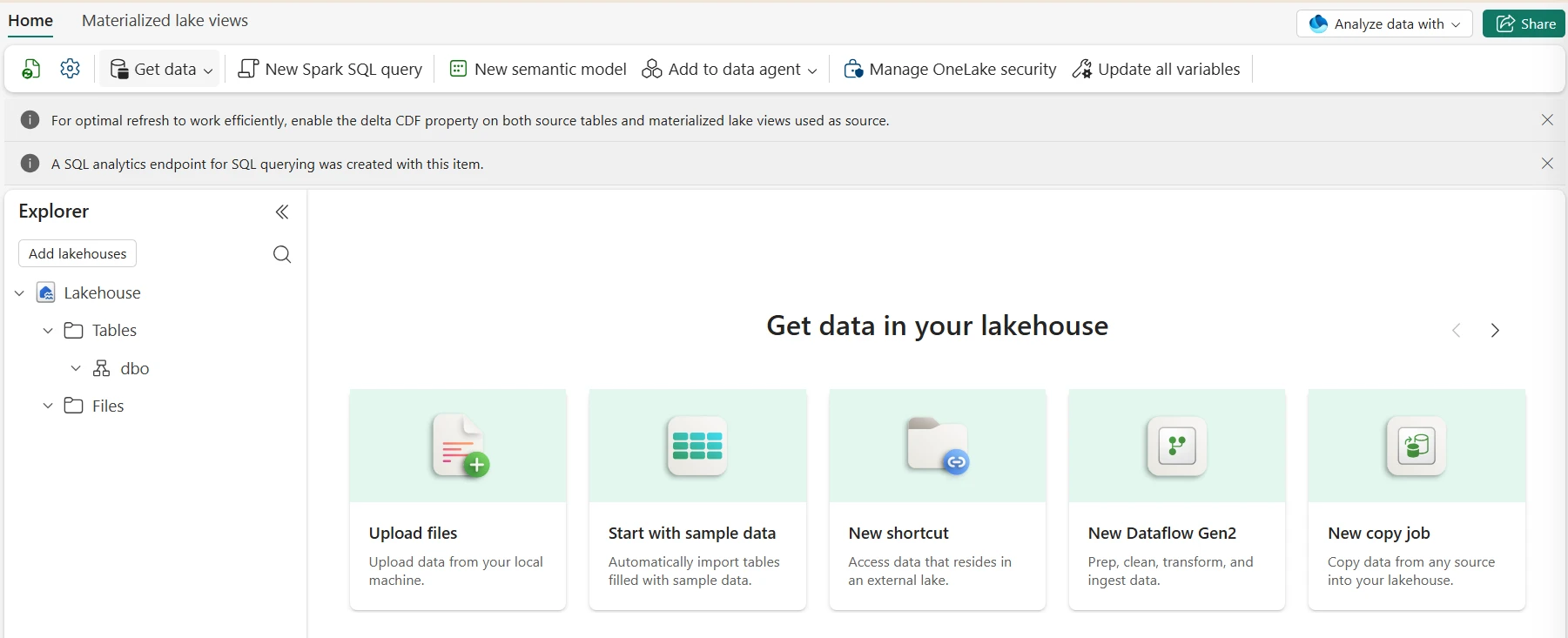
Fabric supports multiple ingestion paths into Lakehouse, all landing data in OneLake. The right method depends on source type, latency requirement, and whether the team prefers code-first or low-code tooling.
Data Pipelines — Copy Activity and Copy Job
Data Pipelines connect to 90+ sources and land data into Lakehouse tables or Files. Copy Activity gives full control over schema mapping, partition options, and fault tolerance. Copy Job Activity (GA April 2026) is the no-code equivalent with automatic schema detection, bulk/incremental/CDC in one item, and SCD Type 2 support for Fabric Warehouse. CDC for SQL Server, Azure SQL, and Azure SQL MI is now GA; auto-partition support for Oracle, Lakehouse, and SAP HANA is in Preview.
# Read raw files from ADLS landing zone
df = (spark.read
      .format("parquet")
      .load("abfss://landing@storage.dfs.core.windows.net/raw/sales/"))

# Write as managed Delta table in Bronze schema
(df.write
   .format("delta")
   .mode("overwrite")
   .option("overwriteSchema", "true")
   .saveAsTable("bronze.sales_raw"))
Dataflow Gen2 — Low-Code Ingestion
Dataflow Gen2 uses Power Query with 200+ connectors to load and transform data into Lakehouse tables — no Spark knowledge required. The June 2026 release added Mapping Data Flow transformations inside Dataflow Gen2, bringing ADF Mapping Data Flow logic into the Fabric low-code experience. Output directly to Lakehouse managed tables, queryable immediately via the SQL endpoint and Power BI.
Spark Notebooks — Complex ETL and CDC
Notebooks are the right tool for complex ingestion: CDC with Delta MERGE, custom schema enforcement, data quality gates, feature engineering, and multi-source joins. Use mssparkutils.runtime.getParameterValue() to receive pipeline parameters so notebooks are parameterised and rerunnable rather than hardcoded.
from delta.tables import DeltaTable
from pyspark.sql.functions import current_timestamp, lit

RUN_DATE = mssparkutils.runtime.getParameterValue("run_date", "2026-06-06")

# Read incremental source data
df_inc = (spark.read.format("delta")
          .table("bronze.sales_raw")
          .filter(col("load_date") == lit(RUN_DATE))
          .dropDuplicates(["order_id"]))

# MERGE to Silver table — safe to rerun for the same run_date
target = DeltaTable.forName(spark, "silver.fact_sales")
(target.alias("tgt")
       .merge(df_inc.alias("src"), "tgt.order_id = src.order_id")
       .whenMatchedUpdateAll()
       .whenNotMatchedInsertAll()
       .execute())
Eventstream — Real-Time Ingestion
Fabric Eventstream ingests streaming data from Azure Event Hubs, IoT Hub, Kafka, MQTT, and CDC sources. Route streams to Lakehouse Delta tables, Eventhouse KQL databases, or both simultaneously. June 2026 added GA support for Apache Kafka and Azure Service Bus connectors, pagination support for the HTTP connector (Preview), and Eventstream observability through Workspace Monitoring (Preview).
Mirroring and OneLake Shortcuts
Data Mirroring keeps operational databases (Azure SQL DB, Cosmos DB, Snowflake, Databricks Unity Catalog) in sync as Delta tables in OneLake without custom ETL — near-real-time replication with zero code. OneLake shortcuts virtualise data from ADLS Gen2, S3, or other Lakehouses as folders inside your Lakehouse without copying it. June 2026 added network security controls for Mirroring — workspace-level outbound access protection for mirrored connections.
SQL Endpoint, Direct Lake & Power BI
Advertisements
The SQL analytics endpoint is auto-generated at Lakehouse creation and exposes every managed Delta table as a read-only T-SQL relation. Connect with Power BI Desktop, Azure Data Studio, or any T-SQL client using Entra ID authentication against the Fabric connection endpoint.
SELECT
    product_name,
    SUM(revenue)    AS total_revenue,
    COUNT(order_id) AS order_count
FROM  gold.sales_summary
GROUP BY product_name
ORDER BY total_revenue DESC;
June 2026 — SQL Endpoint Updates
The June 2026 release added several SQL analytics endpoint improvements: CI/CD Support for SQL analytics endpoint (Preview) — version-control and promote SQL endpoint objects across environments; Enhanced metadata sync (Preview) — improved consistency between Lakehouse table changes and SQL endpoint schema; Time Travel via SQL analytics endpoint (Preview) — query historical Delta table versions using SQL syntax; and Configurable Retention (Preview) for controlling Delta history depth.
Power BI Direct Lake Mode
Direct Lake allows the Power BI Analysis Services engine to read Delta Parquet files directly from OneLake memory — no import job, no scheduled refresh window. Reports reflect data as soon as the upstream ETL or MLV refresh writes new files to the Gold Delta table.
- Unsupported DAX functions — some functions force a fallback; check the Direct Lake function compatibility list on Microsoft Learn
- OneSecurity enabled on the Lakehouse — Direct Lake does not support Lakehouses with OneLake data access roles (OneSecurity preview) enabled; manage RLS at the semantic model level instead
- Model exceeds SKU memory framing — Direct Lake frames column data into memory; if the model exceeds the F-SKU framing limit, it falls back to DirectQuery for that query
- Unsupported relationship cardinality or column types — binary columns, certain calculated columns, and many-to-many relationships without bridge tables can trigger fallback
Diagnose via Power BI Desktop Performance Analyzer — look for DirectQuery storage engine events. See the Direct Lake fallback fix guide for resolution steps.
Security & Governance
Fabric Lakehouse security operates at three layers: workspace RBAC, item-level permissions, and data-plane controls. All identity is anchored to Microsoft Entra ID — no separate credential store.
| Layer | Mechanism | Practical Use |
|---|---|---|
| Workspace RBAC | Admin, Member, Contributor, Viewer roles | Engineers are Members. Analysts are Viewers — they can query the SQL endpoint but cannot edit notebooks or pipelines. |
| Item permissions | ReadAll, ReadData, Build permissions per Lakehouse item | Grant ReadData to a reporting service principal without exposing the full workspace. |
| SQL endpoint RLS | Row-level security defined in the SQL endpoint or semantic model | Regional managers see only their region’s rows in Gold tables. |
| Column masking | Dynamic data masking in SQL analytics endpoint (GA) | Mask PII columns from non-admin roles without changing ETL output. |
| Sensitivity labels | Microsoft Purview Information Protection integration | Labels applied in M365 inherit automatically to Fabric Lakehouse items and reports. |
| Customer-managed keys | GA — OneLake data encrypted with customer-owned keys in Azure Key Vault | Required for some regulated industries. Extended in 2026 to support Key Vaults behind a firewall (Preview). |
OneLake data access roles (OneSecurity preview) — which enforce table, column, and row-level permissions at the OneLake storage level — are not compatible with Direct Lake semantic models on the same Lakehouse as of June 2026. Enabling OneSecurity on a Lakehouse causes Direct Lake models to fail with an access error and fall back to DirectQuery. Manage RLS at the Power BI semantic model level for Lakehouses serving Direct Lake until this limitation is resolved.
OneLake Shortcuts — Permission Requirements
When creating shortcuts to external ADLS Gen2, S3, or cross-workspace Lakehouses, the identity accessing the shortcut (your Entra ID in interactive sessions, the workspace identity or service principal in pipeline runs) must have at least Storage Blob Data Reader on the target ADLS account, or equivalent permissions on the target Lakehouse workspace. Shortcut authorization failures are almost always a permission mismatch between the accessing identity and the target storage. See the OneLake shortcut authorization fix guide for the full diagnostic checklist.
Governance and Lineage
Microsoft Purview captures lineage from sources through Lakehouse ingestion pipelines, MLVs, SQL endpoint views, semantic models, and Power BI reports. As of 2026, cross-workspace lineage for non-Power BI Fabric assets has a known limitation in Purview — MLV extended lineage (June 2026) addresses the orchestration side of this by making refresh dependency order visible inside Fabric itself, while the Purview cross-workspace lineage gap remains on the roadmap.
Optimization, Maintenance & Cost Control
Performance and cost in a Fabric Lakehouse depend on Delta file layout, partitioning strategy, query patterns, and OneLake storage tier decisions. The June 2026 storage tiers feature adds a new cost lever that did not exist previously.
OneLake Storage Tiers — Cost Strategy
All OneLake data defaults to the Hot tier. The three tiers have different cost trade-offs: Hot has the lowest transaction cost and is correct for Delta tables actively queried by Spark, SQL endpoint, or Direct Lake. Cool has lower storage cost but higher transaction cost — suitable for historical partitions accessed monthly or less. Cold has the lowest storage cost with the highest transaction cost and retrieval charges — suitable for compliance archives accessed less than once per year.
# Example lifecycle rule (configured in Fabric UI or via API, not T-SQL)
# Rule: Move files not accessed in 90 days to Cool tier
Rule name:  move_old_bronze_to_cool
Scope:      /workspaces/{workspace_id}/lakehouses/{lakehouse_id}/Tables/bronze.*/
Action:     ChangeTier → Cool
Condition:  LastAccessedDaysAgo >= 90

# Rule: Move files not accessed in 365 days to Cold tier
Rule name:  move_archive_to_cold
Scope:      /workspaces/{workspace_id}/lakehouses/{lakehouse_id}/Tables/bronze.*/
Action:     ChangeTier → Cold
Condition:  LastAccessedDaysAgo >= 365

# NOTE: Delta transaction log files should remain Hot —
# exclude _delta_log/ paths from cooling rules
Delta transaction log files (_delta_log/) are read on every table open operation. Moving Delta log files to Cool or Cold tier significantly increases the transaction cost of every Spark job and SQL query on that table, because log reads are charged at the higher tier rate. Scope lifecycle rules to data Parquet files only, not to the _delta_log/ directory. Hot tier for transaction logs is always correct — they are small and accessed constantly.
Table Maintenance — OPTIMIZE and VACUUM
Incremental writes create many small Parquet files over time. OPTIMIZE compacts them into larger files — Power BI Direct Lake performance depends on this. VACUUM removes old Delta file versions outside the retention window. As of March 2026, the Lakehouse Maintenance Activity in Data Factory pipelines (Preview) runs VACUUM and OPTIMIZE as a native pipeline step without a separate notebook.
-- Compact small files and co-locate data for common filter patterns
OPTIMIZE gold.sales_summary
ZORDER BY (region, category);

-- Remove Delta versions older than 7 days
-- Run during maintenance windows, not while active queries run
VACUUM gold.sales_summary RETAIN 168 HOURS;

-- Check current table health
DESCRIBE DETAIL gold.sales_summary;
Partition Strategy
Partition large fact tables by date or high-cardinality business keys so Spark and SQL endpoint queries only scan relevant partitions. Target 256 MB–1 GB per partition file after OPTIMIZE runs. Too many small partitions (under 128 MB) hurt metadata reads; too few large partitions (over 4 GB) hurt parallelism. For time-series tables, partition by year+month rather than day to avoid thousands of partitions accumulating over years.
The OneLake storage tiers feature (June 2026) is the first cost lever in Fabric that does not require changing pipeline or query logic. For organisations retaining years of Bronze data for compliance, moving Bronze partitions older than 90 days to Cool and older than 365 days to Cold can cut OneLake storage costs by 40–60% on those partitions, with no impact on active Silver and Gold layer performance. The key discipline is excluding Delta transaction logs from any cooling policy — that single mistake turns a cost optimisation into a performance problem.
Real-World Use Cases
Retail Analytics — Real-Time KPIs
POS data arrives via Data Pipelines Copy Job (CDC from SQL Server) into Bronze. Online orders stream through Eventstream into a separate Bronze table. Product catalogue comes from a Warehouse shortcut — no data movement. Materialized Lake Views normalise and join Bronze tables into a Silver customer-order fact. A Gold MLV aggregates sales by region, product, and channel. Power BI Direct Lake serves the Gold table — report latency matches the Eventstream ingestion rate, not a scheduled refresh window.
Finance — Power BI Premium to Fabric Lakehouse Migration
Legacy Power BI Premium datasets using Import mode are migrated to Fabric Lakehouse-backed Direct Lake semantic models via the Power BI Premium to Fabric migration path. Scheduled import refreshes are replaced by pipeline-triggered MLV refreshes — report data is as fresh as the last ETL run, not the last scheduled import. RLS moves from Power BI dataset-level to semantic model-level with Entra ID group mapping.
AI and RAG Pipelines on Fabric Lakehouse
Documents, embeddings, and structured reference data stored in a Fabric Lakehouse are accessible to Azure OpenAI via native OneLake integration — no custom ETL pipeline required to get enterprise data into the AI context. Fabric Data Agents (GA in Microsoft 365 Copilot, June 2026) can query Lakehouse tables directly using natural language, with the NL2SQL engine (Improved, June 2026 Preview) translating questions to T-SQL against the SQL analytics endpoint.
Manufacturing and IoT
Factory telemetry streams from IoT Hub through Eventstream into both a Lakehouse Bronze table and an Eventhouse KQL database simultaneously. The KQL database serves sub-second real-time dashboards with time-series visualisation (Preview, June 2026). The Lakehouse Bronze table feeds Silver and Gold MLVs for historical analysis. Predictive maintenance models trained in Fabric Data Science notebooks read from the Gold Lakehouse and write predictions back as a new Delta table, also queryable via Direct Lake.
Frequently Asked Questions – Fabric Lakehouse Tutorial
spark.write.format("delta").saveAsTable() or the Lakehouse table creation UI) appear in the SQL analytics endpoint. Files stored as raw CSV, JSON, or Parquet under the Files section are not exposed. The fix is always the same: write or convert the data to a Delta table using saveAsTable(). If you used .save("Tables/my_table") without saveAsTable(), the files exist in OneLake but are not registered as a managed table — the SQL endpoint cannot see them. Register them by running spark.catalog.createTable("my_table", path="Tables/my_table", source="delta")._delta_log/) to Cool or Cold — they are read on every table open and the higher transaction cost offsets any storage saving.Feature descriptions are based on official Microsoft Learn documentation and the Fabric June 2026 Feature Summary (published June 2, 2026). Preview features are subject to change. Verify current feature status at learn.microsoft.com/fabric/data-engineering/lakehouse-overview and the Fabric Updates Blog. UIG Data Lab is an independent publication, not affiliated with or endorsed by Microsoft Corporation.