Data Pipelines in Fabric — Complete 2026 Guide
Everything from trigger types and activity reference to the June 2026 updates — Approval Activity, Conditional Retries, Copy Job GA, dbt Job, Lakehouse Utility Suite, and the ADF Migration Tool. Production patterns included.
Fabric Data Pipelines are the low-code orchestration engine inside Microsoft Fabric Data Factory. They support over 90 source connectors, every major activity type (Copy, Notebook, Dataflow, dbt, Stored Procedure, Web, Lookup, ForEach, Switch, Until, Approval), and four trigger types: Manual, Schedule, Event, and Job Event. As of June 2026, new additions include Approval Activity for human-in-the-loop governance, Conditional Retries for targeted failure recovery, Copy Job Activity GA, Refresh Materialized Lake View, Refresh SQL Endpoint GA, and the ADF Migration Tool.
Activity Reference Summary
Quick reference for every activity category in Fabric pipelines as of June 2026.
| Category | Activities | Status (June 2026) |
|---|---|---|
| Data movement | Copy Activity, Copy Job Activity | GA |
| Transformation | Dataflow Gen2, Notebook, Spark Job Definition, dbt Job, Stored Procedure, Script | GA / dbt Job Preview |
| Lakehouse utility | Lakehouse Maintenance, Refresh SQL Endpoint, Refresh Materialized Lake View | SQL Endpoint GA · others Preview |
| Control flow | If Condition, Switch, ForEach, Until, Execute Pipeline, Wait, Fail | GA |
| Iteration & state | Lookup, Get Metadata, Set Variable, Append Variable, Filter | GA |
| External / integration | Web, WebHook, Delete, User Data Function | GA |
| Governance | Approval Activity | Preview — June 2026 |
| Triggers | Manual, Schedule, Event (file arrival / deletion), Job Event, Interval-based | GA / Interval-based Preview |
What’s New in Data Pipelines in Fabric – June 2026 & Recent Updates
Advertisements
The June 2026 Fabric release and the Build 2026 announcements (June 2026) added a significant number of pipeline-specific features. These are the ones that matter for production deployments.
Approval Activity Preview
Weave human approval steps directly into pipeline runs. The pipeline pauses at the approval gate and waits for a designated approver to respond before proceeding — no external Logic App or Power Automate flow required. Source: June 2026 Feature Summary.
Conditional Retries Preview
Retry specific activities under specific conditions — not blindly on any failure. Define which error types trigger a retry and which should fail immediately. Prevents infinite retry loops on permanent errors like schema mismatches.
Copy Job Activity GA
Embed a Copy Job inside a pipeline as a first-class activity. Combines Copy Job’s automatic schema detection, bulk/incremental/CDC support with pipeline orchestration, conditional logic, and retry handling. GA since April 2026.
Refresh SQL Endpoint GA
Refresh the Lakehouse SQL analytics endpoint on demand as a pipeline step. Sync SQL refreshes with ingestion pipelines so downstream BI queries always read the latest state. Previously required a separate workaround or manual trigger.
Lakehouse Maintenance Activity Preview
Run VACUUM, OPTIMIZE, and storage management operations as a native pipeline activity — no separate notebook required. Schedule nightly table maintenance inside the same pipeline as your ETL load.
Refresh Materialized Lake View Preview
Refresh a Materialized Lake View as a pipeline step. Coordinate view refreshes with the upstream ingestion that feeds them — no separate scheduling required.
ADF Migration Tool Preview
Built into Azure Data Factory and Azure Synapse. Select any pipeline, click Migrate — the pipeline moves to Fabric Data Factory immediately, unlocking Copilot, Copy Job, dbt, Airflow, and OneLake. No pipeline rewrites.
Variable Library — Connection & Item References
Variable Libraries now support connection references (point at external sources without embedding credentials) and item references (link to Lakehouses, notebooks, or pipelines dynamically). Promote the same pipeline definition from dev to prod — connections resolve at runtime.
CDC in Copy Job — SQL Estates GA
Change Data Capture for SQL Server, Azure SQL, and Azure SQL Managed Instance via Copy Job is now GA. SCD Type 2 support for Fabric Warehouse and auto-partition support for Oracle, Lakehouse, and SAP HANA are in Preview.
Outbound Access Protection for Data Factory GA
Workspace-level outbound access protection now applies to all Data Factory items — Pipelines, Copy Job, and Dataflows. Enforce which external endpoints pipelines can reach from a protected workspace.
At Build 2026, Microsoft announced a modernised pipeline canvas for large pipelines, a dbt Job API for programmatic CI/CD control, dbt project export/import for round-tripping between Fabric and external tools, Airflow Copilot for natural-language DAG authoring, and Workspace Identity authentication for SharePoint connectors. Source: Build 2026: Fabric Data Factory recap.
Fabric AI Functions moved to gpt-5-mini as the default model in June 2026. The gpt-4.1 model series has been retired: gpt-4.1 retired May 30, gpt-4.1-mini retired June 15. Any pipeline or Dataflow Gen2 activity still pinned to those model IDs is already failing. Migrate pinned references to gpt-5.1 (for gpt-4.1) or gpt-5-mini (for gpt-4.1-mini) immediately if you haven’t already.
Trigger Types
Pipelines run on demand or automatically. The trigger type determines when the pipeline starts, how parameters are passed, and what monitoring data is captured in the Monitor Hub. Choosing wrong costs both capacity and reliability.
| Trigger | How It Works | Best For | Limit |
|---|---|---|---|
| Manual | On-demand via UI or REST API. Supports passing pipeline parameters at invocation time. | Ad-hoc loads, testing, debugging, triggered by external systems via API | No limit |
| Schedule | Recurrence-based: minutely, hourly, daily, weekly, monthly. Timezone support. Multiple start times per schedule. | Time-based ETL, maintenance, report refresh | Up to 20 schedules per pipeline |
| Interval-based Preview | Non-overlapping, non-wall-clock time windows (tumbling-window style). Each interval has a managed start and end time visible in Monitor Hub. | Migrating ADF tumbling window triggers; incremental loads with explicit time slices | — |
| Event | File arrival or deletion in a OneLake folder or Azure Blob Storage path. No polling — event-driven via Azure Event Grid. | Reactive ingestion — process file the moment it lands | — |
| Job Event | Trigger when a parent pipeline, dataflow, or lakehouse refresh completes (success, failure, or both). | Dependent pipeline chains — start transformation only after ingestion finishes | — |
Schedule Trigger — Practical Configuration
Schedule triggers support timezone-aware recurrence. Common production patterns that cover most enterprise ETL schedules:
# Every 15 minutes during business hours
Frequency: Minute | Interval: 15
Start: 06:00 | End: 20:00 | Timezone: Europe/London

# Daily at two specific times
Frequency: Day | Times: ["02:00", "14:00"]
Timezone: America/New_York

# Weekdays only at 09:00
Frequency: Week | Days: [Monday, Tuesday, Wednesday, Thursday, Friday]
Times: ["09:00"] | Timezone: UTC

# Monthly — first day of month
Frequency: Month | Days of month: [1]
Times: ["03:00"]
Heavy transformation pipelines running during business hours compete for CU capacity with Power BI report queries. Schedule large Spark jobs and OPTIMIZE operations between midnight and 6 AM. The Fabric Capacity Optimization guide covers CU burst handling and pause/resume scheduling in detail.
Event triggers are the right pattern for file-arrival ingestion, but they have one edge case worth planning for: if multiple files arrive in the same folder within seconds of each other, each file triggers a separate pipeline run. On high-volume ingestion paths (hundreds of files per hour), that means hundreds of concurrent pipeline runs all competing for the same capacity. For high-frequency file arrival, set a schedule trigger polling every 5 minutes and process all available files in a ForEach loop — it is more predictable and cheaper than one event-triggered run per file.
Data Movement: Copy Activity & Copy Job
Fabric Data Factory has two distinct data movement mechanisms. They are not interchangeable — understanding the difference prevents a lot of pipeline design mistakes.
Copy Activity
- 90+ source and destination connectors
- Manual schema mapping and column-level configuration
- Parallel copy settings, partition options, staging
- Watermark-based incremental load via pipeline expressions
- Fault tolerance: skip type-mismatched rows, log to audit table
- Full control over compression, format, and transformation-on-read
Copy Job Activity GA April 2026
- No-code — automatic schema detection, no manual mapping required
- Bulk load, incremental load, and CDC in one item
- CDC for SQL Server, Azure SQL, Azure SQL MI now GA
- SCD Type 2 for Fabric Warehouse — Preview
- Auto-partition for Oracle, Lakehouse, SAP HANA — Preview
- Edit via JSON payload for programmatic customisation
- SAP data via ABAP Add-On — Preview
Incremental Load Pattern — Copy Activity with Watermark
The most common production use of Copy Activity is an incremental load keyed on a high-water mark stored in a control table. The pattern is three activities: Lookup reads the last load date, Copy Activity uses it as a source filter, Stored Procedure updates the watermark after success.
# Step 1 — Lookup Activity: read last successful load date
Query: SELECT MAX(last_load_date) AS watermark
       FROM etl_control.load_log
       WHERE table_name = 'orders'

# Step 2 — Copy Activity source query (dynamic)
@{concat('SELECT * FROM dbo.orders WHERE modified_date > ''',
  activity('LookupWatermark').output.firstRow.watermark,
  ''' ORDER BY modified_date')}

# Step 3 — Stored Procedure Activity: update watermark on success
EXEC etl_control.usp_UpdateWatermark
  @table_name = 'orders',
  @new_watermark = '@{utcnow()}'
The two most common Copy Activity failures on CSV sources: a Byte Order Mark (BOM) at the start of the file causes the first column name to be misread, and column order changes in the source cause silent data mismatches when schema mapping is set to “auto”. Fix BOM issues by enabling Skip BOM in the source dataset settings. For column order reliability, always use explicit column mappings in the Copy Activity — never rely on positional mapping for production pipelines. Full diagnosis steps are in the Copy Activity CSV BOM fix guide.
Transformation Activities
Transformation activities run compute against data rather than moving it. The right activity depends on team skillset, transformation complexity, and whether the job needs to be scheduled or run ad-hoc.
Dataflow Gen2
Dataflow Gen2 runs visual Power Query transformations on managed Spark at any scale. The June 2026 release added Mapping Data Flow (MDF) Transform support inside Dataflow Gen2 — Azure Data Factory’s Mapping Data Flow transformations are now available as a low-code Spark-scale data engineering experience inside the Fabric authoring canvas. The Execute Query API (Streaming API) enables programmatic, low-latency execution of Power Query queries against live data sources from external systems.
Parameters passed from a parent pipeline enable incremental loading without hardcoding dates or filter values. A common pattern: a Lookup activity reads the last processed date from a control table, passes it as a pipeline parameter, and the Dataflow applies a WHERE load_date > @param_last_date filter at the source before any data moves.
Notebook Activity
Execute Spark notebooks with workspace identity or service principal authentication. Service principal execution has been the production standard since December 2025 — no user session required, credential rotation via Azure Key Vault, all execution logged under the service principal identity for compliance audits. Pass pipeline parameters to the notebook via mssparkutils.runtime.getParameterValue().
dbt Job Activity Preview
Orchestrate dbt transformations directly from a pipeline canvas. This closes the gap between EL (Extract and Load) and T (Transform) in an ELT architecture without switching tools. The dbt Job runs with serverless execution, integrated testing, and Entra ID security inside the same pipeline that ran the upstream Copy Activity.
The dbt Job API (Preview, Build 2026) enables programmatic control for CI/CD — trigger dbt jobs from GitHub Actions or Azure DevOps without manual pipeline UI interaction. The dbt project export feature enables round-tripping a dbt project between Fabric and external tools.
Pipeline: "daily_sales_elt"

Activity 1: Copy Job Activity
  Source: Azure SQL Server (orders table — CDC incremental)
  Target: Lakehouse bronze.orders_raw
  Mode: CDC | Status: GA

Activity 2: dbt Job Activity  (on success of Activity 1)
  dbt Project: "sales_models"
  Command: dbt run --select +sales_gold
  Test: dbt test --select sales_gold
  Status: Preview

Activity 3: Refresh SQL Endpoint Activity  (on success of Activity 2)
  Target: sales_lakehouse SQL analytics endpoint
  Sync: BI queries now read updated gold layer
  Status: GA

Activity 4: Set Variable
  Variable: pipeline_status = "SUCCESS"
  On failure of any step → pipeline_status = "FAILED"
Teams migrating from Azure Data Factory who relied on Mapping Data Flows no longer need to rewrite those transformations as notebooks or Dataflow Gen2 queries. ADF Mapping Data Flow transformations are now available inside Dataflow Gen2 as of the week of June 8, 2026. The ADF Migration Tool also includes MDF asset migration support.
Control Flow Activities
Advertisements
Control flow activities are what separate a Fabric pipeline from a simple scheduled script. They enable conditional logic, iteration, error branching, and human checkpoints — all without writing orchestration code.
Lookup — Data-Driven Control
Lookup reads a single row or row set from any supported source — SQL table, REST endpoint, file — and makes the result available as a pipeline variable for downstream activities. The watermark incremental load pattern in Section 03 is the most common use, but Lookup also drives dynamic ForEach iteration by fetching a list of items to process.
ForEach — Parallelised Batch Processing
ForEach iterates over an array and executes a set of inner activities for each item. Sequential mode processes items one at a time; parallel mode processes up to 50 concurrently (configurable, default 20). Use parallel mode for independent items — separate customer files, separate table loads. Use sequential mode when order of operations matters — sequential database updates, ordered partition loads.
# Lookup: fetch active tenant list
Activity: Lookup
Query: SELECT tenant_id, container_path
       FROM config.active_tenants
       WHERE status = 'active'

# ForEach: process each tenant in parallel
Activity: ForEach
Items: @activity('LookupTenants').output.value
Batch count: 20  # concurrent executions
IsSequential: false

  # Inside ForEach loop:
  → Execute Pipeline: "process_tenant_data"
     Parameters:
       tenant_id: @item().tenant_id
       source_path: @item().container_path
  → On failure: Append Variable (error_list, @item().tenant_id)
You cannot nest a ForEach inside another ForEach at the same pipeline level. Move the inner loop logic into a child pipeline and invoke it with Execute Pipeline from inside the outer ForEach. This also improves modularity — the child pipeline becomes reusable for ad-hoc single-tenant processing without triggering the full batch.
If Condition and Switch
If Condition evaluates a single boolean expression and routes to a True or False branch. Switch evaluates a selector expression against multiple named cases — cleaner than nested If activities when routing between three or more code paths. Common Switch pattern: route by file type (CSV → Copy Activity with explicit mapping, JSON → Dataflow Gen2, Parquet → direct Delta write), with a Default case that logs unrecognised types to an error table rather than silently failing.
Until — Polling Loops
Until executes inner activities repeatedly until a condition is true. Use it for polling external job status, waiting for an external API to return a terminal state, or implementing retry-with-delay logic for transient failures. Always include a Web Activity inside the loop with a Wait Activity to avoid hammering an external endpoint — set a minimum 10-second wait between polls for external APIs.
Approval Activity New — June 2026 Preview
The Approval Activity pauses a pipeline at a defined checkpoint and waits for a designated approver to respond before continuing. No external Logic App or Power Automate flow is required — the approval UI is embedded in Fabric. This enables governance-driven data publication workflows: data loaded and validated by an automated pipeline, but only published to production after a data steward approves the quality check results.
Activity 1: Copy Job Activity
  Source: ERP system → Lakehouse staging.orders

Activity 2: Notebook Activity
  Run: data_quality_check.py
  Output: @variables('quality_score')

Activity 3: If Condition
  Condition: @greater(variables('quality_score'), 95)

  TRUE branch:
    Activity 4: Approval Activity  (Preview)
      Title: "Approve orders publish to gold"
      Approvers: data-stewards@company.com
      Timeout: 24 hours
      On Approved:
        Activity 5: Notebook Activity — promote staging → gold
      On Rejected:
        Activity 6: Fail Activity — "Data rejected by steward"

  FALSE branch:
    Activity 7: Fail Activity
      Message: "Quality score @{variables('quality_score')} below threshold"
Utility Activities
Utility activities manage state, invoke external systems, handle cleanup, and add control points. These are the activities that make pipelines robust rather than just functional.
Lakehouse Maintenance Activity Preview — FabCon 2026
VACUUM and OPTIMIZE operations are now native pipeline activities — no separate maintenance notebook required. Configure VACUUM to remove files older than N hours and OPTIMIZE to compact small files and reorder data for faster reads. Schedule the activity nightly after your ETL load completes, inside the same pipeline. Source: Fabric FabCon 2026 blog.
Incremental Delta writes create many small Parquet files over time. Without OPTIMIZE, Power BI Direct Lake queries slow down because they must open hundreds of tiny files rather than a few large ones. Running the Lakehouse Maintenance Activity nightly after your ETL pipeline keeps file sizes in the 256 MB–1 GB range where Direct Lake performance is optimal. Previously, this required a separate maintenance notebook triggered by a second pipeline run — now it is a single activity appended to your existing ETL pipeline.
Web & WebHook Activities
Web Activity sends HTTP requests (GET, POST, PUT, DELETE) to any REST endpoint. Use it to call microservices, fetch OAuth tokens, or trigger external workflows from within a pipeline. The most common production pattern: a Web Activity POST to an authentication endpoint, extract the bearer token from the response with @activity('GetToken').output.data.token, store it in a pipeline variable, then pass it as an Authorization header in downstream Copy Activity or Web Activity calls.
WebHook Activity calls an endpoint and waits for a callback before proceeding — the pipeline pauses until the external system invokes the callback URL. Use it for long-running external processes where you need confirmation before proceeding, or for human approval workflows that predate the new Approval Activity.
Delete Activity
Removes files or folders from Lakehouse storage or cloud blob paths. Two production uses: clean up processed files from a staging folder after a successful Copy Activity run, and remove partial results when a pipeline fails mid-run to ensure the next retry starts from a clean state. Always place Delete Activity in the On Success branch after the downstream activity has confirmed successful processing — never delete before confirming the copy completed.
Set Variable & Append Variable
Set Variable initialises or updates a named pipeline variable in the current run scope. Append Variable adds an element to an array variable — the primary mechanism for building error lists, processed file lists, or summary statistics inside ForEach loops. Variables are scoped to the pipeline run; they do not persist across runs. For cross-run state (watermarks, control flags), use a database table or Lakehouse file, not a pipeline variable.
Wait and Fail Activities
Wait pauses execution for a specified number of seconds — primarily for rate limiting when polling external APIs. Fail intentionally terminates the pipeline with a custom error message and code. Use Fail in validation branches where the pipeline should stop loudly rather than continue silently with bad data: if row count from a source is below an expected minimum, Fail with a message that appears in the Monitor Hub and triggers any configured alerts.
User Data Function Activity
Call custom Python functions directly from a pipeline without the overhead of a full Spark notebook. User Data Functions support async execution, pandas integration, and interactive development mode for testing before publishing. Use for lightweight custom logic — string manipulation, custom hashing, format conversion — that is too complex for pipeline expression language but too lightweight to justify a notebook.
Production Patterns
These three patterns cover the most common real-world pipeline architectures. Each one uses multiple activity types together and is designed to handle failure gracefully.
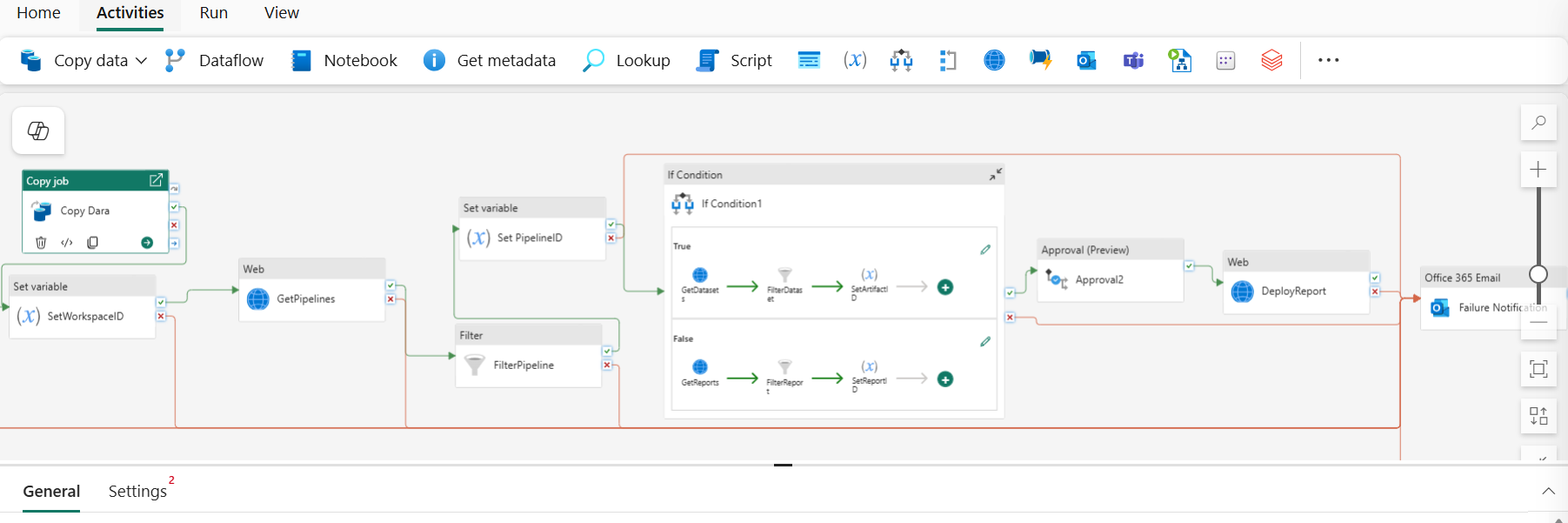
Pattern 1 — Multi-Tenant Parallel ETL
A SaaS platform with 100+ tenants, each with daily data in blob storage. Linear processing is too slow; one tenant failure should not block others.
- Lookup — Fetch Active Tenant ListQuery the config table:
SELECT tenant_id, source_path FROM config.tenants WHERE status = 'active'. The output drives the ForEach array. - Set Variable — Initialise Error Tracking
@variables('error_tenants')= empty array. Populated by Append Variable inside the loop on failure. - ForEach — Process 20 Tenants ConcurrentlyExecute child pipeline
process_tenant_etlwith@item().tenant_idand@item().source_pathas parameters. On failure: Append Variable with@item().tenant_id. - If Condition — Check Error Count
@greater(length(variables('error_tenants')), 0)→ True: Web Activity POST to alerting endpoint with error list. False: Stored Procedure to mark daily load successful. - Dataflow Gen2 — Cross-Tenant AggregationAggregate KPIs across all tenant gold tables for the platform-level reporting layer.
Pattern 2 — Event-Driven File Ingestion with Quality Gate
Files arrive unpredictably in a OneLake folder. Each file must be validated before it reaches the curated layer, and failed files must be quarantined without blocking subsequent arrivals.
Trigger: Event — OneLake folder arrival
  Path: /raw/inbound/orders/
  File pattern: *.csv

Pipeline: "ingest_orders_on_arrival"

Activity 1: Get Metadata
  Dataset: @trigger().outputs.body.folderPath
  Field list: [columnCount, structure, size]

Activity 2: If Condition
  Condition: @equals(activity('GetMeta').output.columnCount, 12)
  # Expected 12 columns — reject anything else

  TRUE → Activity 3: Copy Job Activity (CDC incremental → bronze.orders)
         Activity 4: Notebook Activity (validate row counts, flag nulls)
         Activity 5: If quality_score > 95:
                       Copy Job Activity (bronze → curated.orders)
                       Refresh SQL Endpoint Activity
                     Else: Move to quarantine path

  FALSE → Activity 6: Delete Activity (move to /raw/rejected/)
           Activity 7: Web Activity (POST alert to Teams channel)
Pattern 3 — Governance Pipeline with Approval Gate
Regulated data publication where a data steward must approve before data reaches the gold layer accessible to report consumers. Uses the new Approval Activity (June 2026 Preview).
Trigger: Schedule — daily at 04:00 UTC

Activity 1: Copy Job Activity (source → staging)
Activity 2: dbt Job Activity  (staging → validated silver models)
Activity 3: Notebook Activity (run data quality assertions)
            → Set Variable: quality_score, row_count, anomaly_count

Activity 4: Approval Activity  # New — Preview June 2026
  Title: "@{concat('Daily load ', formatDateTime(utcnow(), 'yyyy-MM-dd'))}"
  Detail: "Rows: @{variables('row_count')} | Quality: @{variables('quality_score')}%"
  Approvers: data-governance@company.com
  Timeout: 8 hours

  On Approved:
    Activity 5: Notebook Activity — promote silver → gold
    Activity 6: Refresh SQL Endpoint Activity
    Activity 7: Stored Procedure — log approval to audit table

  On Rejected / Timeout:
    Activity 8: Fail Activity
      Message: "Gold publish blocked — @{activity('Approval').output.comment}"
The modular architecture — each pipeline doing one job and invoking child pipelines via Execute Pipeline — is not just good practice, it is the difference between a pipeline that is debuggable in production and one that requires a full redesign when something breaks. In Monitor Hub, activity-level logs are only as useful as the pipeline is granular. A 60-activity monolith that fails at activity 47 is much harder to triage than a parent pipeline that shows one child pipeline failed, at which point you open that child pipeline’s run and find the exact failure in three activities. Keep parent pipelines as orchestration only. Keep transformation logic in child pipelines or notebooks.
Monitoring, Security & CI/CD
Monitor Hub
The Monitor Hub shows every pipeline run with status, trigger type, duration, and activity-level details. Filter by workspace, pipeline name, trigger type, or date range. Drill into any run to see individual activity durations, input/output parameters, and error messages. Copy Activity logs include row counts and skipped rows; Notebook Activity logs include Spark job IDs linkable to the Spark UI for performance profiling.
The Datawarehouse Monitor (Preview, June 2026) extends observability to SQL Warehouse operations, adding query performance tracking alongside pipeline run data in a unified monitoring view.
Security Checklist
| Requirement | Implementation | Why It Matters |
|---|---|---|
| No hardcoded credentials | Linked Services + Azure Key Vault secrets | Credential rotation without pipeline edits; audit trail in Key Vault |
| Service principal for notebook execution | Entra ID service principal assigned to workspace; credential rotation via Key Vault | No user-bound sessions; runs survive user offboarding |
| Outbound access protection | Enable OAP on workspace — GA for all Data Factory items | Controls which external endpoints pipelines can reach; prevents exfiltration |
| Workspace Identity for connectors | Snowflake, SharePoint now support secret-less auth via Workspace Identity | No credentials stored in Linked Service; identity-bound to workspace lifecycle |
| Minimal role assignment | Service principals: Contributor on specific OneLake items, not full workspace Admin | Least-privilege access; limits blast radius of a compromised identity |
CI/CD and Variable Libraries
Variable Libraries now support connection references and item references as variable types (June 2026). Define one Variable Library with multiple value sets — one for dev, one for test, one for prod — and mark one active per workspace. Pipelines resolve connection and item references at runtime based on the active value set. This is the correct pattern for promoting the same pipeline definition across environments: no pipeline edits, no hardcoded environment strings, no manual search-and-replace during promotion.
The same Variable Library is now available from Apache Airflow DAGs running in Fabric — define once, share across both pipeline and Airflow orchestration in the same workspace.
GitHub Enterprise Cloud with Data Residency is now GA for Fabric Git integration (June 2026), enabling organisations with ghe.com instances to store Git-backed Fabric items within specific geographic boundaries for regulatory compliance.
Official References & Internal Guides
For deep technical specifications, pipeline optimization, and cross-workload integration, review our companion guides:
Frequently Asked Questions
Feature descriptions and activity names are based on official Microsoft Fabric documentation and the Fabric June 2026 Feature Summary published June 2, 2026. Preview features are subject to change before GA. Verify current feature status at learn.microsoft.com/fabric/data-factory and the Fabric Updates Blog. UIG Data Lab is an independent publication, not affiliated with or endorsed by Microsoft Corporation.