Cloud Data Platforms · Verified June 2026
Microsoft Fabric vs Google BigQuery
Two different bets on how an enterprise should run analytics. Fabric bets the SaaS bundle wins; BigQuery bets serverless SQL wins. Here’s what each one actually costs, where each one actually breaks, and what’s changed since January — checked against Microsoft Learn and Google Cloud’s own documentation, not last year’s marketing.
If your reporting layer is Power BI and your org already lives in Microsoft 365, Direct Lake on OneLake removes a network hop that BigQuery’s DirectQuery can’t avoid. If your data already sits in Google Cloud and your team runs Looker or a Python-heavy stack, BigQuery’s on-demand pricing and instant slot scaling will be cheaper and faster for exploratory work. Most organizations running both don’t pick a winner — they land on BigQuery (or another engine) for ingestion and heavy SQL, a OneLake Shortcut or BigQuery Omni’s cross-cloud cache for the handoff, and Fabric strictly for the Power BI-facing layer.
A 20-person analytics team scanning roughly 15 TiB a month, US region, list pricing — illustrative only:
At this scale, on-demand BigQuery wins by a wide margin because Fabric capacity is a fixed monthly cost regardless of usage. That gap closes, and can reverse, once Power BI distribution to dozens of viewers or sustained warehouse load enters the picture. See the pricing section for where the math actually flips.
OneLake vs BigLake: where the data actually sits
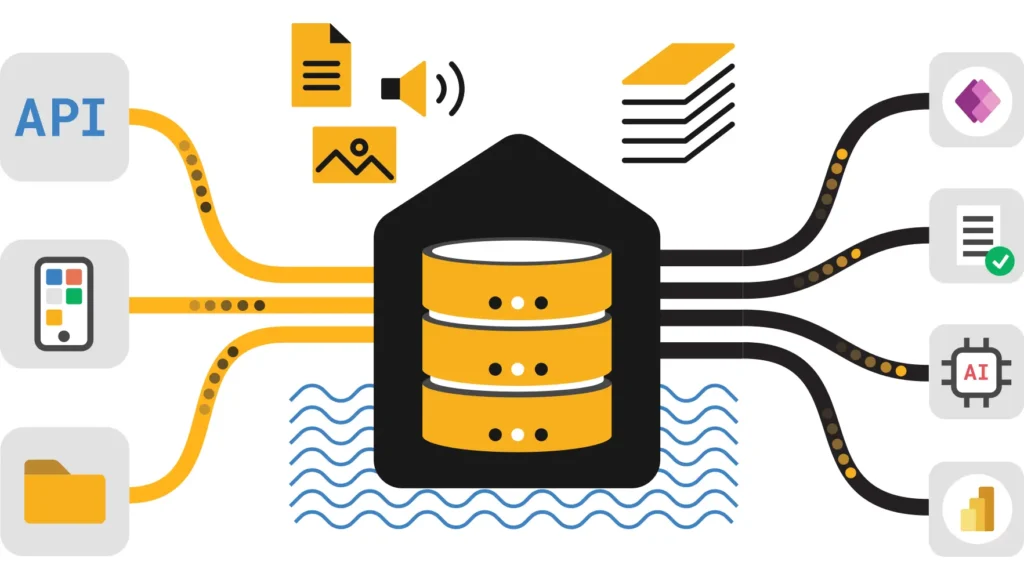
Both platforms store table data in Parquet underneath. The difference is what sits on top of it. OneLake is a SaaS wrapper over Azure Data Lake Storage Gen2, and everything Fabric writes — lakehouse tables, warehouse tables, KQL databases — lands as open Delta Parquet. You can browse petabytes of it through Windows File Explorer if you’ve got the OneLake driver installed, and any Delta-aware engine outside Fabric can read it directly without asking Microsoft’s permission.
BigQuery historically stored data in Capacitor, a proprietary columnar format tuned hard for vectorized scans and shuffle performance. It’s fast, but it’s closed: nothing outside BigQuery reads Capacitor files directly. Google’s answer is BigLake, a metadata and governance layer that lets BigQuery query open formats sitting in Cloud Storage, plus a managed Iceberg storage option with its own REST Catalog announced at Google Cloud Next 2026 — multi-table transactions, automatic file management, and read/write interoperability with Spark and other open engines. Native Capacitor tables still generally edge out open-format tables on raw scan speed inside BigQuery, but the gap that used to justify staying locked into Capacitor has narrowed.
The practical read: Fabric was built open-format from day one because OneLake had to be; BigQuery is retrofitting openness onto a closed core because customers asked for it. Neither approach is wrong, but they imply different lock-in profiles. See the Iceberg section below for how this plays out for multi-engine shops.
The agentic layer both vendors are racing to ship
Advertisements
If you last evaluated either platform before this spring, this is the section that changed the most. Both Microsoft and Google spent the first half of 2026 wiring AI agents directly into the warehouse rather than bolting a chatbot on top.
Fabric IQ, Graph, and Data Agents
Fabric IQ, introduced at FabCon and SQLCon 2026 in Atlanta, is a semantic and ontology layer that sits over analytical and operational data — telemetry, time series, graph, geospatial — so agents and people can reason in terms of business entities instead of raw tables. Microsoft has since added a planning capability on top, letting teams build budgets and forecasts directly on Fabric’s semantic models. Fabric Graph (public preview) adds a scalable graph database for relationship modeling, and Fabric Data Agents reached general availability this year as virtual analysts that answer questions against governed data, alongside operations agents aimed at real-time decisions. OneLake itself now exposes an MCP server, generally available, so external agent frameworks can discover and query Fabric data without a custom connector.
Gemini in BigQuery and the Data Engineering Agent
Google’s parallel push centers on Gemini in BigQuery. Comments-to-SQL lets engineers describe intent in plain English inline with their query and get working SQL back; Gemini can also explain and fix broken queries, and Gemini Cloud Assist offers query optimization recommendations for customers on BigQuery Editions. More significant for production teams is the Data Engineering Agent, which builds Dataform pipelines autonomously while enforcing governance rules and tests, and the Data Science Agent, which automates loading, cleaning, and visualization inside BigQuery notebooks from a plain-English goal. Google also shipped managed and remote MCP support across its database portfolio — AlloyDB, Spanner, Cloud SQL, Bigtable, Firestore — so the same agent tooling reaches well past BigQuery itself.
Neither agent layer is mature enough to be a primary decision driver yet, but the shape of the bet is worth noting. Fabric’s agent story reaches outward from the semantic layer into Power BI and operational systems; BigQuery’s reaches outward from the warehouse into the rest of Google’s database fleet. If your organization is already standardized on one vendor’s identity and governance stack, that’s where the agentic layer will be least painful to adopt first. I wouldn’t switch platforms for this alone in 2026, but I’d factor it into a renewal decision.
Dremel vs Polaris and the Spark runtime
BigQuery runs on Dremel, a multi-tenant, massively parallel engine with compute fully separated from storage and a shuffle tier riding Google’s internal network fabric. You can throw thousands of slots at a query with no warm-up, which is most of why ad-hoc analysis feels instant in BigQuery. The tradeoff is that Dremel is SQL-first; Python and Spark workloads are a secondary citizen even with BigQuery’s notebook tooling.
Fabric splits the work across engines that share OneLake storage: a Spark runtime for engineering and data science, a T-SQL warehouse engine, and KQL for real-time data. You can hand the same Delta table to a notebook and a stored procedure without copying anything. The historical weak point was Spark cold start — Starter Pools cut this to roughly 5–30 seconds rather than minutes, and Fabric’s newer Autoscale Billing for Spark goes further by running Spark jobs on dedicated, serverless compute outside the shared capacity pool entirely, which removes the contention that used to make unpredictable Spark workloads expensive to size for.
T-SQL vs GoogleSQL
Migration teams underestimate this one. The dialects diverge enough that nothing copy-pastes cleanly.
T-SQL uses TOP and DATEADD; GoogleSQL uses LIMIT and DATE_SUB. Stored procedures with branching logic, cursors, or error handling need to be rewritten by hand — there’s no reliable automatic transpiler for either direction as of this writing. Teams migrating between the two generally rebuild transformation logic in dbt rather than porting procedures.
Workload performance, honestly rated
| Workload | Fabric | BigQuery |
|---|---|---|
| Daily Power BI dashboards | Strong — Direct Lake on OneLake reads in-memory with no import step | Adequate — BI Engine helps, but DirectQuery still adds a network hop |
| Ad-hoc exploratory SQL | Adequate — Spark/Warehouse cold start, mitigated by Starter Pools | Strong — thousands of slots available instantly, no warm-up |
| Streaming analytics | Adequate — Eventstreams plus the new Mirrored Database Change Feed connector | Strong — native Pub/Sub integration, mature streaming inserts |
| GA4 / marketing analytics | Weak natively — needs export or a shortcut to GCS first | Strong — GA4’s native BigQuery export schema |
| Enterprise Power BI distribution | Strong — F64+ removes per-viewer Pro licensing entirely | Weak — requires a gateway and DirectQuery, adds latency at scale |
| Python/Spark-heavy engineering | Adequate — full Spark runtime, but BigQuery notebooks now have agent automation | Strong — Data Engineering and Data Science Agents automate pipeline build-out |
Ratings reflect default configuration, not the ceiling either platform can reach with tuning, dedicated reservations, or third-party acceleration.
Direct Lake vs BI Engine & DirectQuery
Advertisements
This is the section where the original “Direct Lake just works” pitch oversimplifies, and where Fabric documentation itself has gotten more precise in 2026. There are now two distinct Direct Lake variants, and they behave differently when something goes wrong.
Direct Lake on SQL endpoints, generally available since late 2023, routes through a lakehouse or warehouse’s SQL analytics endpoint. If a query hits a guardrail — too many Parquet files for the SKU, row-level security defined at the SQL layer, an unmaterialized view — it silently falls back to DirectQuery. Reports keep working, but performance degrades without an obvious signal unless you’re watching for it.
Direct Lake on OneLake reached general availability in March 2026. It reads Delta tables directly without the SQL endpoint as an intermediary, can pull from multiple Fabric sources in one semantic model, and — deliberately — has no DirectQuery fallback at all. If guardrails are exceeded, the query fails rather than quietly getting slower. Microsoft’s own guidance treats fallback as a failure mode to design around, not a safety net, so the newer variant just enforces that by removing the escape hatch. The DirectLakeBehavior model property lets you force either mode during development to see exactly what you’re shipping.
Against that, BigQuery’s BI Engine caches data in memory to accelerate dashboard queries, and when it fully accelerates a stage, that stage reads zero bytes and costs nothing extra on-demand. The structural limit is that Power BI still talks to BigQuery over DirectQuery, which means a network round trip on every interaction regardless of how fast BigQuery executes the SQL underneath. Independent benchmarking (FourMoo, January 2026) put median query duration at roughly 174ms for Power BI Import mode, 247ms for Direct Lake, and 724ms for DirectQuery — consistent with the architectural story, though any single benchmark should be treated as directional rather than gospel for your own workload.
Egress fees: both platforms now cache around them
Cloud providers charge little to bring data in and a lot to send it out. The “Shortcuts avoid egress” pitch that circulates about Fabric is half-true and the missing half matters for budgeting.
A OneLake Shortcut to a GCS bucket lets Fabric’s Spark, SQL, and Power BI engines treat the bucket as a local folder. The first read of any file still crosses Google’s network and bills as standard GCS egress. What actually controls cost is shortcut caching: OneLake stores files under 1 GB in a workspace-scoped cache with a retention window you set anywhere from 1 to 28 days, refreshed on every access and automatically invalidated if the source changes. Subsequent reads within that window hit the cache, not GCS. Caching covers GCS, S3, S3-compatible, and on-premises gateway shortcuts; ADLS Gen2 shortcuts don’t need it because that data is already inside Azure.
BigQuery picked up the same idea from the other direction. BigQuery Omni’s cross-cloud caching, announced at Google Cloud Next 2026, stores AWS or Azure data on first read and serves repeat queries from that cache, cutting egress on follow-on reads of the same external data. The mechanics differ in the details — supported source types, retention controls, and how each platform prices the cache itself — but the strategic move is identical: neither vendor can make egress free, so both now make it a one-time cost per dataset rather than a recurring one.
Don’t pick a platform on the egress story alone in 2026. Both sides now have an answer. The real variable is read frequency: if a workload reads the same cross-cloud data dozens of times a day, caching neutralizes egress almost entirely on either platform. If reads are sparse and the cache window keeps expiring before the next access, you’re paying egress on nearly every read regardless of vendor.
Pricing: F-SKUs vs Editions
Fabric is a fixed-capacity model: you rent a pool of Capacity Units and every workload draws from it, whether you’re running queries or not. BigQuery defaults to pure consumption and offers reserved capacity as an opt-in once volume justifies it. Neither model is “the cheap one” in the abstract.
Fabric F-SKUs (pay-as-you-go, US region, approximate)
| SKU | Capacity Units | List price/mo |
|---|---|---|
| F2 | 2 CU/s | ~$262 |
| F8 | 8 CU/s | ~$1,050 |
| F32 | 32 CU/s | ~$4,200 |
| F64 | 64 CU/s | ~$8,400 |
A 1-year reserved commitment runs roughly 40% below pay-as-you-go. OneLake storage is billed separately at approximately $0.023/GB per month. F64 is the threshold that matters most: below it, every viewer of published Power BI content needs a Pro license (~$10/user/mo); at F64 and above, that requirement disappears, which is usually the deciding factor for organizations with hundreds of report viewers.
BigQuery: on-demand and Editions
| Model | Rate | Best for |
|---|---|---|
| On-demand | $6.25/TiB scanned (1 TiB free/mo) | Unpredictable or low-volume querying |
| Standard Edition | $0.04/slot-hour | Predictable workloads without advanced security needs |
| Enterprise Edition | $0.06/slot-hour | Production teams needing BI Engine, row/column security |
| Enterprise Plus | $0.10/slot-hour | Regulated industries needing CMEK, VPC Service Controls |
Storage runs $0.02/GB/month active, dropping to $0.01/GB/month automatically after 90 days without modification. One- and three-year slot commitments save roughly 20% and 37–40% respectively. As a practitioner rule of thumb rather than an official Google figure, the break-even between on-demand and committed capacity tends to land somewhere around 300–500 TiB scanned per month — below that, on-demand is usually cheaper; above it, commitments usually win.
Capacity is billed whether you use it or not unless you pause it, and pausing a reserved (not pay-as-you-go) commitment isn’t an option, you’re paying for the full term regardless of usage. Run the Fabric pricing calculator against your actual viewer count and workload mix before committing to a SKU.
Purview vs IAM, and what’s changing in 2026
BigQuery’s governance runs on Google Cloud IAM with Policy Tags for column-level control — granular and well understood by anyone already on GCP, but it stops at BigQuery’s edge; once data is exported, the label doesn’t travel with it. Enterprise Plus adds VPC Service Controls and customer-managed encryption keys for regulated environments.
Fabric integrates with Microsoft Purview, and sensitivity labels applied there persist when data moves into Excel or a Power BI report, which is the main practical advantage over IAM-only approaches. The bigger 2026 development is OneLake Security, expected to reach general availability soon, which brings unified role-based access control plus consistent row- and column-level security across every Fabric workload from one place, rather than configuring security separately per engine. For a setup walkthrough, see the Fabric Data Governance Tutorial.
Both platforms now speak Iceberg
Neither vendor makes you choose Iceberg over its native format anymore. OneLake exposes an Iceberg REST Catalog endpoint and a virtualization layer that presents Delta tables as Iceberg and back again without rewriting the underlying Parquet, so Snowflake, Trino, or Dremio can read Fabric data without OneLake’s blessing of a specific connector. BigQuery’s answer, announced at Google Cloud Next 2026, is managed Iceberg storage with its own REST Catalog, supporting multi-table transactions and read/write interoperability with Spark and other open engines directly inside BigQuery.
If your stack already spans more than one query engine, the table-format decision is increasingly separate from the Fabric-vs-BigQuery decision. For the deeper architectural comparison, including Delta UniForm and where the two formats are converging in 2026, see the Apache Iceberg vs Delta Lake guide.
Who should avoid each platform
Avoid BigQuery if…
- You’re a Power BI-first enterprise; DirectQuery latency stays noticeable however fast BigQuery’s compute is.
- You need a fixed monthly number for finance; on-demand billing scales with usage, which is volatile by design.
- Most of your downstream apps live outside Google Cloud and read the same data repeatedly — egress adds up even with caching.
Avoid Fabric if…
- You’re deeply invested in Looker, Firebase, or GA4’s native export schema; Fabric needs an extra hop to reach that data.
- You need instant, low-latency ad-hoc SQL without thinking about Starter Pool warm-up or capacity sizing.
- You require compute that physically runs outside Azure; Fabric’s compute layer is Azure-resident even when the data is virtualized elsewhere.
A company with application logs already in GCP keeps BigQuery for raw log analysis — it’s faster there and the team already knows GoogleSQL. Their sales org lives in Microsoft 365 and wants Power BI dashboards. The fix isn’t migrating either system: it’s a OneLake Shortcut to the aggregated, already-small “gold” tables, with caching enabled so the egress hit happens once instead of on every refresh. Raw data stays where it’s cheapest to process; reporting happens where the audience already works.
FAQ – Microsoft Fabric vs Google BigQuery
Can Fabric query GCS or BigQuery data without moving it, and does that avoid egress fees?
Does BigQuery have an equivalent to OneLake’s shortcut caching?
Which is cheaper, Fabric or BigQuery?
Can I migrate stored procedures between the two?
What changed with Direct Lake in 2026?
DirectLakeBehavior property lets you test either mode explicitly during development.Do both platforms support Apache Iceberg now?
Accuracy note: Pricing reflects US-region, list-price figures from Microsoft Learn, the Azure Fabric pricing page, and Google Cloud’s BigQuery pricing documentation as of June 2026; regional pricing, enterprise agreements, and currency will change the actual number. FabCon/SQLCon and Google Cloud Next 2026 feature details are sourced from Microsoft’s and Google’s own event recap blogs. The Direct Lake benchmark figures are from an independent third-party test (FourMoo, January 2026), not official vendor numbers. UIG Data Lab is an independent publication and isn’t affiliated with or endorsed by Microsoft or Google.