Microsoft Fabric Apps & Rayfin — Complete Developer Guide
Microsoft Fabric Apps is the managed backend-as-a-service platform built into Microsoft Fabric, deployed using the open-source Rayfin SDK. This guide covers the architecture, TypeScript data models, CLI commands, GraphQL API, authentication model, pricing, and real enterprise use cases — all verified against official Microsoft Learn documentation published June 2, 2026.
Microsoft Fabric Apps is a managed backend-as-a-service (BaaS) execution environment inside your Microsoft Fabric tenant. Deploy one command — npx rayfin up — and Fabric automatically provisions a SQL database, Microsoft Entra ID authentication, a GraphQL API, and static content hosting. App data lands in OneLake automatically — no ETL pipeline required. Rayfin is the open-source SDK and CLI used locally to define data models, business logic, and access policies in TypeScript before deploying to Fabric. Announced as public preview at Microsoft Build 2026 on June 2, 2026. Replit is the exclusive launch partner.
What Are Microsoft Fabric Apps?
For decades, enterprise data architectures enforced a strict split between applications and analytics. Applications wrote to operational databases — PostgreSQL, Azure SQL, Cosmos DB — and data engineers ran ETL pipelines to pull that data into warehouses for reporting. Every new application became a new data silo.
Microsoft Fabric Apps closes that gap. Instead of running your application backend on a separate cloud infrastructure and then piping data into Fabric, your backend is Fabric. The SQL database, authentication, APIs, and hosting all run inside your existing Fabric tenant. Data lands in OneLake by default — the same OneLake your Power BI models, Notebooks, and Data Agents already read from. No ETL. No pipeline. No silo.
The developer toolchain for this is Rayfin — an open-source SDK and CLI announced at Microsoft Build 2026. Developers define data models, business logic, and access policies in TypeScript, then run npx rayfin up. Fabric provisions the entire backend automatically.
Microsoft Fabric Apps and Rayfin entered public preview at Microsoft Build 2026 on June 2, 2026. CLI commands, TypeScript decorators, API behaviour, and pricing are subject to change before General Availability. Do not deploy mission-critical production workloads until GA is announced.
Microsoft Fabric Apps Architecture
Understanding Microsoft Fabric Apps requires seeing two layers: the developer toolchain that runs locally, and the cloud execution environment that runs inside your Fabric tenant.
Developer Layer — Rayfin SDK
- Open-source SDK installed via npm
- TypeScript-first — data models defined as classes with decorators
- Local development with full stack running via
npm run dev - GitHub-based workflows — define schema, logic, policies in code
- Rayfin CLI handles scaffold, local dev, and deployment
Cloud Layer — Fabric Execution Environment
- Managed hosting inside your Fabric tenant boundary
- Auto-provisioned SQL database, auth, GraphQL API, static hosting
- Each service is a separate artifact in the Fabric workspace
- Data lands in OneLake automatically — immediately available to Fabric stack
- Governance, security, and compliance inherited from Fabric workspace
The security model is architectural. Data never leaves your Microsoft Fabric tenant by design. Each child service is an individual artifact in the workspace, subject to the platform’s existing governance controls — workspace RBAC, sensitivity labels, and Purview policies all apply automatically.
The key architectural difference from Supabase or Neon — the default Postgres BaaS options that AI coding tools reach for today — is governance. Those create isolated database silos outside your data estate. Rayfin routes everything through your Fabric tenant. For enterprise teams already on Fabric, that distinction removes an entire category of compliance and lineage problems.
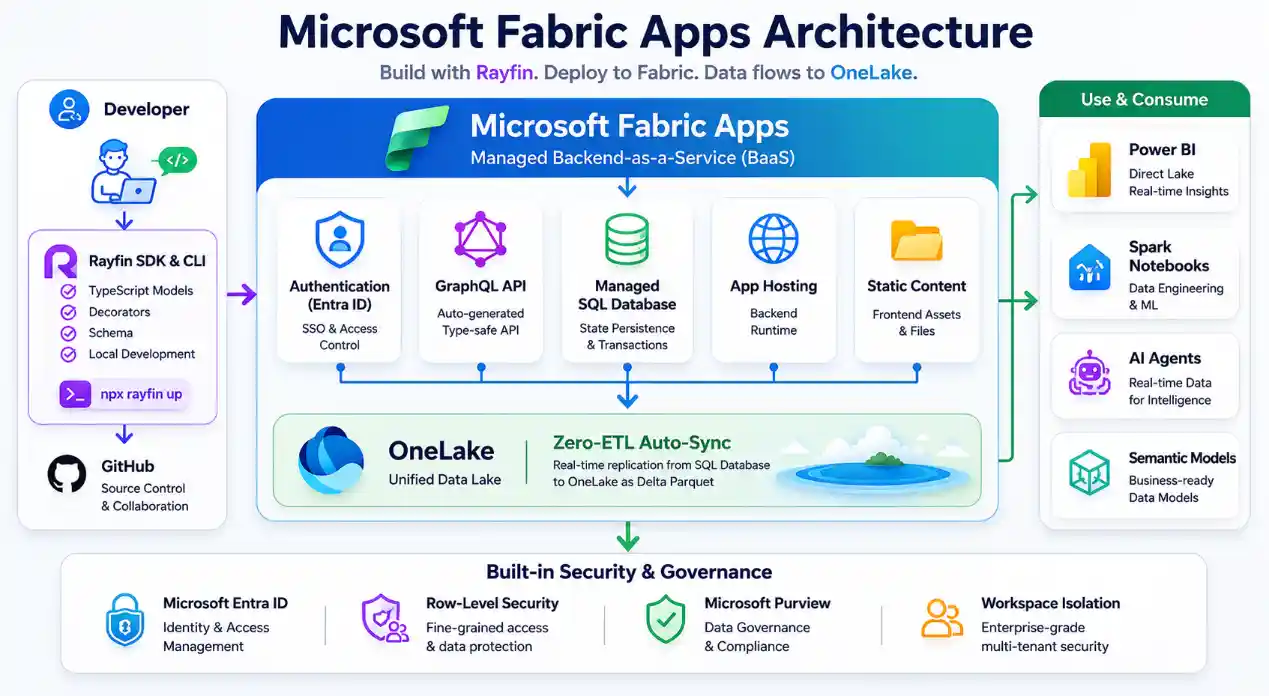
Microsoft Fabric Apps Child Services — What Gets Auto-Provisioned
Deploying a Microsoft Fabric App with npx rayfin up automatically orchestrates four child services inside your Fabric workspace. Microsoft refers to these as Child Services — each appears as a separate Fabric artifact in the workspace view.
| Child Service | What It Does | Configurable? |
|---|---|---|
| SQL Database | Managed relational database for application state, user data, and transactional records. Schema generated automatically from TypeScript decorators. | Via decorators — column types, constraints, RLS policies |
| Microsoft Entra ID Auth | Fabric SSO (Microsoft Entra ID) authentication. Handles sign-in, sign-up, session management, and token validation automatically. | Enabled/disabled in rayfin.yml — cannot be disabled for deployed apps |
| GraphQL API | Schema-driven GraphQL endpoint generated from TypeScript entity classes. Exposes CRUD operations, filtering, sorting, and pagination automatically. | Extended via custom resolvers |
| Static Content Hosting | Frontend assets (HTML, CSS, JS) stored in OneLake and served from a public URL. Compiled frontend deployed alongside backend. | Optional — toggle in rayfin.yml |
Setting services.auth.enabled to false in rayfin.yml causes npx rayfin up to fail. Authentication is required for all Fabric App deployments. For local development only, email and password authentication is available as a fallback via RayfinClient.
Rayfin CLI — Local Development Workflow
The standard Microsoft Fabric Apps development workflow uses three core Rayfin CLI commands: scaffold, run locally, and deploy.
# 1. Scaffold a new project from template
npm create @microsoft/rayfin@latest my-app --workspace <workspacename>

# 2. Run locally (full stack — database, API, and frontend)
cd my-app
npm run dev

# 3. Deploy to Microsoft Fabric
npx rayfin up
Project Structure
The scaffold command generates a structured, predictable project tree. The rayfin/ directory contains the backend definition — data models, configuration, and TypeScript schema. The src/ directory contains the frontend.
my-app/
├── rayfin/
│   ├── data/          # TypeScript entity classes (your data models)
│   ├── rayfin.yml     # Service configuration (auth, db, hosting)
│   └── tsconfig.json
├── src/               # Frontend source code
└── package.json
Key CLI Commands
| Command | What It Does |
|---|---|
npm create @microsoft/rayfin@latest | Scaffolds a new Fabric App project from template |
npx rayfin init | Adds Rayfin to an existing project — walks through service configuration without scaffolding |
npm run dev | Starts the full local development stack — database, GraphQL API, and frontend dev server |
npx rayfin up | Deploys the application to Microsoft Fabric — provisions all child services and deploys frontend |
npx rayfin status | Shows the current deployment status of the cloud application |
npx rayfin switch --workspace | Switches the active deployment target between Fabric workspaces |
npx rayfin login | Signs in to the Rayfin platform from the CLI |
npx rayfin env | Emits framework-specific .env.local values from rayfin/.env for frontend frameworks |
- The Fabric workspace must be assigned to an active Fabric capacity (F-SKU). Trial capacities are supported; standard Pro workspaces are not.
- A Fabric tenant administrator must enable Fabric Apps (preview) in Tenant settings in the Fabric admin portal. Without this,
npx rayfin upwill fail with a deployment rejection. - Node.js and npm must be installed locally.
TypeScript Data Models & Decorators in Microsoft Fabric Apps
The Rayfin programming model is code-first and TypeScript-driven. Instead of writing SQL DDL scripts, developers define data models as TypeScript classes with decorators. Fabric Apps reads these decorators at deploy time and generates the SQL schema, GraphQL API, data validation rules, and row-level security policies automatically.
Core Decorators from @microsoft/rayfin-core
import { entity, role, text, boolean, date, uuid } from '@microsoft/rayfin-core';

@entity()
@role('authenticated', '*', {
  policy: (claims, item) => claims.sub.eq(item.user_id),
})
export class Todo {
  @uuid()
  id!: string;

  @text({ min: 1, max: 100 })
  title!: string;

  @boolean()
  isCompleted!: boolean;

  @date()
  createdAt!: Date;

  @date({ optional: true })
  dueDate?: Date;

  @text()
  user_id!: string;
}
This single class definition causes Fabric Apps to generate: a Todo table in the SQL database with the correct column types and constraints; a GraphQL API with CRUD operations, filtering, and pagination; a row-level security policy that restricts each user to seeing only their own Todo items; and data validation on the title column (minimum 1 character, maximum 100).
| Decorator | What It Generates |
|---|---|
@entity() | A new table in the SQL database. Required on every data model class. |
@uuid() | A UUID primary key column with automatic generation. |
@text({ min, max }) | A text column with optional min/max length validation constraints. |
@boolean() | A boolean column. |
@date({ optional }) | A date/timestamp column. Mark optional for nullable columns. |
@role(role, permission, { policy }) | Row-level security policy. The policy function receives JWT claims and the row — return true to allow access. |
Your TypeScript model files act as the single source of truth for the entire backend schema — database, API, and security policies all stay in sync automatically when you redeploy.
GraphQL API — Reading and Writing Data in Microsoft Fabric Apps
Every entity class decorated with @entity() automatically gets a full GraphQL API. You do not write resolvers for standard CRUD operations — Fabric Apps generates them. The client-side SDK provides a typed, fluent API for querying and mutating data.
import { RayfinClient } from '@microsoft/rayfin-client';
import type { Todo } from '../rayfin/data/Todo';

type AppSchema = {
  Todo: Todo;
};

const client = new RayfinClient<AppSchema>({
  baseUrl: import.meta.env.VITE_RAYFIN_API_URL ?? 'http://localhost:5168',
  publishableKey: 'pk-your-project-key',
});

// Query all todos for the signed-in user
const todos = await client.data.Todo.findMany({
  where: { isCompleted: { eq: false } },
  orderBy: { createdAt: 'desc' },
  take: 20,
});

// Create a new todo
const newTodo = await client.data.Todo.create({
  data: { title: 'Review Q2 data model', isCompleted: false },
});
The generic type argument on RayfinClient enables TypeScript to provide autocomplete and compile-time type checking for all data operations. If your schema changes — a new column, a renamed field — TypeScript catches mismatches before deployment.
Row-level security policies defined in @role() decorators are enforced at the GraphQL layer automatically. A findMany query on a user-scoped entity returns only the rows the authenticated user is permitted to see — no WHERE clause needed on the client side.
Authentication, Security & the Shared Responsibility Model
Authentication Model
Microsoft Fabric Apps uses Microsoft Entra ID SSO (Fabric SSO) as the exclusive authentication provider for deployed applications. The RayfinClient exposes an auth service that handles sign-in, sign-up, session management, and sign-out — the same call handles both new and returning users.
For local development only, email and password authentication is available as a fallback so developers can test without a Fabric deployment. In production on Fabric, Fabric SSO is the only supported auth method.
Shared Responsibility Model
Microsoft Fabric Handles
- Entra ID SSO integration and token validation
- HTTPS / TLS encryption for all traffic
- PKCE (Proof Key for Code Exchange) for secure OAuth flows
- Row-level security enforcement at the database layer
- Workspace RBAC and tenant boundary enforcement
- Hosting, networking, and scaling of child services
Developer Handles
- Secret and credential management (API keys, service accounts)
- API key rotation and expiry policies
- Data exposure scope via GraphQL queries and mutations
- Business logic correctness and compliance
- RLS policy logic in
@role()decorators
Workspace Permission Levels
| Permission Level | What It Allows | Typical Grantee |
|---|---|---|
| Run and Interact | Use the deployed application — sign in, query data, submit forms | End users |
| Edit | Deploy updates, modify backend schema, alter application code | Developers |
| Reshare | Grant application permissions to other users within the tenant | Workspace admins |
Microsoft Fabric Apps Pricing & Capacity Usage
Microsoft Fabric Apps consumes Capacity Units (CUs) from the assigned Fabric capacity — the same CU pool that powers your Warehouses, Lakehouses, and Notebooks. There is no separate billing account for Fabric Apps.
| Resource | CU Consumption | Notes |
|---|---|---|
| SQL Database compute | 1 Fabric CU = 0.383 SQL database vCores | Consumed while database is processing queries |
| GraphQL reads and writes | 10 CUs per hour of request and response processing time | Measured as actual processing time, not wall-clock time |
| Static content hosting | OneLake storage rates + read/write CUs to serve content | Frontend assets stored in OneLake, served from public URL |
Pricing details published at Microsoft Build 2026 are preview rates. Microsoft may adjust CU consumption rates before General Availability. Verify current rates at learn.microsoft.com/en-us/fabric/apps/pricing before capacity planning. Monitor consumption in the Microsoft Fabric Capacity Metrics app.
Microsoft Fabric Apps as an AI Agent Backend
While Microsoft Fabric Apps supports standard CRUD application patterns, Microsoft launched this platform primarily to serve as a governed backend for AI agents. The vibe-coding era has made it easy for anyone with a prompt to create a working application in minutes — but each one arrives with its own uncoordinated database, its own auth model, and no connection to the enterprise data estate.
Rayfin is Microsoft’s structural answer to that problem: every agent-created application deploys to the same governed Fabric tenant, inherits the same security controls, and routes its data into the same OneLake.
Why AI Agents Need Microsoft Fabric Apps
Persistent State for Agents
Agents need a reliable transactional database for conversation history, task progress, and working memory. The auto-provisioned SQL database handles this without manual setup.
Enterprise Governance
Entra ID and workspace permissions mean agents are scoped to exactly what the invoking user is authorised to access — agents cannot exceed user permissions.
OneLake Integration
Operational data generated by agents lands in OneLake automatically — immediately available for Power BI reporting, semantic model grounding, and Fabric Data Agent queries.
Machine-Readable API
The auto-generated GraphQL API gives agents a structured, typed interface for data operations without writing SQL — predictable schema, predictable responses.
Replit is the exclusive launch partner for Microsoft Fabric Apps. The integration lets teams build in Replit using natural language or AI assistance, then deploy the backend to Fabric with Rayfin — application data stays inside the Fabric tenant boundary rather than Replit’s infrastructure.
For the broader picture of AI agent development on Fabric, see Agentic Data Engineering Tutorial and Microsoft Fabric Data Agent — Complete Guide.
Microsoft Fabric Apps vs Power Apps — Key Differences
Both platforms create applications within the Microsoft ecosystem, but they target entirely different development personas and use cases. Choosing the wrong platform adds unnecessary complexity — this comparison clarifies the decision.
| Feature | Microsoft Fabric Apps | Microsoft Power Apps |
|---|---|---|
| Development approach | Code-first — TypeScript + Rayfin SDK | Low-code / no-code — canvas or model-driven |
| Target persona | Software engineers, full-stack developers, AI coding agents | Citizen developers, business analysts |
| Database | Managed SQL database — auto-provisioned from TypeScript models | Dataverse or external connectors |
| API layer | Auto-generated GraphQL API | Power Automate / custom connectors only |
| OneLake integration | Native — data lands in OneLake automatically | Via Dataverse connectors |
| AI agent backends | Primary use case | Limited — Copilot Studio integrations only |
| Authentication | Entra ID SSO — mandatory | Entra ID or Dataverse security |
| Pricing model | Fabric CU consumption | Per-app or per-user Power Platform licensing |
The decision is straightforward: if your team writes TypeScript and you need a governed, AI-ready backend that integrates with your existing Fabric data estate, use Microsoft Fabric Apps. If your business analyst needs to build an internal form or workflow tool without writing code, use Power Apps.
Current Limitations of Microsoft Fabric Apps
Microsoft Fabric Apps is in public preview. These are confirmed limitations as of June 2026 based on official Microsoft Learn documentation.
| Limitation | Detail |
|---|---|
| Authentication providers | Entra ID only. Auth0, Okta, Google, Facebook, and consumer social logins are not supported. Cannot be disabled for deployed apps. |
| External B2C users | Applications requiring public-facing users outside the Microsoft tenant cannot currently use Fabric Apps. Roadmap item — the Build 2026 session indicated B2C support is planned for later in 2026. |
| Legacy T-SQL stored procedures | The Rayfin framework abstracts the database layer via TypeScript decorators. Applications with thousands of lines of legacy T-SQL stored procedures will not migrate cleanly to this model. |
| Heavy OLTP scale | High-frequency, very high-volume transactional systems should use dedicated databases like Azure SQL or Cosmos DB. Fabric Apps is optimised for application backends with moderate transactional load. |
| Complex ERP systems | Custom ERP and complex multi-module enterprise systems are not suitable candidates for Fabric Apps at this stage of the preview. |
| Pro workspace support | Trial Fabric capacities are supported but standard Power BI Pro workspaces without Fabric capacity are not. |
| Tenant admin required | A Fabric tenant administrator must explicitly enable Fabric Apps in Tenant settings. Without this, all deployments fail. |
FAQ — Microsoft Fabric Apps & Rayfin
npx rayfin up. Rayfin is the developer toolchain; Fabric Apps is the runtime.services.auth.enabled to false causes npx rayfin up to fail. B2C support for external users is on the roadmap for later in 2026.Official Microsoft Documentation — Fabric Apps & Rayfin
Information is based on official Microsoft Learn documentation published June 2, 2026 (last updated June 2, 2026) and Microsoft Build 2026 announcements. Microsoft Fabric Apps and Rayfin are in public preview — CLI commands, decorator syntax, pricing, and feature availability are subject to change before General Availability. Always verify at learn.microsoft.com/en-us/fabric/apps/overview before production planning. UIG Data Lab is an independent publication, not affiliated with Microsoft Corporation.