Direct Lake Fallback to DirectQuery: Causes and Fixes
Direct Lake fallback to DirectQuery is one of the most common reasons Microsoft Fabric reports suddenly feel slow even though the dataset claims to use Direct Lake mode.
This guide explains what Direct Lake fallback to DirectQuery means, how to confirm that it is happening, and the key design changes that keep your semantic models running in Direct Lake.
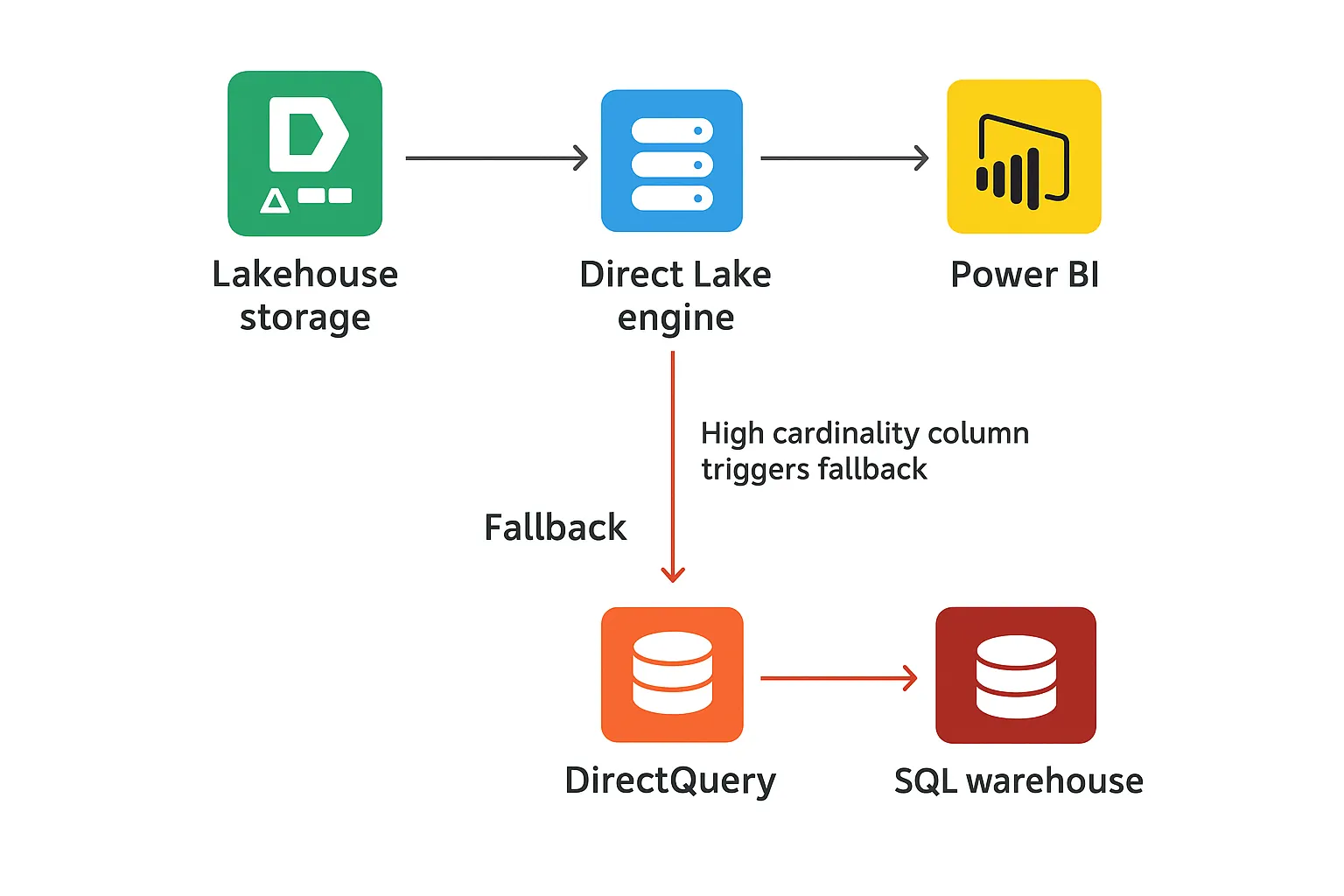
When Direct Lake suddenly feels slow
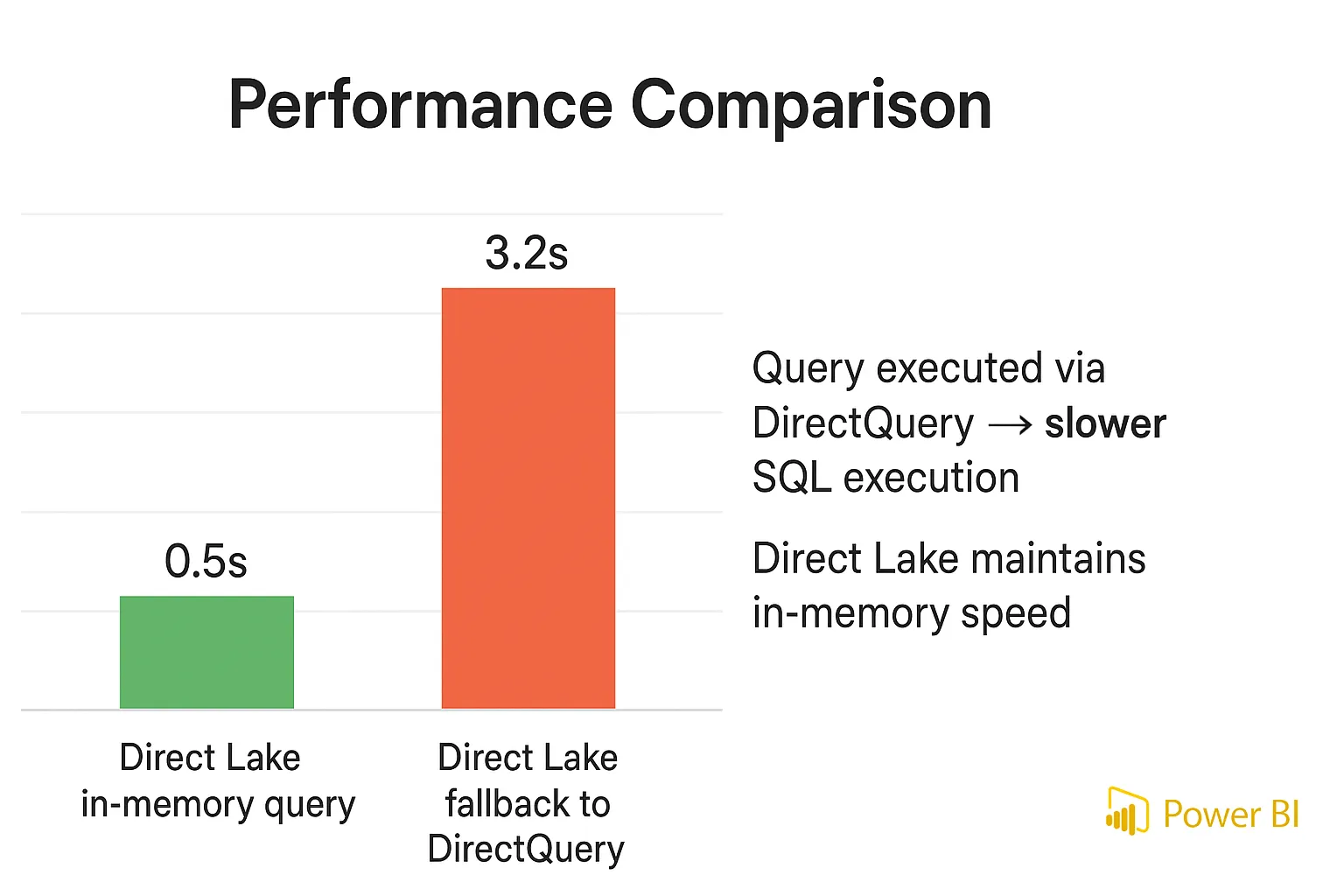
A Direct Lake model can start out very fast over large Delta tables in OneLake. After a security update, schema change, or data growth, the same report may take several seconds per visual even though the storage mode still says Direct Lake in the model view.
At that point many teams tweak visuals and DAX, but the real issue is that the engine is pushing work down to the SQL endpoint. In other words, Direct Lake fallback to DirectQuery is already active and every secured or complex query pays an extra round trip.
Direct Lake connected directly to OneLake does not have a SQL endpoint in the path and therefore cannot fall back in the same way; the fallback behaviour described here applies when the semantic model is bound through a lakehouse or warehouse SQL endpoint.
For a full architecture walkthrough that pairs with this troubleshooting article, add an internal link here to your DP-600 Direct Lake performance optimization guide on this site.
Quick checklist for Direct Lake fallback
Use this short checklist before you dive into the details:
- Report feels much slower than an Import model with similar data volume.
- Semantic model is connected through a lakehouse or warehouse SQL endpoint.
- Traces for normal visuals show SQL text and DirectQuery events, not only storage-engine calls.
- Capacity metrics show spikes in DirectQuery activity during user sessions.
- Large fact tables have many small Parquet files or recently crossed a capacity tier boundary.
How to confirm Direct Lake fallback to DirectQuery
Trace report queries with diagnostics
The safest way to detect Direct Lake fallback to DirectQuery is to capture query traces while you interact with the report. If normal visuals produce DirectQuery events and SQL text against the warehouse or lakehouse, those requests are no longer using pure Direct Lake execution.
Some internal checks, such as engine edition or object-level security probes, can generate short DirectQuery_Begin and DirectQuery_End events even when the main query still runs in Direct Lake, so focus on events tied to long-running visuals rather than one-off metadata calls.
Use DAX Studio or performance analyzer
Attach DAX Studio to the semantic model, enable server timings, and refresh a few representative visuals. When the trace shows SQL being generated for simple aggregations, the dataset is behaving like DirectQuery even though it was designed for Direct Lake.
You can repeat the same test with the built-in performance analyzer in Power BI if you prefer to stay inside the report authoring experience.
Check capacity metrics for DirectQuery spikes
Open the Fabric capacity metrics app and focus on time windows when users report slowness. Spikes in DirectQuery workload that align with those sessions show that more queries are going through the SQL endpoint than through Direct Lake.
For official details on how the engine processes these requests, link to the Direct Lake query processing article on Microsoft Learn from this section.
Main reasons Direct Lake falls back to DirectQuery
Direct Lake is fast when the engine reads compressed Delta data directly from OneLake and keeps hot columns in memory. Direct Lake fallback to DirectQuery happens when security settings, unsupported source objects, or raw data volume force the engine to involve the SQL layer.
| Symptom | Likely cause | Effect on queries |
|---|---|---|
| Slow visuals on secured tables | Row-level or object-level security defined in the SQL endpoint | Queries must go through the warehouse to enforce security rules |
| Only views are slow | Semantic model uses complex views instead of physical Delta tables | View logic runs in the SQL engine for every request |
| Performance dipped after data growth | Tables exceed Direct Lake guardrails for rows or Parquet files on the current capacity SKU | Large or fragmented tables become ineligible for in-memory scans |
| Modeling features feel restricted | Business logic kept as DAX calculated columns or tables | Extra query layers add overhead and complexity |
Security rules in the SQL endpoint
When tables in the SQL analytics endpoint enforce row-level or object-level security, the warehouse must participate in every secured query. To keep results correct, the engine routes those secured requests through DirectQuery instead of staying on a pure Direct Lake path.
This pattern is common in centralized warehouses, so architects must balance security centralization with the extra latency it introduces for users of Direct Lake datasets.
Views instead of gold Delta tables
Direct Lake works best when the semantic model points to clean gold tables in the lakehouse. If the dataset targets views that perform joins or heavy transformations, the SQL engine evaluates that logic every time, which makes Direct Lake fallback to DirectQuery more likely.
Materializing this logic into a dedicated gold table removes the extra hop and gives VertiPaq a simple columnar structure it can cache well.
Crossing Direct Lake capacity guardrails
Each Fabric capacity tier has limits for Direct Lake around total rows, row groups, and the number of Parquet files a table can have. When a fact table grows beyond those limits for its F-SKU, the engine protects stability by routing queries through the SQL endpoint instead of using Direct Lake.
Rather than hard-coding those numbers, check the latest guardrail values in the Direct Lake performance guidance on Microsoft Learn so the design stays valid as capacities evolve.
How DirectLakeBehavior influences fallback
The DirectLakeBehavior setting controls what happens when a query hits one of these conditions. Automatic allows Direct Lake fallback to DirectQuery silently, DirectLakeOnly stops the query with an error, and DirectLakeOrEmpty returns an empty result rather than slow data.
For production workloads where user experience matters most, Automatic is often the default, but for DP-600 preparation and performance testing, DirectLakeOnly helps you surface hidden fallback paths before users see them.
How to reduce Direct Lake fallback to DirectQuery
Once you know which tables cause trouble, the solution is to simplify the data path and lower capacity pressure. Most successful fixes move logic upstream, simplify security, and keep Delta tables compact and well-partitioned so Direct Lake fallback to DirectQuery becomes rare.
Push transformations into gold tables
Replace complex views with gold tables written by pipelines, Dataflows Gen2, or Spark notebooks. Point the semantic model directly at those Delta tables so VertiPaq can scan them without invoking the SQL engine on every query.
You can link this advice to your Fabric lakehouse tutorial article, which shows a complete bronze–silver–gold pipeline that produces such tables.
Align security with performance goals
Move row filters into the semantic model wherever possible so the largest fact tables remain eligible for in-memory execution. Keep warehouse-level security for small lookup tables or niche scenarios where central control matters more than raw speed.
If strict RLS in the warehouse is mandatory, consider separating those secured tables into a dedicated model so only specific reports pay the DirectQuery cost.
Reduce cardinality and compact Delta files
Replace long text columns with integer surrogate keys, trim unused attributes, and partition large facts by date so hot data stays narrow. This reduces dictionary sizes and makes it easier for Direct Lake to keep important columns cached.
When tables contain many small Parquet files, run compaction so the engine touches fewer segments for each query and is less likely to trigger fallback.
Spark SQL to compact fragmented Delta tables
Adjust the table name, partition column, and Z-order keys to match your own lakehouse design and the filters most common in your reports.
Design Fabric models that stay fast
Direct Lake fallback to DirectQuery is not random; it appears when security, unsupported features, or data volume push Direct Lake outside its comfort zone. By moving logic upstream, aligning security with performance, and keeping Delta tables compact, you can keep more queries on the in-memory path.
Combine this troubleshooting page with your DP-600 Direct Lake performance article and the Direct Lake documentation on Microsoft Learn to build a strong knowledge base for both exam prep and real projects.
Burning Direct Lake Fallback to DirectQuery Questions Answered
This section covers the most searched questions about Direct Lake fallback to DirectQuery. Use it as a troubleshooting reference and as DP-600 exam revision material.
Why does Direct Lake fall back to DirectQuery in Microsoft Fabric?
Direct Lake falls back to DirectQuery when VertiPaq cannot answer a request by scanning Delta files in OneLake alone. Typical triggers are security rules in the SQL endpoint, semantic models that point to complex views, and Delta tables that exceed Direct Lake guardrails for rows, row groups, or Parquet files on the active capacity tier.
💡 Thinking about starting a small side income online?
Many creators start with simple tools and workflows — no investment required.
See how creators do it → CreatorOpsMatrix.comHow do I know if my Direct Lake dataset is falling back to DirectQuery?
Start by capturing query traces while you refresh key visuals. If those traces show DirectQuery events with SQL text for normal report interactions, the dataset is not using pure Direct Lake for those queries, even if the model view still displays Direct Lake as the storage mode.
How do I stop Direct Lake falling back to DirectQuery on secured tables with RLS or OLS?
Move as much row-level logic as possible from the SQL endpoint into the semantic model. Keep warehouse RLS and OLS focused on small lookup tables and consider a separate dataset for highly secured data, so your main Direct Lake fact tables stay eligible for in-memory execution.
What Direct Lake guardrails cause fallback to DirectQuery and how do I stay within them?
Guardrails define upper limits on rows, row groups, and Parquet files for each table. Once a table crosses those limits for its F-SKU, the engine stops treating it as a Direct Lake candidate and sends queries through the SQL endpoint. Regularly compact files, avoid unnecessary partitions, and archive old data so active partitions sit well inside those thresholds.
How do SQL views and calculated columns trigger Direct Lake fallback to DirectQuery?
SQL views force the warehouse or lakehouse engine to evaluate joins and filters on every request. Heavy business logic left as DAX calculated columns or tables adds extra evaluation layers. Together these patterns push work from VertiPaq to the SQL engine and make Direct Lake fallback far more likely.
What is the difference between Direct Lake on OneLake and Direct Lake over SQL endpoints for fallback behavior?
Direct Lake on OneLake connects straight to Delta tables and has no SQL endpoint in the path, so it does not perform a classic switch to DirectQuery. The SQL-endpoint flavour of Direct Lake, used with lakehouses and warehouses, can choose per query between in-memory scans and SQL-based execution. Fallback discussions in documentation and blogs usually refer to this second case.
How can I use DAX Studio or traces to detect Direct Lake queries that are using DirectQuery?
Attach DAX Studio, enable server timings, and refresh one visual at a time. A pure Direct Lake query shows storage-engine activity without SQL text. If the trace includes DirectQuery Begin and SQL statements for a normal visual, that visual is running through the SQL endpoint instead.
How does the DirectLakeBehavior setting control fallback to DirectQuery?
The DirectLakeBehavior property tells the engine what to do when a query would normally fall back. Automatic allows Direct Lake fallback to DirectQuery without warnings. DirectLakeOnly blocks the query, which is ideal during testing. DirectLakeOrEmpty returns an empty result rather than a slow DirectQuery response.
How do large Delta tables and many small Parquet files impact Direct Lake performance and fallback?
Very large Delta tables with thousands of tiny Parquet files increase metadata overhead and fragment row groups. Queries then touch more files, take longer, and can cross guardrail limits. Once that happens, the engine routes requests through the SQL endpoint and performance looks like DirectQuery instead of Direct Lake.
What is the best architecture Direct Lake vs Import vs DirectQuery for large Fabric models?
A common winning pattern is to keep detailed facts as Delta in OneLake and expose them with Direct Lake. Dimensions and small lookup tables stay in Import mode when richer modeling features are needed. DirectQuery is reserved for special cases, such as external systems that cannot land in Fabric or strict real-time scenarios.
Can Direct Lake on OneLake fall back to DirectQuery, or is fallback only for SQL endpoints?
Pure Direct Lake on OneLake does not fall back to a different DirectQuery connection because there is no SQL engine in the path. Fallback behaviour described in Microsoft articles applies to Direct Lake over lakehouse or warehouse SQL endpoints, where the engine can decide to send queries down to SQL when it cannot serve them purely from OneLake.
How do composite models and remote Direct Lake semantic models affect DirectQuery fallback?
Composite models mix storage modes, so a single visual can touch Import, Direct Lake, and DirectQuery sources. When a query spans a remote Direct Lake semantic model and an external DirectQuery source, the engine may need to coordinate results through SQL, which increases the chance of DirectQuery-style execution. Keeping cross-source joins to essential scenarios helps more visuals stay in Direct Lake.
How should I tune Fabric capacity to reduce Direct Lake fallback to DirectQuery?
Use the Fabric metrics app to watch memory usage, query durations, and any guardrail warnings for key tables. If, after optimizing Delta layout, those tables still push close to limits during normal load, move to a larger F-SKU so they remain fully eligible for Direct Lake even under peak concurrency.
What known issues can cause Direct Lake models to fall back to DirectQuery unexpectedly?
Microsoft publishes known issues where Direct Lake models may fall back after specific actions, such as query cancellation or rare security configurations. When fallback appears without an obvious architectural reason, review the current known-issues list to check whether a platform bug, hotfix, or temporary mitigation explains the behaviour.
How can I monitor Direct Lake fallback to DirectQuery over time in the Fabric metrics app?
Track semantic model workload charts and filter them for DirectQuery activity. Correlate those spikes with user sessions and with specific datasets that should run in Direct Lake. Over time this pattern highlights which models and tables most often trigger fallback, so you can focus optimization and capacity upgrades where they provide the most benefit.
Keep Learning About Direct Lake and Fabric
Use these in-depth guides to fix root causes of fallback and design faster Microsoft Fabric solutions.




