Fabric Apps in Power BI Desktop: What Is Real Today and How to Build One
Microsoft says you will soon be able to describe an app in plain language inside Power BI Desktop and publish it to Fabric. This guide separates what is announced from what you can use now, explains the licensing and capacity picture, and walks through the documented route that works today: a Fabric App connected to your semantic model, built with the Rayfin CLI and a coding agent.
By A.J. · Documentation review: 24 October 2026 · Independent guide
Power BI learning resources / Fabric Apps
1. Status: what is announced and what is usable
The news cycle around this feature is easy to misread, because three separate things were announced and they are on different timelines. Here is how they line up as of 24 October 2026.
| Item | Status | What Microsoft says |
|---|---|---|
| Fabric Apps for semantic models, built with the Rayfin CLI and the data app template | Usable (preview) | Announced at Build in June 2026 and documented on Microsoft Learn. The data app template page says the Rayfin CLI is currently the supported way to create apps from the template. |
| Apps in Power BI for Pro and Premium Per User customers | Coming soon | Microsoft said Pro, PPU, and Fabric capacity customers would get preview access, with Fabric Apps and Fabric Database capabilities at no additional cost, up to 1 GB per app. Microsoft’s timeframe is “in the coming weeks”, and as of 24 October 2026 the preview has not opened. |
| Natural-language app builder inside Power BI Desktop | Coming soon | The Power BI team post says users will be able to generate, preview, edit, and publish apps from a trusted semantic model, available to Desktop users “in the coming months”. It is not in current Desktop builds. |
How the announcement unfolded
- June 2026: Fabric Apps for semantic models was announced at Build, and the Power BI June 2026 feature summary described it as an AI-first way to build custom web apps with Fabric as the backend.
- 29 September 2026: at FabCon Europe, Microsoft announced the Desktop app-building experience and the Pro and PPU licensing. Microsoft’s Fabric Apps documentation was refreshed the same day.
- What happens next: a preview for Pro and PPU customers, then the Desktop experience. Both dates are described loosely, so treat any firm date you read elsewhere as a guess.
Official sources for this section: the Power BI team’s announcement and the data app template documentation.
2. What “Fabric App in Power BI Desktop” actually means
Advertisements
A report answers “what happened”. Microsoft wants this feature to help with “what do we do about it”. Instead of stopping at a report page, a team can use its existing semantic model as the governed source of metrics and build an application around it, with forms, decisions, saved state, and a tailored interface.
Say a sales report shows a region where margin has fallen below target. A Fabric App can show the same trusted margin measure next to a form where the manager records a reason, assigns an owner, sets a review date, and tracks the follow-up. The numbers come from the semantic model. The manager’s entries go into the app’s own database.
The naming trap: Power BI app vs Fabric App
A classic Power BI app is a packaged bundle of reports and dashboards that you distribute to an audience. A Fabric App is a custom web application hosted on Fabric, with its own code, sign-in, and backend services. The new Desktop experience is meant to make building a Fabric App easier for Power BI authors. It isn’t a rename of the old distribution app.
3. How the pieces fit together
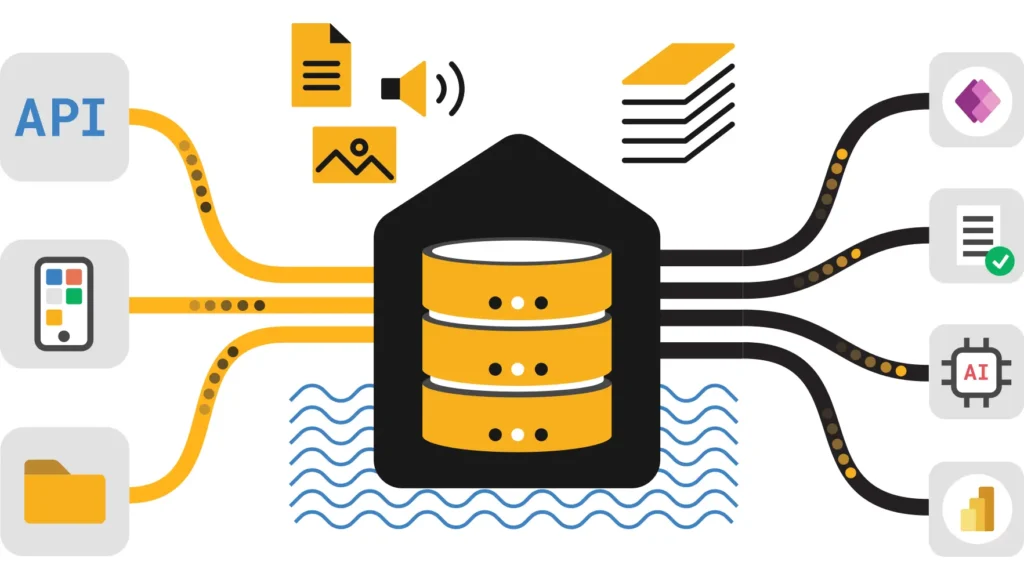
Think of three layers. The semantic model is the trusted analytical layer. The app is the interactive layer. A separate app database holds the operational records that users create.
A conceptual diagram, not a screenshot of the unreleased Desktop interface.
Don’t expect the read connector to write anywhere. Operational records belong in the app’s own database.
What a deployed Fabric App is made of
According to Microsoft’s overview, a deployed app is a managed service in Fabric with child items. You get a SQL database in Fabric holding your schema, an authentication service that signs users in with Fabric single sign-on through Microsoft Entra ID, and static hosting for your built frontend. The backend exposes a GraphQL data API, and you define your data models in TypeScript. The Rayfin CLI scaffolds, runs, and deploys all of it.
4. Fabric App vs Power BI report vs classic Power BI app
| Experience | Best for | Typical interaction | Key distinction |
|---|---|---|---|
| Power BI report | Exploring metrics and explaining performance | Filters, drill-through, cross-highlighting, bookmarks | An analytical experience built from visuals over a semantic model. Reports remain a core part of Power BI. |
| Copilot in Power BI | Help with analysis, summaries and report authoring | Natural-language requests | AI assists with BI content. It isn’t a standalone workflow app. |
| Classic Power BI app | Distributing curated reports and dashboards | Navigate packaged content | A distribution mechanism, not a custom data application. |
| Fabric App | Custom web experiences and workflows backed by Fabric | Custom UI, forms, saved state, backend functions, data connectors | A web application with its own lifecycle, sign-in and data services. |
| Desktop app builder (announced) | Lower-effort creation of a Fabric App from a semantic model | Describe, generate, preview, edit, publish | Brings app creation into Desktop. Check rollout before expecting it in your tenant. |
Microsoft’s own wording is that Fabric Apps complement reports, particularly where a team needs more flexibility, faster iteration, or a more tailored experience. Use a report when the goal is to inspect or communicate a number. Reach for an app when users have to do something about the number. Many solutions will end up with both.
5. Practical app ideas that go beyond a dashboard
Show regions or products below a margin target. Let managers record a cause, an owner, a next step, and a due date.
Display governed actuals and targets while capturing proposed assumptions for review. Decide up front how approval and audit will work.
Use model measures to flag slow-moving stock, then record a proposed action, status and owner without touching the analytical model.
Show account metrics next to task assignment and notes, with access limited by user role.
Worked example: sales margin review
Take a semantic model with net sales, gross margin, date, product and region. A manager wants one page that shows margin trends, filters by region and period, and lets them record why an exception happened.
- Read from the model. Query the real measures for sales and margin. Reuse the model’s definitions. Don’t recalculate margin in front-end code.
- Render the result. KPI cards, a trend, a region comparison, and a detail table, each with loading, empty and error states.
- Capture the action. The user submits a reason, an owner and a due date to the app database.
- Govern it. Record who submitted what, validate required fields, restrict access to the right audience, and decide whether those records should flow back into analytics.
This shows where an app earns its keep. It does not mean a generated app builds every table, approval rule, or integration correctly on its own. Each of those has to be inspected and tested.
6. Licensing, capacity and cost: what we know and what we don’t
Advertisements
This is the part most people get wrong, because “no additional cost” and “free” are not the same thing. Here is what the sources support.
| Question | What the sources say | What to do about it |
|---|---|---|
| Can a Power BI Pro user build Fabric Apps? | Coming soon: announced for the preview “in the coming weeks”, with Fabric Apps and Fabric Database capabilities at no additional cost, up to 1 GB per app. Today, Microsoft’s Fabric Apps overview still says the workspace must have Fabric capacity assigned. | Plan around Fabric capacity for now. When the Pro and PPU preview opens, test with a real Pro-only account before you rely on it. |
| What does the 1 GB cover? | The announcement says “up to 1 GB per app” and does not spell out what happens beyond it. | Treat it as room for the app’s own data. Fine for forms and plans, tight for anything transaction-heavy. |
| What uses capacity today? | Microsoft’s Fabric Apps pricing page says apps consume capacity units through the SQL database in Fabric, the GraphQL API, and OneLake operations, tracked in the Capacity Metrics app. It says one Fabric capacity unit equals 0.383 SQL database vCores. | Install the Capacity Metrics app before the pilot, and note usage per item so you have a baseline. |
| Does deploying cost extra? | The pricing page says running rayfin up doesn’t add a separate charge beyond the SQL and OneLake operations it triggers. | Deploy as often as you need during development, but watch the database activity it causes. |
| Is it available everywhere? | Microsoft says Fabric Apps are not available in all regions yet. | Check the region availability page before you design a rollout. |
Official reference: Fabric Apps pricing and capacity consumption.
7. Prerequisites for the currently documented route
These apply to Microsoft’s semantic-model template and Rayfin workflow as documented in late September 2026. The future Desktop experience may change or simplify them, so don’t treat this as the final click-path for that interface.
- Fabric access and a workspace: a workspace where you have Contributor, Member, or Admin permission, with Fabric capacity assigned.
- Tenant setting: a Fabric administrator must enable Fabric Apps (preview) for the organisation or for chosen security groups.
- Node.js 20 or later, with npm.
- A coding agent: Microsoft’s walkthrough uses GitHub Copilot in Visual Studio Code or the Copilot CLI. Microsoft says other coding agents work too.
- Model access: Build and Read permission on a semantic model hosted on Fabric or Power BI capacity.
- Tenant query setting: the Semantic Model Execute Queries REST API tenant setting must be enabled.
- Identifiers: the Fabric workspace ID and the semantic model’s item ID.
Start with the data app template page and the first Fabric App quickstart. If a tenant policy blocks you, ask your Fabric administrator. Don’t look for a way around it.
8. Hands-on: build a semantic-model-connected Fabric App today
This is the documented developer path. It produces a web app connected to a published semantic model, using the Rayfin CLI and a coding agent. It is not a recreation of the new Desktop interface.
Step 1: Pick a model you understand
Use a non-sensitive development model first, one with clear measures, sensible relationships, and descriptions. Write down the real names of your date, product, region and key measures. Don’t assume your model has a table called Sales or a measure called Total Revenue.
Check that the people who will use the app have the model permissions they need, and that any row-level security roles return the rows you expect. A developer’s successful query proves nothing about what a viewer in a different role will see.
Step 2: Enable Fabric Apps (preview) if needed
A tenant administrator turns on the workload in the Fabric admin portal under Tenant settings, then Fabric Apps (preview), for the whole organisation or for specific groups. The CLI tutorial points to OneLake catalog, then Govern, then Configurations, then Workloads. The location can move while the feature is in preview, so use whichever matches your portal and don’t enable it broadly without an administrator decision. Changes can take a few minutes to apply.
Step 3: Install and check your tools
Install Node.js 20 or later, Visual Studio Code, and a coding agent that can work in a local project and terminal. Set the agent to ask before it runs commands, and check which folders it can read and change.
node --version
npm --version
Work in a dedicated project folder, not inside an unrelated code repository.
Step 4: Create the data app project
Run Microsoft’s data app template command. Replace the placeholder with your real workspace name, and keep the quotes if it contains spaces.
npm create @microsoft/rayfin@latest -- "sales-insights" --template dataapp --workspace "YOUR_WORKSPACE_NAME"
cd sales-insights
The template brings Fabric sign-in, guidance that helps the coding agent write better DAX, ready-made analytical visuals, a data grid, theming, number formatting, and a browser validation workflow. Microsoft built it because an agent starting from nothing has to solve authentication, DAX generation and chart design every session, which leads to broken or empty visuals and unnecessary queries.
Step 5: Find the semantic model and add the connector
If you don’t know the semantic model’s item ID, list the models in the workspace:
npx rayfin connector search --workspace-id "YOUR_WORKSPACE_ID" --type fabric-semanticmodel --jsonThen add the connector using the ID of the model you want:
npx rayfin connector add --type fabric-semanticmodel --workspace-id "YOUR_WORKSPACE_ID" --item-id "YOUR_SEMANTIC_MODEL_ITEM_ID" --name salesModel --operations executeQueryThe command adds the connector to rayfin/rayfin.yml, creates its schema under rayfin/connectors/salesModel/, and prints a version-matched install command. Run the exact command it prints. Don’t guess package versions.
Step 6: Review the connector and identity settings
Open rayfin/rayfin.yml and the generated schema. The semantic model connector should use delegated authentication, and you should keep the version value the CLI wrote. Microsoft’s guidance is to use the connector client for semantic model queries. If the scaffold already contains another semantic model client, replace its calls rather than keeping two data-access paths.
Microsoft’s documentation shows this query pattern, which is also a quick way to confirm the connection works:
const result = await client.connectors.salesModel.executeQuery({
  query: 'EVALUATE TOPN(10, Sales)',
});

if (result.status === 'success') {
  console.log(result.table.columns, result.table.rows);
} else {
  console.error(result.error.category, result.error.message);
}Sales comes from Microsoft’s example. Use a table from your own model, and always check the returned status before passing rows to a visual.Step 7: Let the coding agent build the explorer
Open the project in VS Code, or run copilot in a terminal in the project folder. Describe the audience, the questions they ask, the interactions, and the visuals. Use the prompts in section 10 and read the agent’s plan before you approve edits.
Step 8: Sign in and run it locally
Start the development environment. Microsoft documents that this runs the frontend dev server and deploys the backend to Fabric, and you open the local URL it prints. If sign-in fails or you hit a 401 or 403, run the login command again and retry.
npx rayfin login
npx rayfin dev
Follow whatever sign-in flow your installed CLI shows. Always verify the result yourself instead of trusting the agent’s report that something worked.
Step 9: Validate in a browser, then preview the deployment
The template includes a Playwright-based browser validation workflow. Use it to check that visuals render, charts aren’t clipped, text is readable, grids handle overflow, loading, empty and error states look right, filters and cross-highlighting work, and the browser console is clean. Microsoft is clear that this confirms the frontend behaviour only. You still need to test the deployed connector separately with a user who has access to both the app and the model.
Then preview the deployment before applying it:
npx rayfin up --dry-runStep 10: Deploy and verify
npx rayfin up
npx rayfin up status
After a successful deploy the CLI prints the hosted app URL and a link to the item in the Fabric portal. Open it, sign in as a real business user, and compare important numbers with the model. A successful deploy says nothing about whether the DAX, security or business logic is right.
Two shortcuts exist for partial changes. npx rayfin up db apply pushes only database changes, and npx rayfin up staticapp deploy redeploys only the frontend. Microsoft’s reference pages take precedence if command names change: Create a Fabric app with the Rayfin CLI and Deploy a Fabric app.
9. Get your semantic model ready before you let an agent loose
The agent reads your model’s metadata and writes DAX against it. A messy model produces a messy app, and the failure is quiet: charts that look fine but answer the wrong question. Spend an hour on the model first. It is the cheapest quality improvement available.
- Clear names. Measures named
Net SalesandGross Margin PctbeatMeasure 1andCalc2. The agent can only guess from what it sees. - Descriptions on tables, columns and measures. One sentence each. They give the agent business meaning it can’t infer from a name.
- Format strings set in the model. The template reuses the model’s format strings across cards, charts, tooltips and grids, so currency and percentages come out right everywhere without extra work.
- Hidden clutter. Hide helper columns, keys and unused fields so the agent isn’t tempted to use them.
- Sensible relationships and a proper date table. Time-intelligence measures depend on them. Broken relationships give plausible-looking wrong numbers.
- Row-level security tested. Confirm the roles work before the app depends on them. The app inherits whatever the model enforces for the signed-in user.
- A short list of “known good” numbers. Pick a few figures the business already trusts so you can check the app against them later.
10. Prompts for the coding agent
Prompt 1: a read-only analytical explorer
Adapted from the structure in Microsoft’s template guide. It insists on inspecting the real schema and forbids invented data.
Build a sales performance explorer using the existing Fabric Apps data app template and the salesModel semantic model connector.

Before editing:
1. Read the repository instructions and the template's agent guidance.
2. Inspect rayfin/connectors/salesModel/schema.ts and identify the actual tables, columns, measures and format strings in the semantic model.
3. Query the model metadata before writing any DAX. Do not guess field names or create mock sales data.
4. Give me a short implementation plan before you change files.

Requirements:
- Use ConnectorsRayfinClient and fabricSemanticModel() for all semantic model access.
- Call client.connectors.salesModel.executeQuery() for DAX. Do not call the Execute Queries REST API directly.
- Build a clean, responsive page for sales managers with KPI cards, a sales trend, a category or region comparison and a detail grid, but only where real model fields support them.
- Add date and category filters where the model supports them.
- Reuse query results where practical, and bound large result sets. Do not load a whole fact table into the browser.
- Apply the model's format strings consistently in cards, charts, tooltips and the grid.
- Include loading, empty, error and retry states. Never expose tokens or sensitive data in error messages.
- Keep the template's Fabric sign-in flow. Do not add credentials, tokens, a second login flow or a second data-access path.
- Use the template's browser validation workflow at desktop and mobile sizes.
- Run the existing build, show me the source-control diff, and report anything unresolved.

Stop and ask if model metadata is ambiguous or a change would be destructive. Do not deploy until I approve the plan and the validation results.
Prompt 2: add an action log (only after prompt 1 is verified)
Write operations are a separate piece of work with their own risks. Don’t ask for them in the same pass as the read-only explorer.
Extend the verified explorer with an action log for margin exceptions.

- Store the records in this Fabric App's own database by defining a TypeScript data model under rayfin/data. Do not try to write to the semantic model.
- Fields: reason, owner, due date, created date, created by.
- Propose the access rules before you write them. Tell me who can read, create and update records, and why.
- Validate required fields on the client and on the server side. Limit text length.
- Show a table of existing actions next to the metric they relate to.
- Show me the schema change and run rayfin up --dry-run before applying anything. Do not use destructive database changes or force flags without asking me.
- Add the new behaviour to the browser validation checks.

Stop and ask before deploying.
11. Adding writeback: a data model example
Microsoft’s model for app data is TypeScript classes with decorators. Fabric Apps reads them and generates the database schema, GraphQL endpoints, row-level authorization rules and type-safe client methods. The database schema should only change through your code. Microsoft warns that editing the SQL database directly in the portal can cause schema conflicts that break the app.
Here is a small action-tracker model written in the same style as Microsoft’s documentation example. It is illustrative, so check it against the Define data models page before you use it.
import { entity, role, text, date, uuid } from '@microsoft/rayfin-core';

@entity()
@role('authenticated', '*', {
  policy: (claims, item) => claims.sub.eq(item.createdBy),
})
export class MarginAction {
  @uuid() id!: string;
  @text({ min: 1, max: 300 }) reason!: string;
  @text() owner!: string;
  @date() dueDate!: Date;
  @date() createdAt!: Date;
  @text() createdBy!: string;
}
Read the access rule carefully. As written, it lets each signed-in user work only with the rows they created. That is right for personal notes and wrong for a shared team tracker, where managers need to see each other’s actions. Decide the rule from the business process before you let an agent write one.
Working with schema changes
- Apply database-only changes with
npx rayfin up db apply, and preview first withnpx rayfin up --dry-run. - Destructive changes, such as altering a column’s type or dropping a column, make
up db applyfail. A force flag exists, but Microsoft notes it can be a breaking change. Treat it as a decision for a person, not for an agent. - If the records must reach your reports, plan that integration separately: who owns the data, how it refreshes, how conflicts and deletes are handled, and what the audit trail looks like.
- Keep a copy of the data model files in source control, since they are the only supported way to change the schema.
Microsoft also lists connectors that can read from or write to other Fabric items. The warehouse and SQL database in Fabric connectors support create, update, and delete operations, the lakehouse SQL analytics endpoint is read-only, and the semantic model connector supports executeQuery only. See Connect Fabric Apps to Fabric data.
12. Validation checklist: the part the agent can’t skip
Test a generated app as carefully as you would test one you wrote by hand.
- Model contract: every table, column and measure the app uses exists in the generated schema, and labels match business definitions.
- Numbers agree: compare several KPIs against the source report for the same filters, dates and user role.
- Filters: try combinations of date, region, category and cross-highlighting, and make sure no two visuals silently disagree.
- Query failure: trigger an unavailable result in a non-production environment and confirm the app shows a safe error.
- Large results: set row limits and paging. Never pull a whole transaction table into the browser.
- Permissions: test as an ordinary business user, not only as a workspace contributor or model owner.
- Row-level security: test representative roles, including a user who should see nothing, and check totals, labels and secondary queries for leaks.
- Writes: if the app stores records, confirm users can only read and change what the data model’s rules allow.
- Responsive layout: check a small laptop, a tablet and a phone width, with long labels and wide grids.
- Release safety: review the source-control diff and the deployment dry run, and write down how you would roll back.
13. Security, identity and governance
Authentication is not authorization
Authentication says who is signed in. Authorization decides what they can see and do. Deployed Fabric Apps use Fabric single sign-on through Microsoft Entra ID, and after deployment that is the only authentication provider available. The semantic model connector uses delegated access, so queries run as the signed-in user and the model’s own permissions and row-level security apply.
That protection doesn’t automatically extend to the app’s own tables. Records in the app database need their own access rules, defined in the data model. Microsoft also states that client-side TypeScript types are not an authorization boundary. Enforce access in connector configuration and entity roles.
Who can open a deployed app
Microsoft’s overview explains that workspace roles don’t override item-level permissions, and that Run and interact is the default level. By default every workspace member gets it. Edit permission lets someone deploy code and change schema, and resharing needs the workspace admin role. If your workspace has a wide audience, check who can open the app before you put sensitive data behind it.
Your responsibilities, in Microsoft’s words, paraphrased
- Keep secrets, keys and sensitive data out of code, frontend assets and the repository. This holds even when app hosting is protected.
- Remember that your code decides what signed-in users can see and do.
- Give contributors only the permissions they need to deploy or manage the app.
- You carry the legal and compliance responsibility for the data your app collects, processes and stores.
Server-side TypeScript functions exist for logic that shouldn’t run in the browser, such as working with secrets or calling other services on behalf of the user. Use them instead of putting that logic in frontend code.
Official references: What is Fabric Apps, Authentication for Fabric Apps, Define data permissions, and Row-level security with Power BI.
14. Troubleshooting common problems
| Symptom | Likely reason | Next check |
|---|---|---|
| No app-builder entry in Power BI Desktop. | The Desktop experience hasn’t rolled out. Microsoft says “coming months”. | Check the latest Power BI announcement and Desktop release notes. Use the Rayfin route if you need a prototype now. |
| Can’t create a Fabric App in the workspace. | The Fabric Apps workload is off for you, the workspace has no Fabric capacity, or your region isn’t supported yet. | Ask a Fabric admin about the Fabric Apps (preview) setting, the capacity assignment, and the region availability page. |
| Connector search returns nothing. | Wrong workspace ID, no access, wrong item type, or the model is in a different workspace. | Check the IDs and your permissions, then re-run the search command. |
| Connector adds fine but queries fail. | The Execute Queries tenant setting, missing Build or Read permission, DAX that references a name that doesn’t exist, or a schema mismatch. | Check the tenant setting, the model permissions, and the error category the connector returns. |
| Blank visuals or wrong numbers. | Invented field names, an unexpected filter context, a query error, or wrong formatting. | Inspect the generated schema and DAX. Compare with the Power BI report under the same filters and user. |
| Works locally, fails after deploy. | Local email and password sign-in is not the same as deployed Fabric single sign-on. | Check the authentication page and rayfin/rayfin.yml. Run login again if your session expired. |
| Deployment returns 401 or 403. | Expired sign-in or not enough workspace or item permission. | Run npx rayfin login, confirm permissions, preview with --dry-run, then retry. |
| Users can see metrics but can’t save an action. | Reading the model and writing app data use separate permissions. | Check the entity roles and row policies in the data model, and the item’s Run and interact access. |
up db apply fails. | You made a destructive schema change, or the database was edited directly in the portal. | Review the change with a dry run. Fix the model in code. Use the force option only on purpose, knowing it can break the app. |
15. A two-week pilot plan
Because the Desktop builder and the Pro licensing are still coming soon, a small pilot is the sensible way to learn without betting anything on dates. Here is a plan I would follow.
- Days 1 to 2: choose the case and the model. Pick one decision a team makes repeatedly, and one well-maintained semantic model with row-level security you can test. Avoid anything sensitive.
- Days 2 to 3: prepare the model. Work through the checklist in section 9, and write down five numbers the business trusts.
- Days 3 to 4: set up. Confirm the tenant settings, capacity assignment and region with your administrator. Install the Capacity Metrics app so you have a baseline.
- Days 4 to 7: build the read-only explorer. Use prompt 1, review the plan, validate in the browser, and check the five numbers.
- Days 8 to 10: add one write feature. Use prompt 2 with a deliberately simple data model, and settle the access rules with the process owner before the agent writes them.
- Days 10 to 12: test as real users. Include someone with a restricted row-level security role and someone with no access, and check mobile.
- Days 12 to 14: review and decide. Look at capacity usage, the source-control diff, and what the agent got wrong. Write a half-page summary of what worked, what needed human fixes, and whether to continue.
16. Frequently asked questions
What are Fabric Apps in Power BI Desktop?
Microsoft announced a natural-language app-creation experience for Power BI Desktop that starts from a trusted semantic model, then lets you generate, preview, edit and publish an app to Fabric. It is separate from the developer route that exists today, though both build the same kind of Fabric App.
Is the Power BI Desktop AI app builder available now?
No. As of 24 October 2026 it is coming soon. Microsoft’s Power BI team post says it will be available to Desktop users “in the coming months”. Watch the Desktop release notes for the rollout.
Is it called Modern Report Builder?
Community recaps of the FabCon keynote say so, and describe it as a sneak peek with preview still to come. Microsoft hasn’t published that name in its Fabric Apps documentation yet, so treat it as reported until it does.
Can I create a Fabric App from a Power BI semantic model today?
Yes. Microsoft documents a route with the Rayfin CLI, the data app template, the semantic model connector and a coding agent. You need Node.js 20 or later, the Fabric Apps workload enabled, Build and Read permission on the model, and the Execute Queries tenant setting turned on.
Can I build one with only a Power BI Pro licence?
Not yet. Microsoft announced preview access for Pro and PPU customers at no additional cost, and it is coming soon, but today Microsoft’s Fabric Apps overview still says the workspace needs Fabric capacity. When the preview opens, test with a Pro-only account before you plan around it.
Does this replace Power BI reports?
No. Microsoft positions Fabric Apps as a complement to reports. Reports stay the main tool for governed analytics. Apps suit custom interfaces, saved state, user input and workflows built around the data.
Is a Fabric App the same as a classic Power BI app?
No. A classic Power BI app packages and distributes reports and dashboards. A Fabric App is a custom web application with its own frontend and backend services.
Can the app write into my Power BI semantic model?
No. The semantic model connector supports queries only. Operational input goes into the app’s own database, and you design any flow back into analytics separately.
What does it cost to run?
Apps consume Fabric capacity through the SQL database, the GraphQL API and OneLake operations, according to Microsoft’s pricing page. Pro and PPU customers are promised building at no additional cost, up to 1 GB per app. Confirm the current terms and measure real usage in the Capacity Metrics app.
Does the app respect row-level security?
Semantic model queries run as the signed-in user under delegated authentication, so the model’s security applies. The app’s own tables need their own access rules, which you define in the data model and must test.
What should I build first?
A read-only explorer on a small, non-sensitive model. Once the numbers, filters, identity and error handling check out, add one narrowly scoped write feature with its own data model.
17. Official Microsoft documentation and further reading
Microsoft’s announcement and documentation are more reliable than screenshots or walkthroughs of unreleased features. Use these for current availability, prerequisites and command syntax.
- Power BI team: Power BI’s next chapter, the evolution of business intelligence: the Desktop announcement and rollout wording.
- What is Fabric Apps (preview)?: architecture, prerequisites, regions, permissions and security responsibilities.
- Create an app connected to a semantic model: the data app template, connector, commands and browser validation.
- Power BI data in Fabric Apps (preview): the overview written for Power BI users.
- Create and deploy a Fabric app with the Rayfin CLI: scaffold, local development, deployment and troubleshooting.
- Connect Fabric Apps to Fabric data: supported connectors, operations and securing access.
- Fabric Apps pricing and capacity consumption: billing meters and what uses capacity.
- Deploy a Fabric app to Fabric: deployment behaviour and dry run.
- Authentication for Fabric Apps and Define data permissions.
- Fabric region availability: check supported regions for Fabric Apps.
Community coverage used for context, not as the source of record: James Serra’s FabCon Barcelona 2026 announcements recap, Tabular Editor’s FabCon recap, and The Register’s report on Pro and PPU access.