Microsoft Fabric RAG Tutorial — Build Trustworthy AI
Retrieval-Augmented Generation (RAG) on Microsoft Fabric grounds every AI answer in your own data, makes each response traceable to a source document, and works within the Fabric security boundary your data team already manages. This guide covers the full stack — architecture, AI Skills setup, embedding strategy, chunking decisions, evaluation metrics, compliance patterns, and troubleshooting — verified against official Microsoft Learn documentation through June 2026.
A Microsoft Fabric RAG system combines Azure OpenAI for answer generation, Azure AI Search for semantic retrieval, OneLake or a Lakehouse for document storage, and Fabric Notebooks for orchestration. At query time, the retriever finds the most relevant document chunks from the index and passes them to the language model as context — the model generates its answer from that retrieved context, not from pre-training alone. Minimum capacity: F2 SKU. Key decision: chunking strategy — 512-token chunks with 50-token overlap is the recommended starting point for most business documents. Every answer is traceable to a source document in your OneLake, which is the compliance differentiator over standalone generative AI.
What Is RAG and Why It Matters for Enterprise AI
Retrieval-Augmented Generation (RAG) is an AI pattern that combines a search step with a generation step. When a user asks a question, the system first retrieves the most relevant documents from a knowledge base, then passes those documents to a language model as context. The model generates its answer from that retrieved context — not from its pre-training weights alone.
For enterprise use, this distinction is what makes RAG deployable where standalone generative AI is not. A language model’s pre-training knowledge is static, anonymous, and unverifiable. A RAG system’s answers are grounded in your specific documents, traceable to specific sources, and reflect the current state of your data — which is the minimum bar for regulated industries and internal business intelligence use cases.
- Traceability — every answer cites the source document and the retrieved chunk, enabling human review
- Currency — retrieval happens at query time from your current knowledge base, not from a training snapshot
- Scope control — the model is constrained to answer from retrieved context, reducing hallucination risk
- Access control — Fabric’s security boundary (workspace permissions, RLS) extends to the documents in the index
Microsoft Fabric RAG Architecture
Advertisements
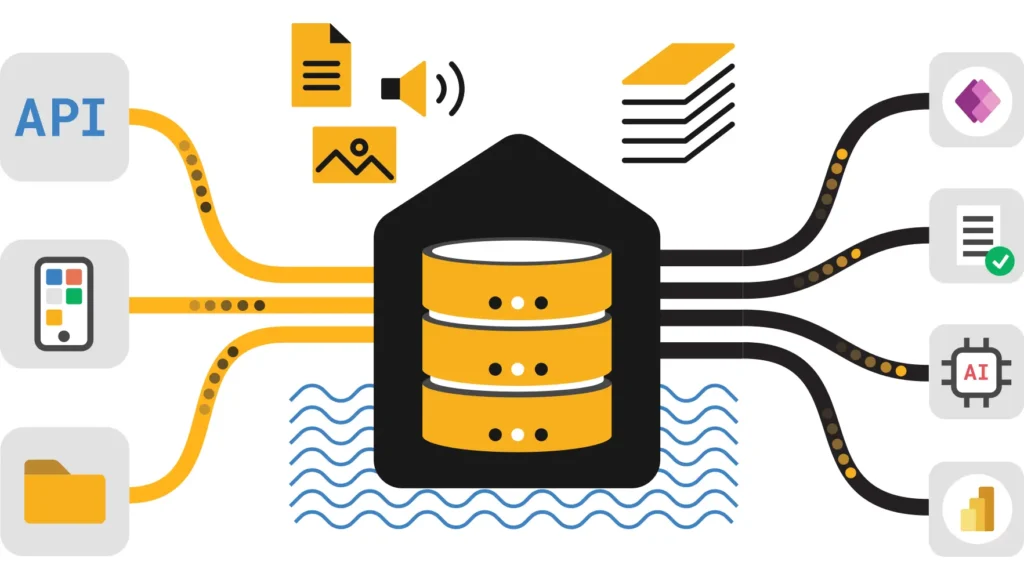
A production RAG system on Microsoft Fabric has four layers: storage, indexing, retrieval, and generation. Each maps to a specific Fabric or Azure service.
| Layer | Service | Role |
|---|---|---|
| Storage | OneLake / Fabric Lakehouse | Raw document storage — PDFs, Word docs, structured data exports. Single governed store within the Fabric security boundary. |
| Indexing | Azure AI Search | Maintains the vector index of embedded document chunks. Handles semantic search, hybrid search, and keyword search. |
| Orchestration | Fabric Notebooks (Python) | Embedding generation, chunk processing, retrieval logic, prompt assembly, and evaluation pipelines. |
| Generation | Azure OpenAI (GPT-4o) | Receives the retrieved context and user query, generates a grounded answer. Also used for embedding generation (text-embedding-3-large or text-embedding-ada-002). |
The Fabric Lakehouse acts as the source of truth for raw documents — not Azure Blob Storage directly — so that the knowledge base inherits Fabric’s governance controls, workspace permissions, and sensitivity labels. Azure AI Search sits outside Fabric but is configured to private endpoints within the same Azure virtual network, keeping data within the trust boundary.
An F2 capacity SKU is the minimum required to run Fabric Notebooks, Lakehouse, and AI Skills together. For production RAG with significant document volumes and concurrent users, F4 or F8 provides headroom for embedding generation and query processing without throttling. Trial capacity (F2) is sufficient for initial build and testing.
Setting Up a RAG Pipeline on Microsoft Fabric
- Provision the Fabric workspace and LakehouseCreate a Fabric workspace on F2 or above. Add a Lakehouse — this is where raw documents land. Create a folder structure:
raw/for incoming files,processed/for cleaned and chunked outputs. - Configure Azure OpenAI and AI SearchDeploy an Azure OpenAI resource in the same region as your Fabric capacity. Deploy a text-embedding model (text-embedding-3-large recommended over ada-002 for new deployments). Create an Azure AI Search resource in the same region. Configure a private endpoint if working in a regulated environment.
- Upload and prepare documentsUpload source documents to the Lakehouse
raw/folder. Use a Fabric Notebook to extract text from PDFs and Word files usingpypdforpython-docx. Write cleaned text to theprocessed/folder as plain text or JSON with metadata (source filename, last modified date, section title). - Chunk documents and generate embeddingsSplit cleaned documents into chunks (see Section 04 for chunking strategy). Generate embeddings for each chunk using the Azure OpenAI embedding deployment. Write chunks and their embedding vectors to the Azure AI Search index.
- Build the retrieval and generation pipelineAt query time: embed the user question, search the AI Search index for the top-K most similar chunks, assemble a prompt combining the retrieved chunks with the user question, call Azure OpenAI GPT-4o for generation, and return the answer with source citations.
- Evaluate and iterateRun the Fabric evaluation notebook against a test question set. Check groundedness, relevance, and faithfulness scores. Adjust chunking or retrieval strategy based on where scores fall below threshold (see Section 07).
from azure.search.documents import SearchClient
from azure.search.documents.models import VectorizedQuery
import openai

def retrieve_and_generate(user_question: str, top_k: int = 5) -> dict:
    # 1. Embed the question
    embedding = openai.embeddings.create(
        model   = "text-embedding-3-large",
        input   = user_question
    ).data[0].embedding

    # 2. Retrieve relevant chunks from AI Search
    vector_query = VectorizedQuery(
        vector         = embedding,
        k_nearest_neighbors = top_k,
        fields         = "content_vector"
    )
    results = search_client.search(
        search_text    = user_question,   # hybrid search
        vector_queries = [vector_query],
        select         = ["content", "source_file", "chunk_id"],
        top            = top_k
    )
    chunks = [{"content": r["content"], "source": r["source_file"]} for r in results]

    # 3. Assemble the grounded prompt
    context = "

".join([f"[{c['source']}]
{c['content']}" for c in chunks])
    prompt  = f"""Answer the question using only the context provided below.
If the context does not contain the answer, say "I don't have enough information."
Cite the source file for each claim.

Context:
{context}

Question: {user_question}"""

    # 4. Generate the grounded answer
    response = openai.chat.completions.create(
        model    = "gpt-4o",
        messages = [{"role": "user", "content": prompt}]
    )
    return {"answer": response.choices[0].message.content, "sources": chunks}
Chunking Strategy — The Decision That Most Affects Retrieval Quality
Chunking is the process of splitting source documents into segments before embedding them into the vector index. Chunk size is the most important single configuration decision in a RAG system — it determines whether the retrieved context is too broad (losing precision) or too narrow (losing surrounding meaning).
| Document Type | Recommended Chunk Size | Overlap | Reasoning |
|---|---|---|---|
| General business documents | 512 tokens | 50 tokens | Balanced starting point for most content types |
| Policy and compliance documents | 256 tokens | 32 tokens | Individual clauses are the retrieval unit, not full sections |
| Technical documentation / FAQs | 256–512 tokens | 50 tokens | Q&A pairs should stay together in one chunk where possible |
| Long-form reports and research | 512–768 tokens | 64 tokens | Sections need more context to be meaningful in isolation |
| Structured data (tables, CSV) | Row or block | None | Row boundaries are more meaningful than token boundaries |
Overlap between adjacent chunks ensures that a sentence spanning a chunk boundary is present in full in at least one chunk. Without overlap, the retriever may return a chunk that begins mid-sentence and lacks the context needed to generate a correct answer.
Chunking strategy is empirical, not theoretical — the right chunk size for your documents can only be confirmed by running evaluation metrics against a real question set. Start at 512/50, run the groundedness and relevance evaluation notebooks, then adjust chunk size in the direction the metrics indicate. If groundedness is low, chunks are too large and are including irrelevant content. If relevance is low, chunks may be too small and missing surrounding context that makes them searchable.
Embedding Models — Choosing the Right Representation
Embeddings convert text chunks into numerical vectors in a high-dimensional space where semantically similar content is positioned close together. The quality of your embedding model determines how well the retriever can find relevant chunks for a given question — including questions phrased differently from the source document wording.
| Model | Dimensions | Best For | Notes |
|---|---|---|---|
| text-embedding-3-large | 3,072 | New deployments — highest retrieval quality | Recommended default for all new RAG systems on Azure OpenAI |
| text-embedding-3-small | 1,536 | Cost-sensitive or high-volume indexing | Good balance of quality and cost; still outperforms ada-002 |
| text-embedding-ada-002 | 1,536 | Legacy compatibility only | Older model — use 3-large or 3-small for new systems |
Once you generate embeddings for your documents using one model, every query embedding at search time must use the same model. Mixing models — for example, indexing with ada-002 then querying with text-embedding-3-large — produces meaningless similarity scores and completely broken retrieval. If you upgrade the embedding model, you must re-embed all documents and rebuild the index from scratch.
RAG vs Classic Chatbot — Why It Matters for Compliance
Advertisements
The distinction between RAG and a standalone generative AI chatbot is not primarily about user experience — it is about evidence. A chatbot generates from pre-training; a RAG system generates from your data. That difference has direct implications for whether AI output can be trusted, cited, and audited in business decisions.
| Capability | RAG System | Classic Chatbot |
|---|---|---|
| Data source | Your live knowledge base — documents updated in near real-time | Static pre-training data, frozen at training cutoff |
| Source citations | Every answer cites source documents | No source tracking — answers are unverifiable |
| Hallucination risk | Low — constrained to retrieved context | Higher — model may invent plausible-sounding answers |
| Data freshness | Reflects current state of knowledge base | Requires full model retraining to update |
| Access control | Index access respects Fabric workspace and AI Search permissions | No data-level access control |
| Compliance audit trail | Full — source document + chunk ID per answer | None — black box responses |
| Proprietary data | Your data stays in your environment | Depends on API data handling policy |
Evaluating RAG Accuracy in Microsoft Fabric
Microsoft Fabric provides evaluation notebooks that compute three core RAG metrics against a test question set. Each metric targets a different failure mode, and together they tell you exactly where the system is breaking down.
Groundedness
Does the generated answer actually come from the retrieved chunks? A low groundedness score means the model is going off-context — either the retrieved chunks are not relevant, or the model is ignoring them and generating from pre-training.
Relevance
Did retrieval return the right documents for the question? A low relevance score means the vector search is not finding the correct chunks — typically a chunking, embedding, or index configuration problem.
Faithfulness
Does the answer accurately represent what the retrieved documents actually say? Low faithfulness with high groundedness indicates the model is mischaracterizing or overgeneralizing from the correct source material.
Target Thresholds
Groundedness >80%, Relevance >80%, Faithfulness >85% for production readiness. Scores below these thresholds on a representative question set indicate the system is not ready for business users.
from azure.ai.evaluation import GroundednessEvaluator, RelevanceEvaluator

groundedness = GroundednessEvaluator(model_config=model_config)
relevance    = RelevanceEvaluator(model_config=model_config)

result = groundedness(
    response = answer,
    context  = "
".join([c["content"] for c in retrieved_chunks])
)
print(f"Groundedness: {result['groundedness']}")  # Score 1-5
RAG for Regulated Industries — Compliance Architecture
For financial services, healthcare, insurance, legal, and government use cases, the auditability of source citation is the compliance differentiator. RAG on Fabric is well-positioned for these environments because the full trust boundary is configurable within Azure and Fabric infrastructure the organization already controls.
| Compliance Requirement | Fabric RAG Implementation |
|---|---|
| Data residency | Fabric capacity and Azure OpenAI in the same geography. AI Search private endpoint in the same VNet. No cross-region data movement. |
| Access control on source documents | Lakehouse workspace permissions govern who can add or modify source documents. AI Search access keys or managed identity restrict index access. |
| Encryption at rest | OneLake uses Microsoft-managed keys by default. Azure AI Search supports customer-managed keys (CMK) via Azure Key Vault for regulated environments. |
| Audit trail per answer | Log the question, retrieved chunk IDs, source filenames, and generated answer to a Delta table in the Lakehouse. Query the log for any compliance review. |
| Sensitivity labels | Documents in the Lakehouse inherit Microsoft Purview sensitivity labels. The RAG pipeline should surface the highest sensitivity label of any chunk cited in an answer. |
Write a retrieval log to a Delta table in the Lakehouse on every query: timestamp, user identity, question text, top-K chunk IDs and source filenames, generated answer. This log is the audit trail that a compliance reviewer can query to verify that an AI-assisted decision was grounded in authorized source material. Without this log, you have a RAG system but not a compliant one.
Troubleshooting RAG Accuracy in Fabric
| Symptom | Most Likely Cause | Fix |
|---|---|---|
| Low groundedness (<70%) | Retrieved chunks are not relevant to the question | Reduce chunk size; improve embedding model; switch to hybrid search (vector + keyword) |
| Low relevance (<70%) | Index not finding correct documents | Check that documents are correctly indexed; verify embedding model consistency; add more representative documents to the knowledge base |
| Hallucinations despite correct retrieval | Prompt not constraining the model to context only | Add explicit instruction: “Answer only from the context provided. If the answer is not in the context, say so.” |
| Incomplete answers | Relevant information split across chunks below top-K threshold | Increase top-K from 5 to 8–10; increase chunk overlap; consider semantic chunking on section boundaries |
| Stale answers | Index not refreshed after source document updates | Schedule an incremental re-indexing pipeline after each document upload — check last-modified metadata to avoid re-embedding unchanged chunks |
| Slow response time | Large index with no filtering; overly large top-K | Add metadata filters (document type, date range, department) to narrow the search space before vector comparison |
Low-Code RAG with Fabric AI Skills
For teams without Python expertise or those building an initial proof of concept, Fabric AI Skills provides a graphical interface for connecting data sources to a natural language query experience — without writing orchestration code.
- Create a new AI Skill in the Fabric workspaceNavigate to the workspace → New item → AI Skill. This opens the AI Skill configuration interface.
- Connect data sourcesAdd a Lakehouse, Warehouse, KQL database, or Power BI semantic model as a data source. The AI Skill uses the connected sources to answer questions using auto-generated SQL, DAX, or KQL.
- Configure natural language instructionsProvide plain English instructions about your data — business terminology, important tables, and any rules for how the AI should interpret ambiguous questions. These instructions are injected into the prompt at query time.
- Test and publishUse the built-in test interface to ask questions and review the generated queries and answers. Publish the AI Skill to make it available as a REST endpoint for teams to integrate into applications or Power BI reports.
AI Skills work well when your knowledge base is structured data in a Lakehouse or Warehouse and questions are answerable with SQL or DAX. For unstructured document retrieval — PDFs, policies, contracts, compliance documents — a custom Notebook-based RAG pipeline with Azure AI Search gives significantly better results because AI Skills do not support document chunking and vector search on unstructured content.
FAQ — Microsoft Fabric RAG Tutorial
Official Resources — Microsoft Fabric RAG Documentation
Information is verified against official Microsoft Learn RAG documentation and the Fabric blog through June 2026. Azure OpenAI model availability, AI Search pricing tiers, and Fabric SKU requirements are subject to change — verify current specifications before deployment planning. UIG Data Lab is an independent publication, not affiliated with Microsoft Corporation.