Spark Shuffle Partitions Optimization Tutorial: Fixing Skew and OutOfMemory Errors
This spark shuffle partitions optimization tutorial explains why most slow Spark jobs are caused by shuffle, not pure CPU limits. When a job runs a heavy groupBy, join, or repartition, Spark must move data between executors. If the number of shuffle partitions is wrong, data piles up in a few tasks and causes skew and OutOfMemory errors.
The goal of this spark shuffle partitions optimization tutorial is to show exactly how to diagnose shuffle bottlenecks in the Spark UI, calculate the right number of shuffle partitions, and apply fixes in PySpark or Scala on Databricks or Microsoft Fabric. It also covers advanced techniques like salting skewed keys when tuning spark.sql.shuffle.partitions is not enough.
What Is Spark Shuffle and Why Do Shuffle Partitions Matter?
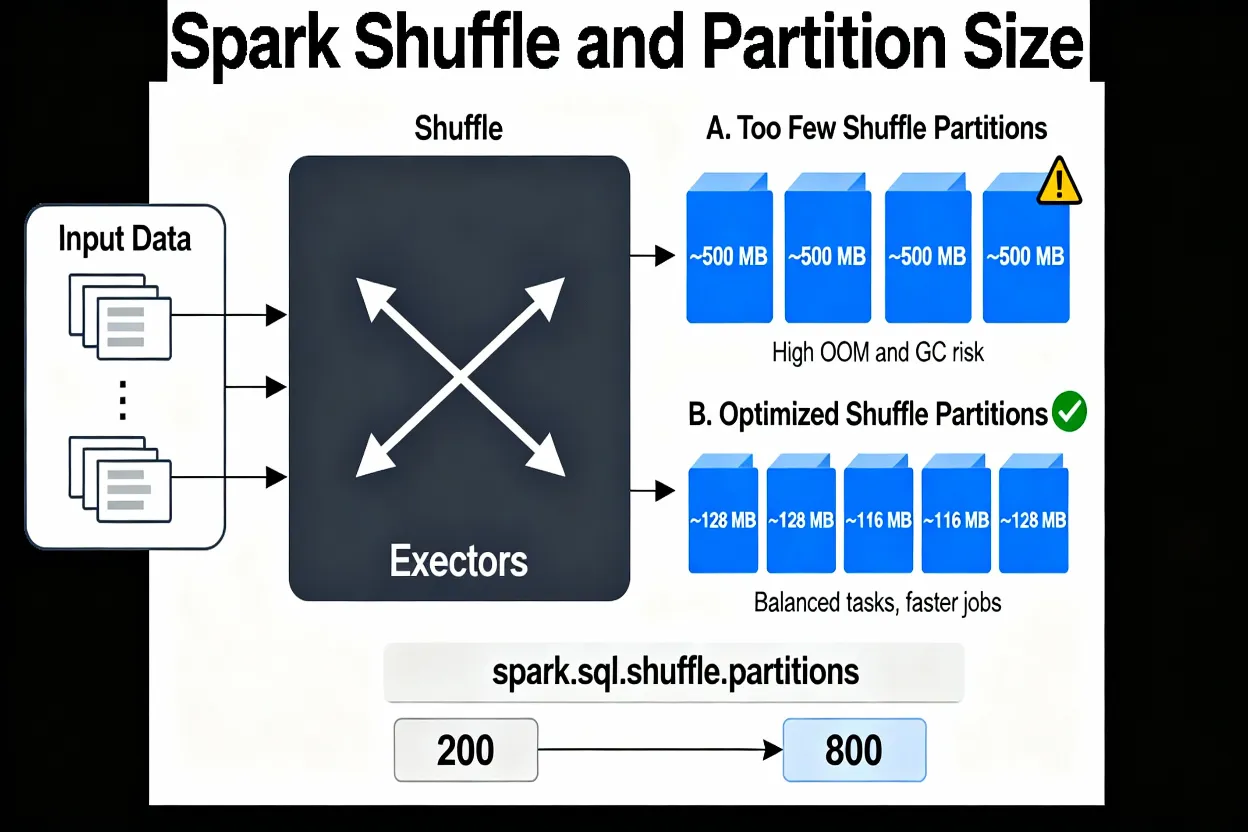
Spark shuffle is the step where data moves across the cluster for wide operations such as joins and aggregations. During this phase Spark writes intermediate data, then reads it back into new partitions. These new partitions are controlled by spark.sql.shuffle.partitions when using DataFrames or SQL.
By default, spark.sql.shuffle.partitions is set to 200. This may work for small jobs but often needs tuning for large shuffle workloads. If there are too few shuffle partitions, each partition becomes very large, which stresses executor memory and garbage collection and can lead to OutOfMemory errors. If there are too many shuffle partitions, Spark must schedule many small tasks, which increases overhead and can slow the job without adding real parallelism.
Where Do I See Shuffle Skew in the Spark UI?
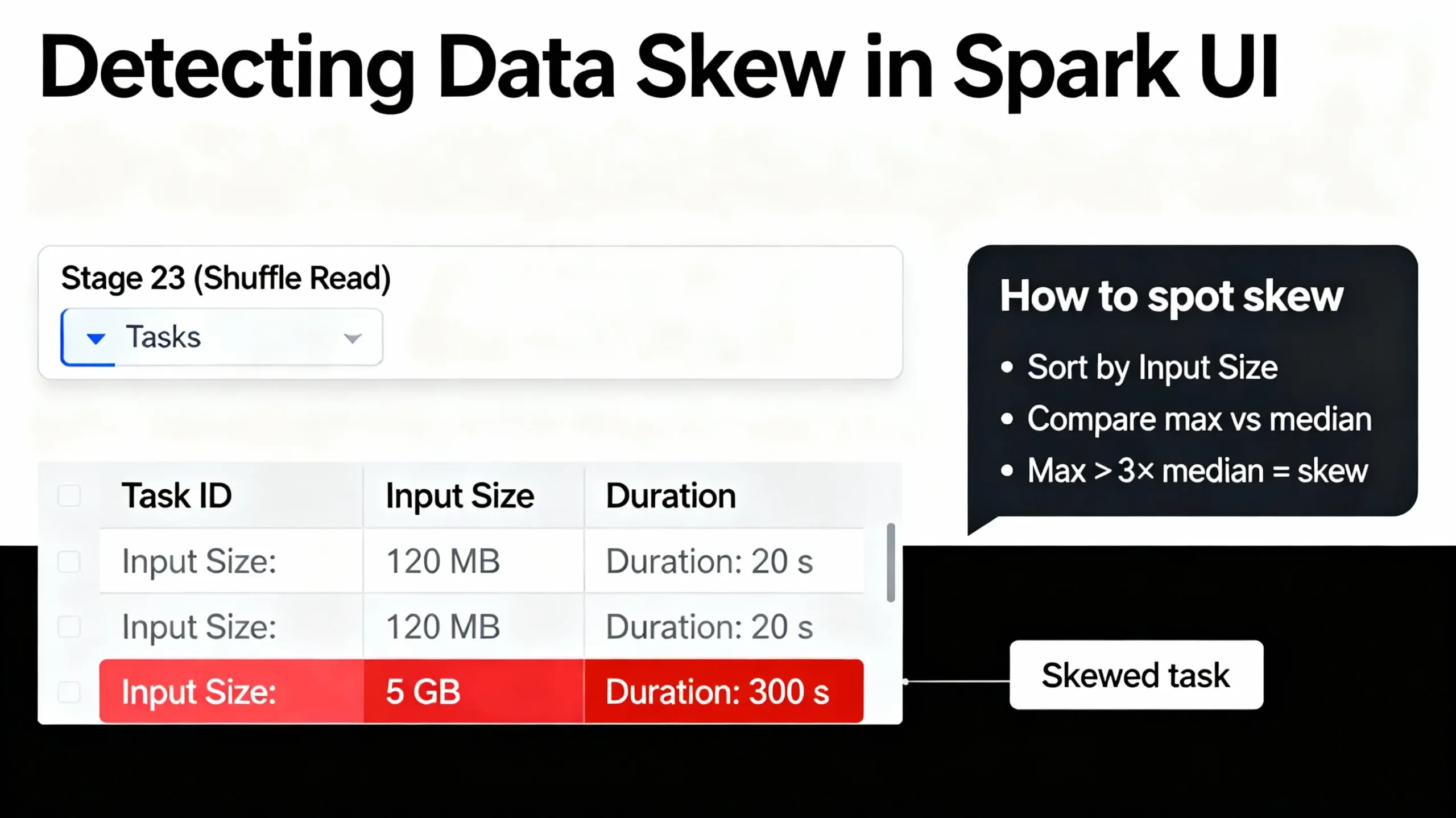
To see shuffle skew, open the Spark UI for your job. On Databricks and Fabric you can click the job, then open the Stages tab. Look for the stage with the longest duration or the largest input size. That stage usually holds the slow shuffle.
Inside the stage, sort the Tasks table by Input Size / Records and by Duration. If the largest task processes more than three times the data of a typical task, or it runs several times longer, then the job has skewed shuffle partitions. This is the signal that the spark shuffle partitions optimization tutorial techniques are needed.
How Do I Diagnose Shuffle Bottlenecks Step by Step?
Start with a failing or very slow job and open its Spark UI page. First, confirm that one or more shuffle stages dominate the total runtime. If most time is spent in a single join or groupBy stage, partitions and skew are likely problems.
Next, inspect the task metrics for that stage. Check input sizes and durations. If some tasks are much larger or slower, skew is present. If all tasks look similar but each one handles a very large amount of data, the overall number of shuffle partitions is too low for the data volume.
How Do I Calculate the Ideal Number of Shuffle Partitions?
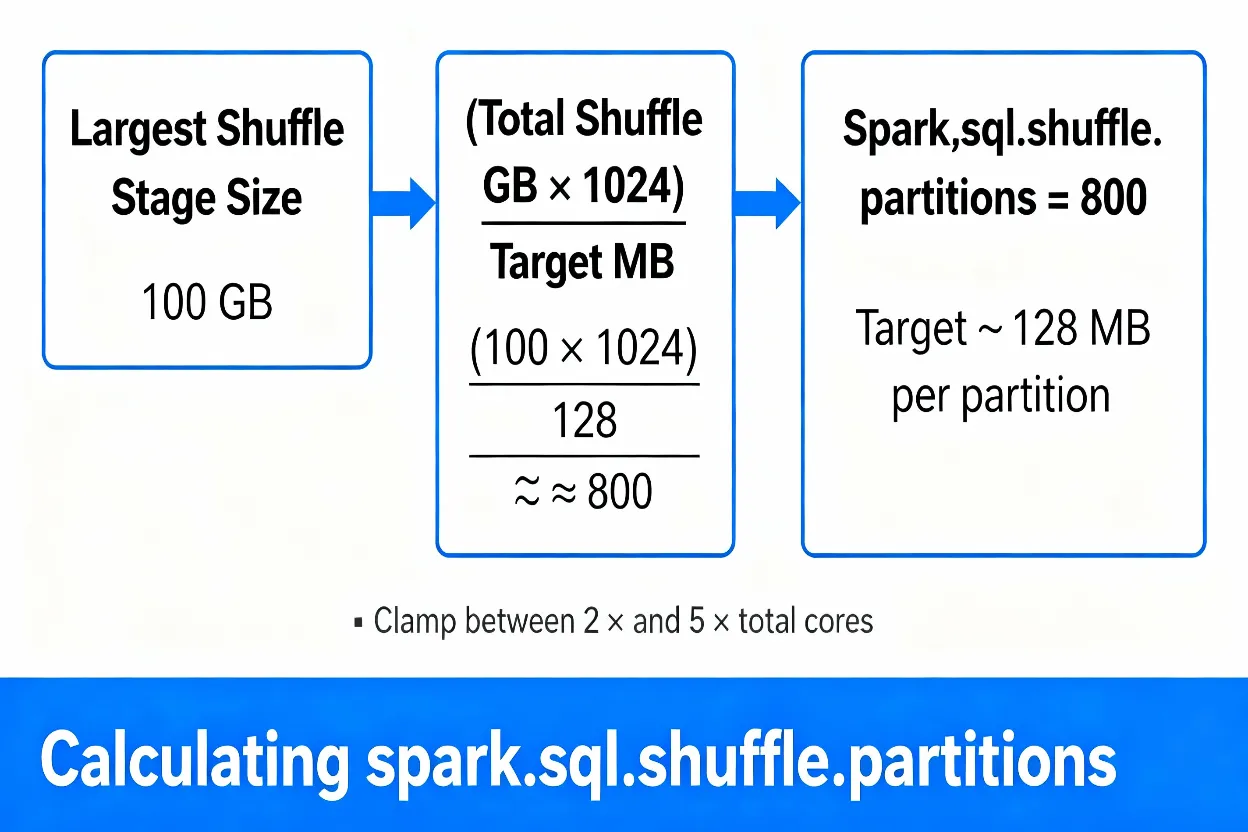
A simple rule is to keep each shuffle partition between about 100 MB and 200 MB. To do this, estimate the shuffle data size for the largest shuffle stage in the Spark UI and divide it by your target size. This gives a first guess for spark.sql.shuffle.partitions. The value must be a positive integer; zero or negative values are invalid.
For example, if a stage shuffles 100 GB and you choose 128 MB per partition, the ideal count is roughly:
# Example partition count
TotalShuffleGB = 100
TargetMB = 128

IdealPartitions = (TotalShuffleGB * 1024) / TargetMB
# ≈ (100 * 1024) / 128 ≈ 800

# Bad example:
# 100 GB shuffle with 200 partitions → ~512 MB per partition (high OOM risk)
# Good example:
# 100 GB shuffle with 800 partitions → ~128 MB per partition (balanced)
You can then adjust this number based on cluster cores. As a guideline, try to keep total shuffle partitions between two and five times the number of available cores, while still respecting the target size. Try to keep shuffle partition sizes strictly below about 200 MB to avoid memory pressure and long GC pauses.
How Do I Set spark.sql.shuffle.partitions in PySpark and Scala?
After you calculate a better partition count, configure spark.sql.shuffle.partitions before running the heavy part of your job. In notebooks and scripts, set it early so all later joins and aggregations use the new value.
PySpark / Databricks Example
# Set shuffle partitions for this session
spark.conf.set("spark.sql.shuffle.partitions", "800")

# Run heavy shuffle operations
df_joined = df1.join(df2, "user_id")
df_agg = df_joined.groupBy("country").agg(F.sum("revenue").alias("total_revenue"))
Scala Example
spark.conf.set("spark.sql.shuffle.partitions", "800")

val dfJoined = df1.join(df2, Seq("user_id"))
val dfAgg = dfJoined
  .groupBy("country")
  .agg(sum("revenue").alias("total_revenue"))
What Is a Good Value for spark.sql.shuffle.partitions?
There is no single perfect value for every job. A good value depends on both total data volume and cluster size. For small datasets, the default value of 200 may already create plenty of partitions. For large datasets, however, 200 partitions can be too few and lead to multi‑gigabyte partitions.
As a starting point, many teams target 100–200 MB per partition and confirm in the Spark UI that the biggest tasks fit in that range. For large jobs, an 800–1200 partition range is common. Very large jobs may need more partitions, as long as the number of partitions does not grow so high that scheduling overhead becomes a new bottleneck.
What Is the Difference Between spark.sql.shuffle.partitions and spark.default.parallelism?
spark.sql.shuffle.partitions is used for DataFrame and SQL shuffle stages. It tells Spark how many partitions to create when a query produces a new shuffled dataset. This makes it the main knob for this spark shuffle partitions optimization tutorial.
spark.default.parallelism is used mainly for RDD operations and as a fallback when Spark cannot infer a better level of parallelism. If most of your code uses DataFrames and Spark SQL, you will usually tune spark.sql.shuffle.partitions and leave spark.default.parallelism at its default.
How Does Adaptive Query Execution Change Shuffle Partitions?
Adaptive Query Execution (AQE) lets Spark change the plan while the query runs. With AQE enabled, Spark can merge small shuffle partitions and sometimes split very large partitions. This can reduce skew and improve performance without manual intervention.
Even with AQE, you still benefit from a reasonable starting value for spark.sql.shuffle.partitions. AQE can refine the plan, but if the initial plan uses an extremely low or extremely high partition count, the engine has to work harder to correct it.
AQE Configuration Example
# Enable Adaptive Query Execution and set an advisory target size
spark.conf.set("spark.sql.adaptive.enabled", "true")
spark.conf.set("spark.sql.adaptive.advisoryPartitionSizeInBytes", "134217728")  # 128 MB
Should I Use Repartition or Coalesce in Shuffle Optimization?
repartition performs a full shuffle and creates new partitions with a more even distribution of data. This is helpful when you want to fix skew or prepare data for a heavy join or aggregation in a controlled way.
coalesce reduces the number of partitions without a full shuffle. It is cheaper, but it does not fix skew and can leave some partitions much larger than others. A common pattern is to use repartition before heavy operations and coalesce after the main computation, before writing results, to reduce the number of small output files.
When Should I Use Salting to Fix Skewed Shuffle Partitions?
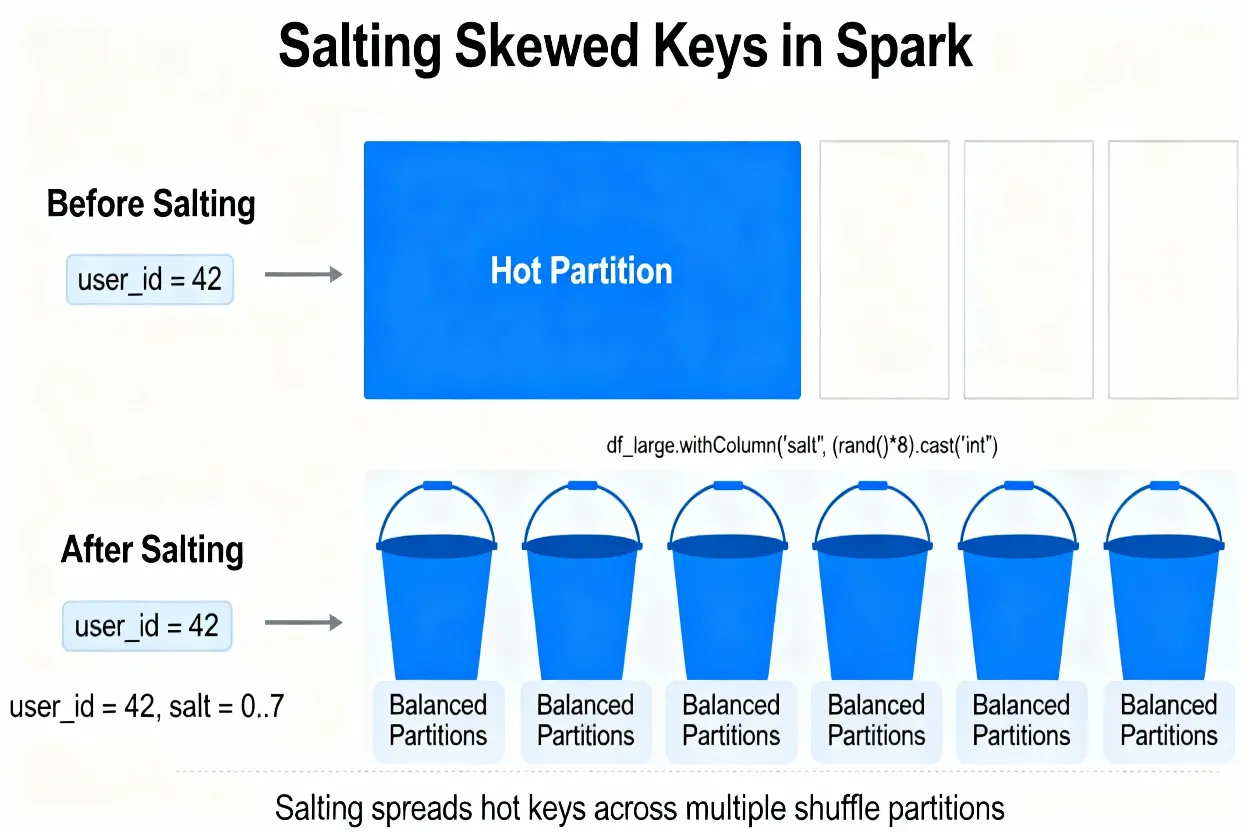
Raising spark.sql.shuffle.partitions helps when data is relatively well balanced. When most of the skew comes from a few very frequent keys, however, a higher partition count still leaves one or two partitions very large. In those cases, salting the key is a better option.
Salting adds a second column, such as a small random integer, and joins on both the original key and the salt. This spreads a single hot key across many partitions. After the join or aggregation is complete, you can remove the salt if you only need the original key.
PySpark Salting Example for a Skewed Join
from pyspark.sql import functions as F

skewed_key = "user_id"
salt_buckets = 8

df_large_salted = dfLarge.withColumn(
    "salt",
    (F.rand() * salt_buckets).cast("int")
)

df_small_expanded = dfSmall.crossJoin(
    spark.range(salt_buckets).toDF("salt")
)

df_joined = df_large_salted.join(
    df_small_expanded,
    on=[skewed_key, "salt"],
    how="inner"
)

df_result = df_joined.groupBy(skewed_key).agg(F.sum("metric").alias("metric_sum"))
How Can I Prevent OutOfMemory Errors from Shuffle?
OutOfMemory errors during shuffle mean one or more partitions do not fit into executor memory. This often happens when spark.sql.shuffle.partitions is too low or when skewed keys concentrate data.
To avoid this, set shuffle partitions so that each task handles a moderate amount of data, use the Spark UI to confirm partition sizes, and apply salting for hot keys. Also, avoid caching huge intermediate DataFrames unless you are sure they add value, because caching increases memory pressure during shuffle stages.
How Do I Apply This Shuffle Partitions Optimization on Databricks and Fabric?
On Databricks, you can set spark.sql.shuffle.partitions at the notebook level or as a cluster default. Combine this with AQE for jobs that vary in size. The same ideas from this spark shuffle partitions optimization tutorial apply directly, because Databricks uses standard Spark behavior with some managed defaults.
On Microsoft Fabric, Spark notebooks and data pipelines also honor the shuffle partitions configuration. Use the built‑in Spark UI to find skewed stages, compute a target partition count, and set it with spark.conf.set. Combine shuffle tuning with good lakehouse design, such as partitioned tables and efficient file sizes, for the best results.
Spark Shuffle Partitions Optimization: Burning Questions Answered
Why is my Spark job slow only on one shuffle stage?
This usually means the slow stage is a shuffle stage such as a big join, groupBy, or window operation. The tasks in that stage handle uneven amounts of data because shuffle partitions are not sized correctly or because some keys are much more frequent than others. Open that stage in the Spark UI and compare input size and duration for each task to confirm whether task skew or very large partitions are the cause.
How do I know if I have too few or too many shuffle partitions?
Too few shuffle partitions show up as tasks with very large input sizes and long runtimes, sometimes with OutOfMemory errors or heavy GC. Too many shuffle partitions show up as hundreds or thousands of tiny tasks that spend more time in scheduling and overhead than useful work. For most jobs, a good balance keeps partitions around 100–200 MB and uses a total partition count between roughly two and five times the number of cluster cores.
What is the safest way to choose spark.sql.shuffle.partitions?
The safest way is to use the size of the largest shuffle stage from the Spark UI. Divide that size by a target partition size such as 128 MB, and use the result as a starting value. Then clamp the partition count into a range that matches your cluster, so that you still have several tasks per core but not thousands of tiny tasks. This data‑driven method is more reliable than picking a random constant.
Does Adaptive Query Execution remove the need to tune shuffle partitions?
Adaptive Query Execution helps a lot but it does not fully remove the need to tune spark.sql.shuffle.partitions. AQE can coalesce very small partitions and split some skewed ones, but it still starts from the initial partition count. If that starting value is very poor, the query may still suffer from big partitions, many tiny tasks, or both. A reasonable starting point plus AQE gives the best results.
What is the difference between spark.sql.shuffle.partitions and spark.default.parallelism in real jobs?
In real jobs that use DataFrames and Spark SQL, spark.sql.shuffle.partitions decides the number of output partitions for shuffles, so it directly controls how many tasks run after joins and aggregations. spark.default.parallelism mostly matters for raw RDD operations and as a default when Spark has no better estimate. For this spark shuffle partitions optimization tutorial, the main focus is on the SQL shuffle setting rather than the RDD parallelism setting.
How do I detect Spark data skew using the Spark UI on Databricks or Fabric?
On Databricks or Microsoft Fabric, open the Spark UI, go to the Jobs page, and click the slow job. Then open the longest stage and inspect the Tasks table. Sort by input size and by duration. If the largest task has input size or runtime several times higher than the median task, there is data skew. That skew means the partitioning of shuffle data is uneven even if the overall number of shuffle partitions looks reasonable.
When should I use repartition instead of coalesce for shuffle optimization?
Use repartition when you want to fix skew or rebalance data before a heavy shuffle operation such as a big join or aggregation. It triggers a full shuffle and can spread data more evenly across partitions. Use coalesce when you want to reduce the number of partitions after the main work is done, usually just before writing results, to avoid many small output files without paying for another full shuffle.
When is salting the best way to fix skewed shuffle partitions?
Salting is the best option when one or a few keys are much more frequent than others, such as a single country, tenant, or user that dominates the data. In that case, increasing spark.sql.shuffle.partitions helps only a little because those hot keys still end up on one or two partitions. Salting adds a small random bucket to the key so that a single hot key is split across multiple shuffle partitions and processed by several tasks in parallel.
Should I use broadcast joins instead of tuning shuffle partitions for some jobs?
Broadcast joins are a good alternative when one side of the join is small enough to fit in memory on each executor. In that case Spark can send the small table to all executors and avoid a full shuffle of that side. If both sides of the join are large, broadcast joins are not possible, and optimizing shuffle partitions and handling skew become more important.
How can I prevent OutOfMemory errors that happen only during shuffle stages?
OutOfMemory errors during shuffle usually mean that one or more partitions are too large or that skew causes a single task to handle too much data. To prevent this, increase spark.sql.shuffle.partitions so that each partition has a safe size, confirm in the Spark UI that tasks stay under your target MB range, and fix skewed keys with techniques like salting. Also review caching and unpersist large DataFrames when they are no longer needed so they do not compete with shuffle buffers.
How should I tune shuffle partitions differently for Databricks and Microsoft Fabric?
On Databricks, tune spark.sql.shuffle.partitions using the same data‑size formula and Spark UI checks, but also enable AQE for extra gains. On Microsoft Fabric, set the configuration at the notebook or job level and follow the same process, using the Fabric Spark UI to inspect stages and skew. In both platforms, combine shuffle tuning with good table design, such as partitioned delta or lakehouse tables and reasonable file sizes, to get the best end‑to‑end performance.
How often should I revisit my spark.sql.shuffle.partitions setting?
You should revisit your shuffle partition count whenever data volume or workload shape changes in a noticeable way. Examples include when a source table doubles in size, when you add a new region or business unit, or when you change join logic. Each time, use the Spark UI to measure the new largest shuffle stage, recalculate a target partition count, and verify that task sizes and runtimes still match the goals of this spark shuffle partitions optimization tutorial.




