Microsoft Work IQ API — Complete Developer Guide
The Microsoft Work IQ API gives custom AI agents governed access to Microsoft 365 collaboration intelligence — emails, meetings, chats, files, people, and organizational signals — through four API domains and three protocols. This guide covers everything developers need: architecture, the four domains in depth, all three protocols, Copilot Credits pricing, Entra ID auth model, the admin setup workflow, and how Work IQ fits inside the broader Microsoft IQ stack. All information verified against official Microsoft Learn documentation and the Microsoft 365 Blog, June 2026.
The Microsoft Work IQ API reached general availability on June 16, 2026. It exposes Microsoft 365 workplace intelligence to custom AI agents through four domains — Chat, Context, Tools, and Workspaces — and three protocols: A2A, MCP, and REST. All requests run under Entra ID delegated authentication — agents see only what the signed-in user can access. Pricing uses Copilot Credits: fixed charges for Tools, variable charges for Chat and Context. No separate SKU or per-user license exists for the Work IQ API itself. Users accessing Work IQ through Microsoft-built apps with a Microsoft 365 Copilot add-on license pay no extra usage charge.
What Is the Microsoft Work IQ API?
Before Work IQ, building an enterprise AI agent that could reason over your organization’s actual work — who is working on what, what was decided in last Tuesday’s meeting, what the latest version of a document says — required a significant custom engineering effort. Teams had to extract data from SharePoint and Teams via the Microsoft Graph API, compute vector embeddings, store them in external vector databases, implement access control lists to prevent sensitive data exposure, and keep the whole pipeline synchronized as data changed.
The Work IQ API eliminates that stack. It exposes a continuously updated, permission-trimmed semantic model of how work actually happens in your organization — built from emails, calendar patterns, Teams chats, SharePoint documents, meeting transcripts, people connections, and line-of-business systems — directly to any agent through standard protocols.
Agents call the Work IQ API. Work IQ assembles the grounding context internally, enforces the invoking user’s Entra ID permissions automatically, and returns agent-ready intelligence. No custom vector pipeline. No external database. No separate governance layer to build.
The Work IQ API moved from public preview to general availability on June 16, 2026, announced at Microsoft Build 2026 on June 2. GA includes A2A protocol support, a redesigned remote MCP server, and REST API access. Usage is now independent of Microsoft 365 Copilot licensing and available on a consumption basis via Copilot Credits.
The Microsoft IQ Stack — Where Work IQ Fits
Work IQ is one component of the broader Microsoft IQ umbrella announced at Build 2026 — an enterprise intelligence architecture that grounds AI agents in both organizational knowledge and the live web. Understanding the full stack clarifies what Work IQ is responsible for and what the other layers handle.
| Layer | What It Provides | Status (June 2026) |
|---|---|---|
| Work IQ | Workplace intelligence — emails, meetings, chats, files, people, and collaboration patterns from Microsoft 365 and connected external systems | GA June 16, 2026 |
| Fabric IQ | Shared semantic foundation over structured business data in Microsoft Fabric — ontology defining how people, data, workflows, and operations relate | Preview |
| Foundry IQ | Orchestration layer — unifies Work IQ, Fabric IQ, File Search, Azure SQL, and MCP behind one SLA-backed retrieval endpoint. Enables retrieval planning across enterprise knowledge and the live web | GA |
| Web IQ | Real-time open web grounding — discovers, ranks, extracts, and packages fresh information from web pages, news, images, and video. Announced at Build 2026. | New — Build 2026 |
For data engineering teams already using Microsoft Fabric, the connection between Work IQ and Fabric IQ is important: Work IQ grounds agents in collaboration signals (who talked to whom, what was decided), while Fabric IQ grounds them in structured business data (what the numbers say). Foundry IQ orchestrates retrieval across both. See Microsoft Fabric IQ — The Intelligence Layer Explained for the Fabric IQ deep-dive.
Work IQ Architecture — How It Builds Organizational Context
Work IQ does not work by indexing documents at query time. It continuously processes signals from across Microsoft 365 and connected external systems, building and maintaining a live semantic model of how work happens in the organization. When an agent queries the API, it draws from this pre-built model rather than running a fresh retrieval pipeline on every request.
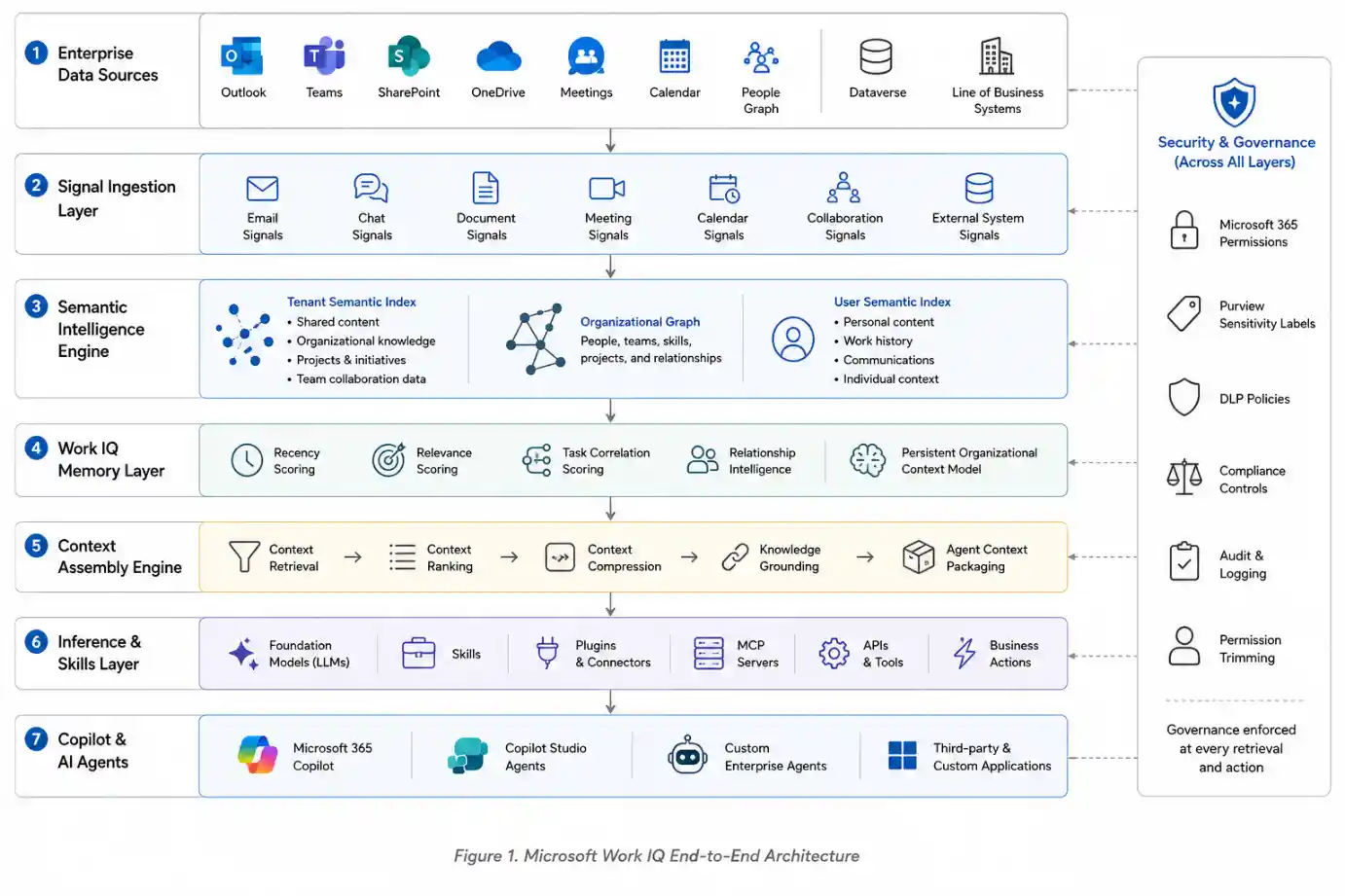
The Three Internal Layers
Data Layer
Continuously ingests signals from emails, calendar entries, Teams chats, SharePoint files, meeting transcripts, people graph connections, and line-of-business systems. Two interlocking indexes operate at different scopes: a tenant-level index for shared organizational content and a user-level index for personal work context.
Memory Layer
Builds persistent semantic understanding from the data signals over time. Scores each potential context item across three dimensions: temporal recency (active projects over stale records), topical similarity (alignment with the agent’s current prompt), and task correlation (user’s collaboration patterns and network interactions).
Inference Layer
Connects the accumulated memory context to models, skills, and tools so agents can reason and act. Packages relevant context into token-efficient, agent-consumable formats rather than returning raw Microsoft Graph payloads. This is what the API surface exposes.
Governance Layer
Enforces Microsoft 365 permissions, Purview sensitivity labels, and compliance policies at every retrieval. All context is permission-trimmed to the invoking user before it reaches the agent. Agents cannot see data the user cannot see.
The important architectural point is that Work IQ is not a search API. It builds a model of organizational context over time and returns inference results from that model. A query like “summarize recent project risks” does not run a keyword search — it evaluates the user’s collaboration history, active workstreams, and communication patterns to surface what is actually relevant. That distinction matters when deciding whether Work IQ is the right tool for a given agent use case.
The Four Work IQ API Domains
The Work IQ API is organized around four domains that map to how agents actually work — from conversational intelligence to persistent state management. Each domain has a distinct purpose and a distinct cost model.
1. Chat — Copilot-Quality Conversational Intelligence
The Chat API returns the response Microsoft 365 Copilot would give a signed-in user for a given prompt, including citations. It provides programmatic access to the full Copilot reasoning and grounding stack — without requiring users to interact with the Copilot interface directly.
Use Chat when your agent needs a synthesized, human-readable answer grounded in organizational context. The response includes source citations so agents can surface provenance to users. This is the most straightforward integration path for developers who want Copilot-quality responses in a custom application.
2. Context — Agent-Ready Grounding Data
The Context API returns the raw grounding data Copilot would use to answer a query — but instead of synthesizing it into a response, it packages that context in a machine-consumable format designed for agent ingestion. The agent then decides what to do with the context rather than receiving a pre-formed answer.
Use Context when your agent needs the underlying signals rather than a synthesized response — for example, when feeding context into your own model with a specialized system prompt, or when combining Work IQ context with data from other sources before generating a response.
3. Tools — Actions Inside Microsoft 365
The Tools domain provides a stable set of action verbs that agents can execute within Microsoft 365 — send email, schedule meeting, upload document, create task, search Teams. The key design principle is that the action vocabulary stays stable even as the underlying Microsoft 365 surface evolves. Agents call a documented Tool, not a raw Graph endpoint.
Tools carry a fixed Copilot Credit charge per invocation — the cost is predictable regardless of the complexity of the underlying operation.
4. Workspaces — Persistent Agent State
Workspaces are secure, tenant-contained containers where long-running agents store intermediate state, files, and memory across complex multi-step tasks. Microsoft Scout and Copilot Cowork use Workspaces for exactly this purpose — storing task progress, intermediate files, and working memory that persists across sessions and agent handoffs in multi-agent systems.
Without Workspaces, agents must either store state in external systems (introducing governance risk) or lose state between sessions (requiring users to repeat context). Workspaces solve both problems by keeping persistent agent memory inside the Microsoft 365 tenant boundary.
| Domain | Returns | Best For | Pricing Type |
|---|---|---|---|
| Chat | Synthesized Copilot response with citations | Conversational agents, Copilot-quality answers in custom UIs | Variable — query complexity |
| Context | Raw grounding data, agent-consumable format | Custom model pipelines, multi-source grounding, specialized prompts | Variable — token depth |
| Tools | Confirmation of executed action | Agents that act — send mail, schedule, upload, search | Fixed — per tool invocation |
| Workspaces | Persistent state container | Long-running agents, multi-step tasks, cross-session memory | Storage-based |
Work IQ API Protocols — A2A, MCP, and REST
Work IQ supports three protocols at GA, each targeting a different agent architecture. Your choice of protocol depends on where your agent runs and how it communicates with other systems.
| Protocol | How It Works | Best For |
|---|---|---|
| A2A — Agent-to-Agent | Structured JSON-RPC communication with contextual metadata. Designed for agents that delegate tasks to other agents or coordinate with orchestration systems. | Multi-agent systems, task delegation pipelines, asynchronous agent orchestration, Microsoft Foundry agents |
| MCP — Model Context Protocol | Redesigned remote MCP server that exposes Microsoft 365 work context as tools. AI assistants in IDEs and coding environments call the MCP server directly. | GitHub Copilot, VS Code AI extensions, local CLI agents, any MCP-compatible AI assistant |
| REST | Standard HTTP request/response. No special protocol library required — any HTTP client works. | Web application backends, service-hosted agents, custom orchestrators, any framework that calls APIs |
A2A requests must include a properly structured JSON-RPC envelope with contextual metadata about the calling agent — agent ID, task context, and capability declarations. This is not required for REST calls. If you are building a simple web application that calls Work IQ, REST is the simpler choice. A2A is worth the additional structure when you are building multi-agent systems where agents need to understand who called them and why.
Authentication & Security Model
Delegated Authentication Only — No Application-Only Access
The Work IQ API enforces Microsoft Entra ID delegated authentication for all requests. Every API call must execute in the context of a signed-in user. Application-only authentication — where an application authenticates as itself without a user context — is not supported.
This is an architectural security decision, not a limitation to work around. Because Work IQ grants access to personal email, meeting content, and collaboration history, running queries without a user context would mean an application could access organizational intelligence without any individual being accountable. The delegated model ensures that every Work IQ query is traceable to a specific user, and that the response is permission-trimmed to exactly what that user can see.
All Work IQ API requests must execute in the context of a signed-in user via Entra ID delegated authentication. Microsoft 365 permissions, Purview sensitivity labels, and compliance policies are enforced automatically based on the invoking user’s identity. An agent cannot retrieve, reason over, or act on data that the invoking user is not authorised to access.
What Entra ID Enforces Automatically
Microsoft 365 Handles
- Entra ID delegated token validation on every request
- Permission trimming — results scoped to user’s access rights
- Purview sensitivity label enforcement
- Microsoft 365 compliance policy enforcement
- Full audit trail of every agent query and action
- Tenant boundary — data never leaves the Microsoft 365 trust boundary
Developer Handles
- Obtaining and refreshing delegated access tokens
- App registration and permission scope declarations
- Admin consent for
WorkIQAgent.Askpermission - Business logic governing when the agent invokes Work IQ
- Consuming billing configuration in the M365 admin center
Work IQ API Pricing — Copilot Credits
From GA on June 16, 2026, the Work IQ API uses a consumption-based pricing model billed in Copilot Credits — the same unified currency used by Copilot Studio and other Microsoft AI services. There is no separate Work IQ API subscription, SKU, or per-user license.
| Usage Pattern | Who Pays | Charge Type |
|---|---|---|
| Work IQ through Microsoft-built apps (Copilot, GitHub Copilot, Foundry) with M365 Copilot add-on license | Covered by existing license — no extra charge | None |
| Tools API — explicit actions (send email, schedule, upload) | Organization’s Copilot Credit balance | Fixed rate per tool invocation |
| Chat API — Copilot-quality responses | Organization’s Copilot Credit balance | Variable — query complexity and token depth |
| Context API — raw grounding data | Organization’s Copilot Credit balance | Variable — query complexity and token depth |
Copilot Credits — How They Work
Copilot Credits are the shared consumption currency across Copilot Studio, Work IQ API, and other Microsoft AI services. Organisations can acquire credits through two mechanisms: pay-as-you-go (credits billed as consumed, no commitment) or Copilot Credit prepurchase plans (bulk purchase at a committed rate).
For organizations currently using the Work IQ API in preview through third-party agents or custom applications: an administrator must enable consumptive billing in the Microsoft 365 admin center before June 16. If billing is not configured, third-party agent access to the Work IQ API will be interrupted at GA. Microsoft-built app usage covered by existing Copilot licenses is not affected.
New Cost Management Dashboard
Microsoft launched a new cost management dashboard in the Microsoft 365 admin center alongside Work IQ GA. IT admins can review AI credit usage, configure Copilot Credit billing (prepaid or pay-as-you-go), set spending limits for tenants, groups, and individual users, and monitor credit requests across agents and services. Work IQ is the first product managed through this dashboard — additional Copilot Credit-consuming products will follow.
Developer Setup — Registering and Calling the Work IQ API
- Register an application in Microsoft EntraNavigate to the Microsoft Entra admin center (entra.microsoft.com). Create a new App Registration. Set the redirect URI appropriate for your application type (web, SPA, or mobile/desktop).
- Add the Work IQ delegated permissionIn the App Registration, go to API permissions → Add a permission → Microsoft APIs → Work IQ. Add the delegated permission
WorkIQAgent.Ask. This is the scope required for all Work IQ API calls. - Grant tenant-wide admin consentA Global Administrator must grant admin consent for the
WorkIQAgent.Askpermission at the tenant level. Without this, individual users will be prompted to consent on first use — or blocked entirely if user consent is disabled by tenant policy. - Configure Copilot Credits billingIn the Microsoft 365 admin center, enable consumptive billing for Work IQ API. Configure whether to use pay-as-you-go or a prepurchase Copilot Credit plan. Set spending limits if required.
- Obtain a delegated access tokenUse MSAL (Microsoft Authentication Library) to acquire a delegated access token for the signed-in user with the
WorkIQAgent.Askscope. The token must represent a real user — application-only tokens are rejected. - Call the Work IQ APIMake REST, A2A, or MCP calls using the token. For REST, include the bearer token in the Authorization header. For A2A, include it in the JSON-RPC security envelope. For MCP, configure the server with the token via the Foundry Toolkit or local CLI.
// Example: REST call to Work IQ Context API
const response = await fetch(
  'https://api.work-iq.microsoft.com/v1/context',
  {
    method: 'POST',
    headers: {
      'Authorization': `Bearer ${delegatedAccessToken}`,
      'Content-Type': 'application/json',
    },
    body: JSON.stringify({
      query: 'What are the open blockers on the Q3 launch?',
      sources: ['email', 'teams', 'sharepoint'],
    }),
  }
);

const context = await response.json();
// context.items contains agent-ready grounding data
// Each item includes source, content, and permission metadataThe Microsoft Foundry Toolkit for Visual Studio Code provides a visual way to configure Work IQ as a built-in tool for agents defined in Foundry. You can define which Work IQ domains your agent can call, set the MCP or A2A endpoint, and test queries against live Microsoft 365 data from within VS Code without writing the full authentication flow manually.
Work IQ MCP Server — Context for AI Coding Assistants
The redesigned Work IQ remote MCP server, released at GA, exposes Microsoft 365 work context as tools for any MCP-compatible AI assistant — GitHub Copilot in VS Code, coding agents, IDE extensions, and local CLI agents. This means a developer’s coding assistant can answer questions grounded in organizational context without leaving the development environment.
The Work IQ CLI can be configured as a local MCP server by adding it to the MCP configuration file of your assistant:
// MCP server configuration (e.g., .vscode/mcp.json)
{
  "workiq": {
    "type": "stdio",
    "command": "workiq",
    "args": ["mcp"]
  }
}

// Example agent interaction via MCP
// User: "Summarize recent discussions about project risks"
{
  "tool": "workiq.search",
  "arguments": {
    "query": "project risks",
    "source": "teams"
  }
}

// Work IQ response
{
  "results": [
    {
      "summary": "Recent discussions highlighted timeline risks in the Q3 feature branch and dependency risks with the authentication service refactor.",
      "sources": ["Teams channel: Engineering #q3-planning", "Meeting: Architecture review 2026-06-08"]
    }
  ]
}Work IQ MCP servers can also be added directly to Copilot Studio agents. In Copilot Studio, navigate to your agent’s tools configuration and add the Work IQ Mail MCP server (or other domain-specific servers). The Agent 365 control plane ensures agents only access approved tools, reducing risk and maintaining compliance alignment.
Work IQ API Use Cases
What Work IQ Is Built For
| Use Case | Which Domains | Notes |
|---|---|---|
| Project status agent — “What’s the current state of Project Phoenix?” | Context + Tools | Context retrieves email threads, meeting notes, and file activity. Tools can schedule a follow-up meeting if blockers are found. |
| Meeting preparation — “Brief me before my 2pm call with the finance team” | Chat | Chat synthesizes recent email and document context involving the attendees into a pre-meeting briefing. |
| Long-running research agent — multi-step task spanning hours or days | Context + Workspaces | Workspaces store intermediate findings and memory. The agent can resume across sessions without losing context. |
| Action-taking agent — “Send the Q2 summary to my stakeholders” | Tools | Tools executes the send-email action within Microsoft 365 under the user’s permissions. |
| Coding assistant with org context — “Does our codebase use the auth pattern from last month’s architecture decision?” | MCP (Context) | Work IQ MCP server surfaces the relevant Teams discussion and SharePoint document directly in the IDE. |
| Multi-agent coordination — specialist agents delegating to Work IQ as a grounding service | A2A (all domains) | A2A protocol handles agent-to-agent communication with full contextual metadata. |
When Work IQ Is Not the Right Choice
Work IQ is optimised for Microsoft 365 collaboration context. It is not a general-purpose database query interface or a replacement for the Microsoft Graph API when you need raw structured data. If your agent needs to query calendar entries in a structured way, enumerate SharePoint list items programmatically, or access Microsoft 365 admin data, the Graph API is the right tool. Work IQ is for agents that need to understand organizational context and act on it — not for applications that need to enumerate raw data resources.
FAQ — Microsoft Work IQ API
Official Resources — Microsoft Work IQ Documentation
Information is verified against official Microsoft Learn documentation, the Microsoft 365 Blog, the Microsoft 365 Developer Blog, and Microsoft Licensing Resources as of June 10, 2026. Work IQ API reached GA on June 16, 2026 — pricing and feature details may be updated post-GA. Always verify at learn.microsoft.com. UIG Data Lab is an independent publication, not affiliated with Microsoft Corporation.