Data Mirroring in Microsoft Fabric: Complete 2026 Guide
Data Mirroring in Fabric is a zero-ETL, near-real-time replication service. This guide covers the full architecture, every supported source, the June 2026 network security expansion, Extended Capabilities, design patterns, and operational monitoring — all verified against Microsoft Learn.
Data Mirroring in Microsoft Fabric is a zero-ETL, near-real-time replication service that continuously synchronizes data from enterprise sources into OneLake using Change Data Capture (CDC). It starts with a full snapshot then streams ongoing inserts, updates, and deletes — no custom pipeline code required. Sources include Azure SQL, PostgreSQL, MySQL, Snowflake, SQL Server, and 150+ systems via Open Mirroring partners. Minimum capacity required: F2. Each CU purchased includes 1 TB of free mirroring storage.
What Is Data Mirroring in Fabric?
Mirroring operates in two distinct phases that must both complete correctly before analytics queries can run against fresh data:
- Initial Snapshot: Captures a consistent baseline from the source database at a specific point in time. Row counts, schema, and all existing data are written to Delta tables in OneLake.
- Continuous CDC (Change Data Capture): After snapshot completion, Fabric reads the source’s change log — transaction log, WAL, or binlog depending on the database engine — and applies inserts, updates, and deletes in strict transaction order.
Sub-Minute Latency
Changes from source typically appear in Fabric within 30–60 seconds for healthy setups — enabling near-real-time dashboards and alerting without custom orchestration.
Managed Infrastructure
Fabric handles snapshot scheduling, CDC configuration, and data delivery. No custom CDC code required for native connectors.
Flexible Source Support
Native connectors for Azure-hosted databases plus Open Mirroring for 150+ enterprise systems via partners including CData Sync, ASAPIO, and Stelo.
Delta Lake Native
Data lands in Delta tables automatically, providing ACID guarantees and seamless querying from notebooks, SQL Warehouse, Power BI, and Spark.
Capacity & Free Storage — Corrected
Mirroring works on any Fabric capacity from F2 upwards. There is no F64 minimum. Each purchased CU includes 1 TB of free mirroring storage — so F2 gives 2 TB free, F64 gives 64 TB free. OneLake storage is only billed when the free limit is exceeded or capacity is paused (per Azure Pricing).
Supported Sources & Architecture
Advertisements
Mirroring supports two broad categories of sources. Check the official Microsoft Learn documentation for the complete current list — capabilities expand quarterly.
Native Connectors (Microsoft-Managed)
- Azure SQL Database & Managed Instance
- Azure Database for PostgreSQL
- Azure Database for MySQL
- SQL Server on-premises (2016+, via gateway)
- Azure Synapse Dedicated SQL Pools
- Snowflake
- SAP (via gateway, June 2026)
- SharePoint (June 2026)
Open Mirroring (Custom & Multi-Cloud)
- Amazon RDS (PostgreSQL, MySQL)
- Google Cloud SQL
- Salesforce, NetSuite (via CData Sync)
- SAP (via ASAPIO partner)
- 150+ enterprise sources via Open Mirroring partners
- Stelo — new Build 2026 integration partner
- Custom sources via Fabric SDK
Always Verify Before Designing
The supported source list expands quarterly. Specific connector capabilities — supported column types, maximum table sizes, CDC mechanism — vary by source. Confirm your exact source version and configuration requirements in Microsoft Learn before beginning any architecture planning.
Architecture Flow
Setup & Prerequisites
Before You Start
Verify all prerequisites are met. Missing any of these causes setup failures or silent data gaps that are difficult to diagnose after the fact.
- Fabric Capacity: Any F-SKU from F2 upwards with available compute.
- Source Connectivity: Network access from Fabric to source — public IP, VNet peering, or private link (June 2026: private link now supported for Azure SQL, SAP, SQL Server, SharePoint).
- CDC Enabled on Source: Transaction log / WAL / binlog CDC must be active on your database before mirroring begins.
- Service Account Permissions: Service account with read + CDC permissions on the source. Use Azure Key Vault for credential storage — never hardcode connection strings.
- Data Gateway (on-premises sources): Install and register the Fabric data gateway in your on-premises network. Supported: SQL Server 2016+, PostgreSQL 10+, MySQL 5.7+.
- Schema Documentation: Document expected column types before starting. Type mapping ambiguities are far easier to resolve before the first snapshot than after.
Step-by-Step Setup
- Create destination LakehouseIn Fabric, create a new Lakehouse to host mirrored tables. Plan your schema upfront — one Delta table per source entity. Decide on your landing-to-serving layer separation before starting.
- Enable CDC on source databaseAzure SQL:
ALTER DATABASE [YourDB] SET CHANGE_TRACKING = ON. PostgreSQL: enable logical replication in postgresql.conf. MySQL: setbinlog_format = 'ROW'in my.cnf. - Configure the mirroring connectionIn Fabric, open the Lakehouse and select New Mirrored Table. Choose your source connector. Enter credentials and connection string. Test connectivity before proceeding.
- Select tables and start snapshotStart with small tables under 100 GB to validate the pipeline. Monitor snapshot progress in the Mirroring Monitor Hub. Validate row counts match source before enabling CDC.
- Validate and enable CDC streamingOnce snapshot completes and counts match, enable CDC streaming. Observe lag and row counts. Set alerts for replication lag exceeding your SLA threshold.
The most common setup mistake is enabling CDC on the source and starting the snapshot before verifying the service account has the correct permissions. A snapshot that fails mid-way due to a permission error leaves partial data in OneLake and forces a full restart. Always run a connectivity and permissions test before starting the first snapshot.
How Mirroring Works Under the Hood
Phase 1: Initial Snapshot
The snapshot phase establishes a consistent baseline by reading source tables at a specific point in time. Fabric writes all existing rows to Delta tables in OneLake with a _timestamp column marking the snapshot time. During this phase, changes accumulating in the source change log are buffered — not lost — so CDC can pick up exactly where the snapshot ended.
Phase 2: Continuous CDC
After snapshot completion, Fabric continuously reads the source’s change log and applies changes in strict order. Each change is idempotent: inserts become upsert operations, deletes are marked or removed, and updates merge with existing Delta rows. The result is a continuously updated Delta table that reflects the source with sub-minute lag.
Type Mapping & Schema Handling
Fabric automatically maps source column types to Delta Lake equivalents. Some mappings are ambiguous — SQL Server NVARCHAR(MAX) maps to Spark STRING, which behaves correctly for most workloads but has performance implications on very wide string columns. Handle edge cases via post-load notebooks that cast columns explicitly.
Schema Change Behavior
| Schema Change Type | Mirroring Behavior | Action Required |
|---|---|---|
| Add column | New column appears in mirrored table; historical rows show NULL | None — automatic |
| Drop column | Column retained in mirrored table with last known values; not deleted | Notify downstream consumers; clean up after validation |
| Rename column | Not automatically handled; treated as drop + add | Coordinate manually; pause mirroring, update config, restart |
| Type change (compatible) | Handled automatically if types are compatible | Verify downstream consumers accept new type |
| Type change (breaking) | Validation errors; rows may route to error state | Coordinate with data engineering; manual backfill may be needed |
Schema Change Coordination Is Critical
Always notify data engineering and analytics teams before modifying source schema. Breaking type changes on actively mirrored tables can cause data loss in the mirrored layer if not handled correctly. Plan mirroring pauses and manual backfills for breaking changes.
Extended Capabilities & June 2026 Updates
Extended Capabilities are optional paid enhancements announced at FabCon Atlanta 2026. They build on core Mirroring to unlock advanced real-world analytics scenarios that replication alone cannot address. Extended Capabilities are billed additionally to the base Mirroring cost.
Delta Change Data Feed (CDF)
Extended Capabilities enable Delta Change Data Feed on mirrored tables — tracking inserts, updates, and deletes as row-level change records with full metadata (operation type, timestamp, source transaction ID). This gives downstream consumers access to incremental change streams directly from the mirrored Delta table, without polling or custom Spark notebooks.
Mirrored Database Change Feed → Eventstreams (April & June 2026)
The new Mirrored Database Change Feed connector — announced at FabCon Atlanta and confirmed in the June 2026 feature update — provides a fully managed path from mirrored change feeds directly into Fabric Eventstreams. This eliminates the need to write custom Spark notebooks to poll for incremental updates.
What This Unlocks
- Discover CDF-enabled mirrored databases in the Real-Time Hub and connect to Eventstreams in a few clicks — no code required
- Stream row-level inserts, updates, and deletes with full fidelity and change metadata
- Apply Eventstream SQL operators, filtering, and aggregation to change streams
- Route outputs simultaneously to Eventhouse, Activator, Lakehouse, and other destinations
- Build event-driven applications using Activator rules triggered by mirrored data changes
Computed Tables (Extended Capability)
Computed Tables allow business logic to be applied directly within the mirroring layer — joining mirrored tables, filtering rows, renaming columns, and producing curated output tables that update continuously as the underlying mirrored data changes. This eliminates the need for separate scheduled notebooks for common transformation patterns.
OneLake Data Access Roles — January 2026
As of January 2026, Fabric supports defining OneLake data access roles on all mirrored item types. Teams can now enforce table-level, row-level, and column-level security on mirrored data directly at the OneLake layer — regardless of how the data is consumed (SQL endpoint, Spark, Power BI). Mirror once, apply fine-grained access controls at the source, and share data confidently via OneLake shortcuts without duplication.
Network Security Expansion — June 2026
For workspaces that restrict public access and only allow connections from selected networks and private links, Mirroring now supports secure setup for:
- Azure SQL Database
- SAP
- SQL Server (2016–2022)
- SharePoint
This means enterprise teams with strict network perimeter controls no longer need to expose source systems to public internet connectivity to use Fabric Mirroring.
The Computed Tables capability changes how you should design mirroring architectures. Previously the pattern was always: raw mirrored tables → transformation notebook → curated output. For simple, stable transformation logic — column selection, basic joins, type casting — Computed Tables can replace the notebook entirely, reducing pipeline components and maintenance overhead. Keep notebooks for complex business logic and anomaly handling.
Design Patterns & Best Practices
Advertisements
Pattern 1: Landing → Transform → Serve
Separate raw mirrored data from curated business tables. This improves traceability, error handling, and allows safe reruns without affecting downstream consumers.
Pattern 2: Idempotent Delta Merge
Use Delta MERGE to ensure downstream upserts are safe to replay. This handles late arrivals and connector restarts without creating duplicates.
Pattern 3: Late Arriving Facts
Mirrored data may occasionally arrive out of order due to network conditions or source transaction log replay. Handle this by capturing source transaction time separately from ingestion time and routing late rows to a quarantine table for review.
Pattern 4: Freshness SLAs
Define and monitor replication lag SLAs per table criticality. Don’t apply the same SLA uniformly across all mirrored tables — the cost of monitoring and alerting should match the business impact of lag.
| Table Criticality | Target Lag SLA | Examples |
|---|---|---|
| Critical | < 1 minute | Orders, payments, inventory |
| Important | < 5 minutes | Customers, products, pricing |
| Reference | < 1 hour | Regions, categories, lookup tables |
Pattern 5: Multi-Source Consolidation
For regional or multi-cloud deployments, mirror from multiple sources into separate tables then consolidate in a notebook or Computed Table. Deduplication by business key with timestamp ranking handles conflicts between regional copies.
Operational Monitoring & Troubleshooting
| Metric | Healthy Range | Action if Breached |
|---|---|---|
| Replication Lag | 30–90 seconds | Investigate network latency, CDC backlog, Fabric capacity throttling |
| Snapshot Duration | 1–2 min/GB | If longer than expected, check source locks and network throughput |
| Failed Transactions | 0 per hour | Review error logs; restart connector for transient errors; escalate for persistent |
| Row Count Match (source vs sink) | 100% after CDC catch-up | Run reconciliation query; check for missing or duplicate rows |
| Capacity CU Usage During Ingestion | < 80% peak | Throttle snapshots, schedule during off-peak, scale capacity |
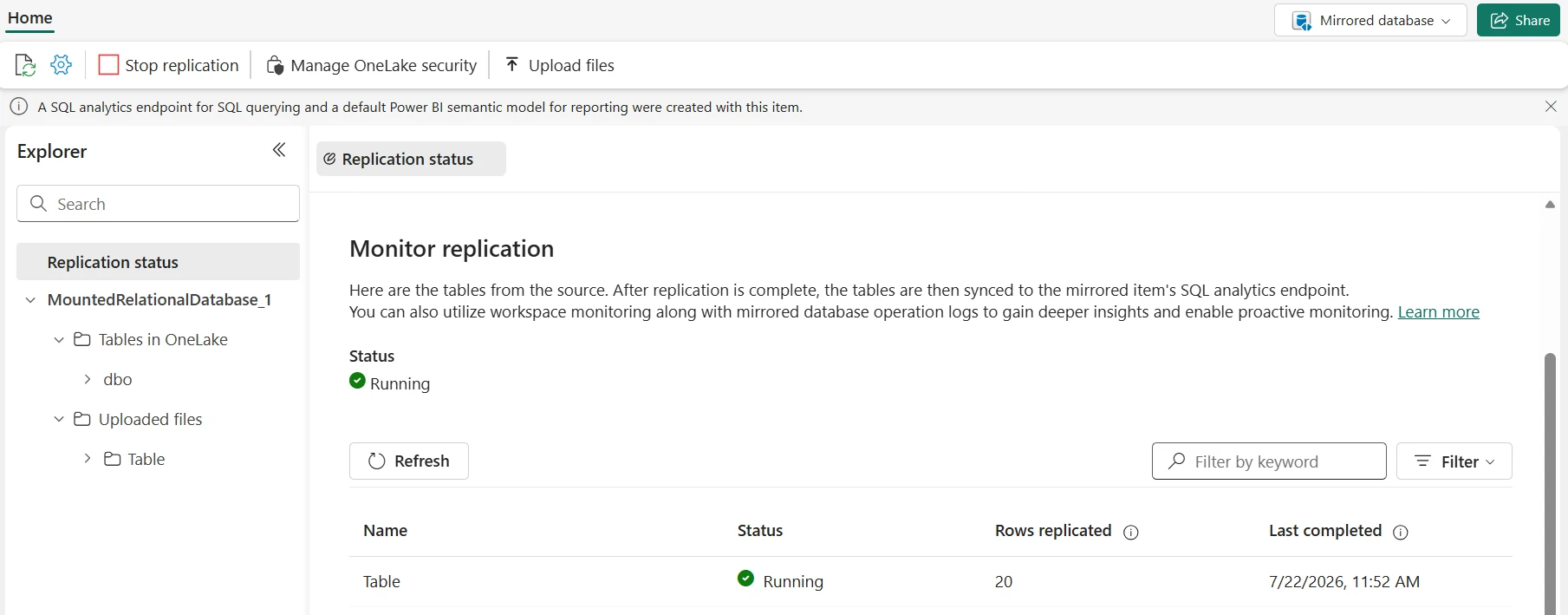
Monitoring via Fabric Monitor Hub
- Navigate to Workspace Settings → Mirroring → Monitor
- View per-table status, last snapshot date, and current CDC lag
- Set alerts for replication lag exceeding 5 minutes or failed CDC batches
- Export metrics to Power BI for trend analysis over time
Reconciliation Query
Common Issues & Fixes
Replication lag increases steadily
Scale Fabric capacity, check for source transaction log locks, reduce CDC batch size, or schedule snapshot reruns during off-peak hours.
Row counts don’t match after CDC catch-up
Check for duplicate key violations, deletes not being marked correctly, or filter conditions in mirroring config. Run the reconciliation query above to identify specific missing or duplicated rows.
Connector restarts frequently
Review error logs to distinguish transient network errors (safe to retry) from persistent connector failures. Add retry logic and increase timeout thresholds before escalating to Microsoft support.
Security, Governance & Lineage
Access Control (Least Privilege)
- Mirroring setup: Workspace admins or data engineers with explicit mirroring permissions only
- Raw mirrored tables: Restrict to data engineering — prevent direct analytics queries against landing data
- Curated tables: Analyst and BI team reader access to curated output only
- Credentials: Azure Key Vault service principals — never hardcode connection strings
- OneLake Data Access Roles: As of January 2026, apply table, row, and column-level security directly on mirrored item types at the OneLake layer
PII Masking in Transformation Notebooks
Data Catalog & Lineage
- Business Glossary: Tag mirrored columns with business terms in the Fabric Data Catalog
- Impact Analysis: Track which dashboards and notebooks consume each mirrored table
- Change Notifications: Alert downstream consumers when source schema changes are planned
- Quality Rules: Register freshness and completeness SLAs per table in the catalog
OneLake Security Roles — Key Benefit
With OneLake data access roles on mirrored items (January 2026), you can mirror data once and share it via OneLake shortcuts across teams — with fine-grained access controls enforced at the OneLake layer regardless of consumption method. This eliminates the need to create separate copies of data for different access levels.
Frequently Asked Questions
Official References & Related Guides
⚠️ Accuracy Disclaimer
This guide is verified against Microsoft Learn — Mirroring Overview, the Extended Capabilities announcement, and the June 2026 Feature Summary at time of writing. Supported source lists, capacity requirements, and feature availability change quarterly. Always verify against official documentation before production deployment. UIG Data Lab is an independent publication, not affiliated with or endorsed by Microsoft Corporation.




