Eventstream in Fabric: Complete 2026 Production Guide
Fabric Eventstream captures, transforms, and routes real-time events from sources like Event Hubs, Kafka, MQTT brokers, and databases into Eventhouse, Lakehouse, and custom destinations. This guide covers every capability including Q1 2026 DeltaFlow, VNet connectivity, Anomaly Detection sources, and the June 2026 Mirrored Change Feed connector — verified against Microsoft Learn.
Eventstream in Microsoft Fabric is a no-code, fully managed real-time data ingestion and transformation service. It captures events from Azure Event Hubs, Kafka, IoT Hub, MQTT brokers, HTTP endpoints, and databases via DeltaFlow, applies transformations such as filtering, aggregation, and temporal windowing, then routes results to Eventhouse (KQL), Lakehouse (Delta), Service Bus, and custom endpoints. All infrastructure scales automatically. Eventstream is part of Fabric’s Real-Time Intelligence workload.
What Is Eventstream in Fabric?
Eventstream sits within Fabric’s Real-Time Intelligence workload alongside Eventhouse and Real-Time Hub. Its job is simple: take events arriving continuously from external systems, apply whatever transformation logic you need, and deliver results to Fabric destinations or external consumers — all without managing infrastructure.
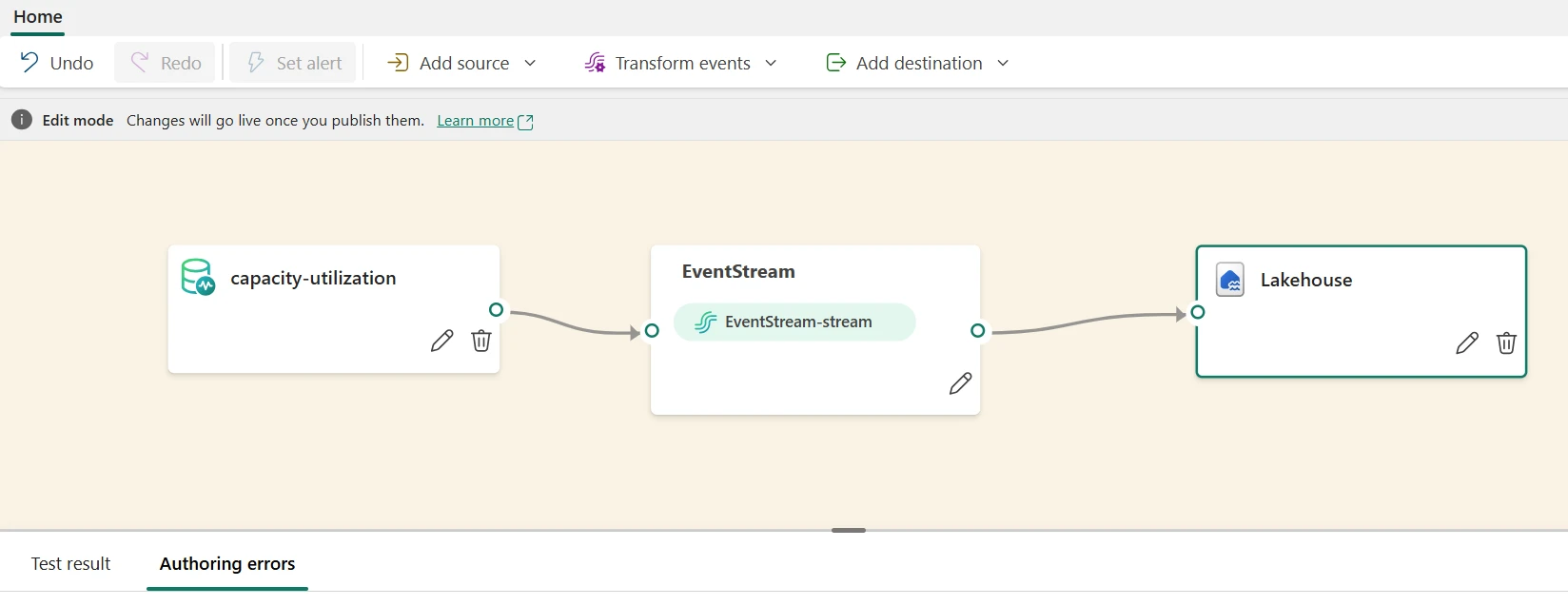
Every Eventstream is a visual pipeline. Sources connect on the left, transformations sit in the middle, destinations connect on the right. The pipeline runs continuously as a managed service. You never provision servers, configure autoscaling, or manage partition assignments manually.
No-Code Visual Editor
Drag-and-drop pipeline builder. Connect sources, chain transformation operators, route to multiple destinations — without writing code.
Fully Managed Infrastructure
Microsoft manages autoscaling, fault tolerance, and partition management. You define the logic; Fabric runs it.
Multiple Source Types
Azure Event Hubs, Kafka, IoT Hub, MQTT brokers, HTTP endpoints, Azure SQL and PostgreSQL via DeltaFlow, Anomaly Detection signals, and Mirrored Database Change Feeds.
Multi-Destination Routing
Route processed events simultaneously to Eventhouse (KQL), Lakehouse (Delta), Event Hub, Service Bus, Derived Streams, and custom HTTP endpoints.
Real-Time Hub — The Control Plane
Real-Time Hub is the centralized discovery and management experience for all streaming artifacts across your Fabric workspace. Find Eventstreams, connect sources, monitor health, and discover CDF-enabled mirrored databases — all from one place.
Pipeline Architecture
Advertisements
Every Eventstream follows the same three-stage pattern. Understanding it prevents the most common design mistakes.
The most common architecture mistake is running all transformations before writing to Eventhouse when Direct Ingestion is the better choice. If your downstream analytics are KQL queries, land raw events via Direct Ingestion and apply filtering and aggregation at query time. Save Event Processing for scenarios where you need to reduce data volume before storage or enrich events with reference data.
Direct Ingestion vs Event Processing
This is the most important decision in any Eventstream design. Getting it wrong affects both latency and your monthly CU bill.
| Factor | Direct Ingestion | Event Processing |
|---|---|---|
| What it does | Streams raw events straight to Eventhouse KQL database | Applies transformations before data lands in destination |
| Latency | Lowest — no transformation overhead | Higher — transformation adds processing time |
| CU cost | Lower — bypasses transformation compute | Higher — transformation units billed |
| Data stored | Raw unprocessed events | Filtered or aggregated records |
| Analytics approach | Query with KQL post-ingestion | Data arrives pre-processed |
| Best for | Archive all events, compliance, low latency KQL dashboards | Reduce storage volume, enrich records, content-based routing |
Default Recommendation
Start with Direct Ingestion to Eventhouse. KQL handles filtering, aggregation, and enrichment at query time — and you preserve all raw event data for future analysis. Switch to Event Processing only when you have a specific reason: volume reduction before storage, or enrichment that can’t be done in KQL.
Sources — Including All 2026 Additions
Existing Core Sources
- Azure Event Hubs — managed event streaming at scale; handles millions of events per second. The most common source for high-throughput cloud-native workloads.
- Apache Kafka — on-premises or cloud Kafka clusters (Amazon MSK, Confluent Cloud). Schema Registry support added Q1 2026 for Kafka-based sources.
- Azure IoT Hub — device-to-cloud messaging with device management. Use for IoT solutions with thousands of registered devices.
- HTTP Custom Endpoint — receive events via webhook. Use for SaaS platforms, mobile apps, and third-party systems pushing data.
- Azure Service Bus — enterprise message bus; use where guaranteed delivery and ordering matter more than throughput.
2026 New Sources
| Source | Status | What It Does |
|---|---|---|
| DeltaFlow | Preview — Q1 2026 | Streams CDC events (inserts, updates, deletes) directly from Azure SQL and PostgreSQL, among other supported database sources, into Eventstreams. Eliminates custom CDC polling logic. |
| MQTT v3.1 / v3.1.1 | GA — Jan 2026 | Expanded MQTT ingestion compatibility. Onboard existing IoT device fleets without protocol upgrades or custom shims. |
| Anomaly Detection | Q1 2026 | Detection signals from Eventhouse Anomaly Detection become first-class streaming inputs — enabling enrichment, routing, and Activator automation. |
| Mirrored Database Change Feed | June 2026 | Streams row-level changes from Fabric Mirrored databases (requires Extended Capabilities / Delta CDF) directly into Eventstreams. Discover in Real-Time Hub. No code required. |
| VNet / Private Network Sources | Q1 2026 | Sources in private networks (VPN, ExpressRoute, private endpoints, peering) now reachable via Azure Managed VNet bridge with streaming VNet data gateway. |
VNet / Private Network Connectivity
As of Q1 2026, Eventstream supports streaming from sources in private network environments. Use an Azure Managed Virtual Network as an intermediary bridge — connected via VPN, ExpressRoute, peering, or private endpoints — with Eventstream connectors injected into that virtual network. A streaming VNet data gateway experience in Fabric manages these resources. This enables regulated-industry deployments where sources must stay behind private links.
Transformation Operators
Six core transformation types are available. Chaining them builds complex processing logic without writing code. Each operator in the pipeline connects to the next — the output of one becomes the input of the next.
| Operator | What It Does | Example |
|---|---|---|
| Filter | Select events matching conditions (WHERE clause logic) | Keep only transactions over $100, or errors from production environments |
| Aggregate | Compute SUM, AVG, COUNT, MIN, MAX across time windows | Per-minute order totals or hourly active user counts |
| Group By | Segment events by dimension, combined with temporal windows | Revenue by region per 5-minute tumbling window |
| Join | Enrich event streams with reference data from lookup streams | Add customer tier from a reference stream to transaction events |
| Manage Fields | Rename, type-cast, or compute new columns | Rename OrderID to order_id, cast price string to decimal, add derived margin field |
| Convert | Transform data between formats and representations | Convert event payload types for different sink schema requirements |
Real-World Transformation Chain Example
Destinations
Advertisements
| Destination | Best For | Latency | Notes |
|---|---|---|---|
| Eventhouse (KQL database) | Real-time dashboards, alerting, time-series analytics | Sub-second | Supports both Direct Ingestion and processed events. Primary destination for Real-Time Intelligence. |
| Lakehouse (Delta tables) | Event archival, batch analytics, compliance | Seconds–minutes | Data lands in OneLake as Delta Parquet. Queryable by Spark, SQL Warehouse, Power BI. |
| Event Hub (output) | Fan-out to multiple downstream subscribers | Sub-second | Use when multiple consumers need the same processed stream. |
| Service Bus | Guaranteed delivery, ordered messaging | Milliseconds | Use where message ordering and at-least-once delivery guarantees are required. |
| Derived Stream | Branch for reuse and chaining | Near-zero overhead | Allows one raw stream to feed multiple downstream Eventstreams without duplicating source connections. |
| Custom Endpoint | External systems, third-party integrations | Variable | HTTP, Kafka, AMQP. Use for legacy systems or external consumers outside Fabric. |
Routing to Both Eventhouse and Lakehouse
A common production pattern routes the same events to both Eventhouse (for real-time KQL queries) and Lakehouse (for batch historical analysis). This is fully supported — a single Eventstream can write to multiple destinations simultaneously. Design the fanout in the pipeline, not upstream.
Temporal Windowing & Aggregations
Windowing enables time-based aggregations on continuous streams. Every aggregation in Eventstream requires a window type. Choosing the wrong one produces misleading metrics.
| Window Type | How It Works | Best For |
|---|---|---|
| Tumbling | Non-overlapping fixed intervals. Each event belongs to exactly one window. No overlap between consecutive windows. | Per-minute order counts, hourly revenue totals. Any metric where you need clean, non-overlapping time buckets. |
| Hopping | Overlapping fixed intervals. Window size is larger than the hop interval, so events appear in multiple windows. | Moving averages, trend detection. Smoothed metrics where you want overlap between adjacent windows. |
| Session | Dynamic duration based on gaps between events. Consecutive events close in time group into one session; gaps trigger a new window. | User session tracking, IoT device active periods, any scenario where activity gaps define a natural grouping boundary. |
| Sliding | Continuously advancing fixed-duration window. Every new event creates a new window instance. | Real-time anomaly detection, threshold monitoring where you need the most precise, continuous view. |
Design Patterns & Production Recipes
Pattern 1: Lambda Architecture — Speed + Batch Layers
For organizations that need both immediate metrics and deep historical analysis, route the same events to both Eventhouse and Lakehouse simultaneously.
Pattern 2: Fanout — Content-Based Routing
Route events to different destinations based on content. One source, multiple consumers, each receiving only the events relevant to them.
Pattern 3: DeltaFlow CDC — Operational Database to Analytics
Use DeltaFlow (Q1 2026) to replace a batch extract job with a continuous CDC stream from Azure SQL or PostgreSQL. No custom CDC code. No polling interval. Changes land in Eventhouse within seconds of the source transaction committing.
DeltaFlow changes the economics of operational analytics. The old pattern was: database → scheduled copy job (30-60 min delay) → warehouse → BI. With DeltaFlow, the delay drops to seconds. The first question to ask before using it: does your Azure SQL source have Change Tracking or CDC enabled? DeltaFlow requires one of these to be active on the source tables you want to stream.
Pattern 4: Mirrored Database Change Feed (June 2026)
If your data is already being mirrored into Fabric via Mirroring with Extended Capabilities (Delta CDF enabled), you can now stream those row-level change records directly into Eventstreams without writing a single line of code.
Monitoring, Performance & Security
Key Metrics to Monitor
| Metric | Healthy Range | Action if Breached |
|---|---|---|
| End-to-end latency | < 5 seconds (typical), sub-second for Direct Ingestion | Check transformation complexity; reduce operator chain or switch to Direct Ingestion |
| Event throughput | Matches source rate with < 1% drop | Check Eventhouse ingestion capacity; scale F-SKU if needed |
| Error rate | 0% (schema mismatch or serialization errors) | Review source schema; add schema validation at ingestion |
| Pending events (queue depth) | Near zero or steadily draining | Growing queue = destination can’t keep up; scale Eventhouse or simplify transformations |
| CU consumption | < 80% sustained | Reduce transformation complexity; use Direct Ingestion; filter events earlier in pipeline |
Performance Optimization
- Filter early: Remove unwanted events as close to the source as possible. Every event that passes through unused transformation operators costs CUs.
- Aggregate before storing: Pre-aggregating in Eventstream can reduce destination write volume by 100x compared to writing raw events.
- Use Derived Streams for reuse: One shared stream feeds multiple downstream Eventstreams — avoids duplicating source connections and reduces overhead.
- Event Hub partitioning: Partition source events by a high-cardinality key (customer ID, device ID). Eventstream processes partitions in parallel.
- Batch windows: Even small aggregation windows (1 minute) dramatically reduce write volume to Lakehouse destinations.
Security Best Practices
- Managed Identity: Use Managed Identity for Eventstream-to-Eventhouse and Eventstream-to-Lakehouse connections. No credential management or rotation required.
- PII masking: Use the Manage Fields operator to hash or mask sensitive columns before they land in any destination.
- Workspace roles: Assign Contributor access only to data engineers who need to modify Eventstreams. Analysts should have Reader access to destinations only.
- Private network sources: For regulated industries, use the VNet managed bridge (Q1 2026) to keep source connections off the public internet entirely.
- TLS in transit: All Eventstream connections use TLS encryption in transit. Lakehouse and Eventhouse storage is encrypted at rest automatically.
Deduplication
Eventstream provides at-least-once delivery — duplicates can occur, especially during connector restarts or network events. For Eventhouse destinations, use KQL’s arg_max() function to deduplicate at query time by event ID, or use ingest_if_not_exists tags during ingestion to prevent duplicate rows from landing.
Frequently Asked Questions
arg_max() function by event ID, or use ingest_if_not_exists tags at ingestion. For Lakehouse destinations, apply deduplication logic in a downstream notebook or Dataflow Gen2 using a Delta MERGE on the event ID column.Official References & Related Guides
⚠️ Accuracy Disclaimer
This guide is verified against Microsoft Learn — Eventstream Overview, the 2026 Q1 Eventstream update blog, and the June 2026 Feature Summary. Feature preview status, supported sources, and connector capabilities change frequently. Always verify against official documentation before production deployment. UIG Data Lab is an independent publication, not affiliated with or endorsed by Microsoft Corporation.




