Materialized Lake Views: Critical Fabric Medallion Guide
Materialized Lake Views turn bronze-to-silver-to-gold pipelines into declarative SQL statements instead of hand-built Spark jobs — with Fabric handling refresh strategy, dependency ordering, and data quality enforcement for you. GA since March 2026, now with Analytics & Insights dashboards and preview Event-Driven Refresh. Here’s the full syntax, refresh mechanics, and where MLVs stop being the right tool.
A materialized lake view (MLV) in Microsoft Fabric is a persisted, automatically refreshed view defined in Spark SQL or PySpark. You write a SELECT statement describing a transformation — a join, an aggregation, a cleaned dataset — and Fabric stores the result as a Delta table, tracks dependencies between views, chooses the optimal refresh strategy, and enforces data quality constraints on every run. Once created, an MLV is queried like any other Lakehouse table by any Fabric engine. Generally available since March 2026.
What Materialized Lake Views Actually Replace
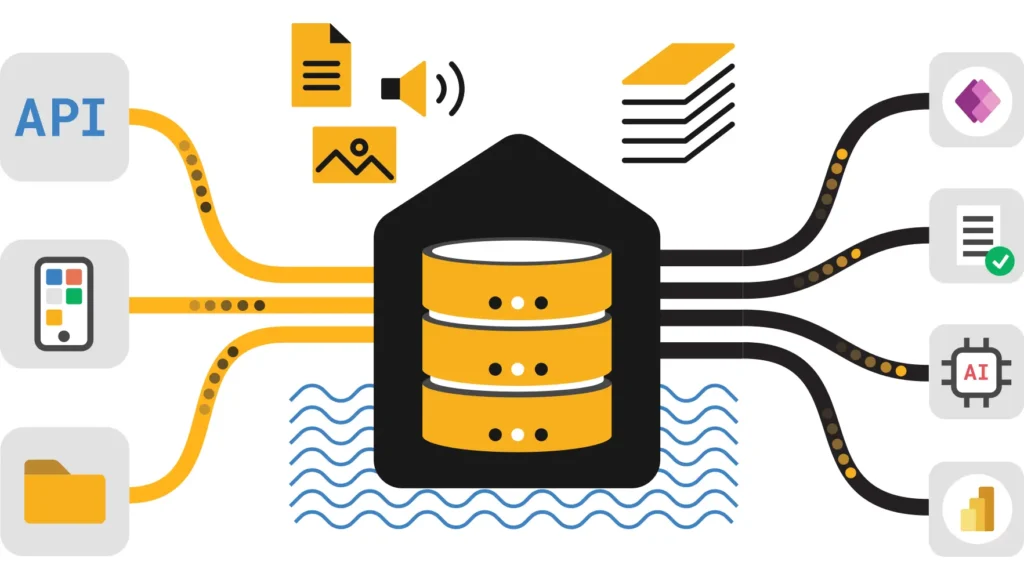
Before MLVs, a bronze-to-silver-to-gold medallion pipeline meant a chain of notebooks: one to clean bronze data, another to join and enrich it into silver, another to aggregate into gold — each one scheduled separately, each one responsible for figuring out what changed since last run. Materialized Lake Views collapse that into declarative SQL: you describe the end state with a SELECT statement, and Fabric works out execution, storage, and refresh.
Declarative, Not Imperative
You write what you want the data to look like — Fabric determines how to get there and keep it current, rather than you scripting each step.
Persisted as Delta
The result materializes as a real Delta table in your Lakehouse — queryable by any Fabric engine with the same security and governance as any other table.
Dependency-Aware
Fabric automatically detects when one MLV depends on another and orchestrates refresh order so downstream views never read stale upstream data.
Smart Refresh by Default
Every refresh picks incremental, full, or skip automatically based on what actually changed — you don’t write that logic yourself.
The Four-Stage Lifecycle
- CreateWrite a SQL query defining the transformation. Fabric stores the definition and materializes the initial result as a Delta table.
- RefreshWhen source data changes, Fabric determines the optimal strategy — incremental, full, or skip — based on Change Data Feed.
- QueryApplications and reports read the materialized result directly. They have no awareness of the underlying transformation logic.
- MonitorRefresh history, execution status, data quality metrics, and dependency lineage are tracked through built-in Fabric tools.
When to Use an MLV — and When Not To
✅ Good Fit
- Frequently accessed aggregations (daily sales totals, monthly metrics)
- Complex joins across large tables queried often, needing consistent results for all consumers
- Data quality transformations that must apply uniformly, defined declaratively
- Reporting datasets combining multiple sources that benefit from automatic refresh
- Medallion architecture — bronze → silver → gold defined in SQL
❌ Wrong Tool
- One-time or rarely accessed queries that don’t benefit from precomputed results
- Non-SQL logic — ML inference, API calls, complex Python processing (use Spark notebooks)
- High-frequency streaming data needing subsecond updates (use Real-Time Intelligence instead)
Regional and Source Limitations
MLVs aren’t currently available in the South Central US region. They also don’t natively support mirrored databases — the practitioner workaround is a OneLake shortcut from the mirrored database into a Lakehouse, then defining the MLV on the shortcut tables. Lineage for shortcut-based sources doesn’t currently appear in the MLV lineage view.
Spark SQL Syntax
You can define an MLV from any table or from another MLV within the same lakehouse, using either SQL authoring directly in the lakehouse editor, or PySpark authoring from a notebook (currently in preview, full refresh only).
Real Example — Silver Layer With a Quality Constraint
| Command | Purpose |
|---|---|
SHOW MATERIALIZED LAKE VIEWS IN schema; | List all MLVs in a schema |
SHOW CREATE MATERIALIZED LAKE VIEW name; | Retrieve the statement that created an MLV |
ALTER MATERIALIZED LAKE VIEW old RENAME TO new; | Rename — the only supported ALTER operation |
DROP MATERIALIZED LAKE VIEW name; | Delete an MLV (also breaks dependent lineage) |
REFRESH MATERIALIZED LAKE VIEW name FULL; | Force a full refresh, e.g. for troubleshooting |
To modify an MLV’s SELECT query, constraints, or partitioning, there’s no ALTER path — use CREATE OR REPLACE. The rename command is the one exception, and it’s rename-only; everything else about the definition requires a full replace.
How Refresh Actually Decides What to Do
Fabric’s decision engine picks the cheapest correct refresh strategy on every run, using Delta Lake Change Data Feed (CDF) to detect what changed at the source.
Incremental Refresh
Processes only new or changed data. Supports aggregations with GROUP BY, left outer and semi joins, and common table expressions (CTEs).
Full Refresh
Rebuilds the entire MLV. Automatic fallback when the query uses constructs incremental refresh doesn’t support, such as window functions.
Skip Refresh
No refresh runs at all when source data hasn’t changed since the last successful run — saving compute for idle periods.
CDF Has to Be Enabled to Get Incremental Refresh
Without Change Data Feed enabled on source tables, optimal refresh can only choose between no refresh and full refresh — incremental isn’t available. Fabric surfaces a banner in the lineage view, recent-runs detail, and individual node level listing MLVs that are eligible for incremental refresh but blocked because CDF isn’t enabled. Select Activate CDF in that banner to fix it in one step — it has no measurable storage or performance cost for append-only workloads.
Using an unsupported construct (window functions, non-deterministic functions) doesn’t break your MLV — Fabric just falls back to full refresh instead of failing. You don’t need to force this manually; it’s automatic.
Built-In Data Quality Constraints
Constraints are defined directly in the CREATE statement and enforced on every refresh — no separate validation job required.
| ON MISMATCH Action | Behavior |
|---|---|
DROP | Silently removes the violating row from the materialized result |
FAIL | Stops the refresh entirely with an error — this is the default if omitted |
Constraints Only Run at Refresh Time
Constraints are enforced during refresh, not on every query. Fabric materializes the result of the SELECT once and serves that stored result — it doesn’t re-validate rows on each read.
Analytics & Insights, and Event-Driven Refresh
Analytics & Insights (GA, July 2026)
Two new tabs sit beside Recent Runs in the MLV monitoring view. Where Recent Runs tells you what happened in a single execution — which views succeeded, which failed, how long the job took — Analytics & Insights answers the questions that matter across your whole estate over time: are durations climbing? Is a new error class spreading across views? The Analytics tab turns run history into trend lines, distributions, and comparisons — duration trajectories, success-rate shifts, error-class frequency over time — readable at a glance.
Event-Driven Refresh (Preview, July 2026)
A new scheduling mode alongside time-based schedules. Time-based schedules are dependable when upstream data lands like clockwork — every hour, every morning — but they can’t answer the operational question that actually matters: is my data fresh right now? Event-driven refresh triggers the moment upstream data is actually ready, instead of on an arbitrary calendar interval.
Combined With Multi-Schedule Support
Together, multi-schedule support and event-driven refresh move refresh management from a fixed-clock, guess-the-cadence posture to a responsive, data-driven one — keeping MLVs fresh the instant new data arrives, and idle when it hasn’t, as your estate of views grows.
Dependency Management & Orchestration
When one MLV’s SELECT statement references another MLV or table, Fabric automatically detects that relationship and manages execution order — you don’t build an orchestration DAG by hand.
Manage Refresh From the Lakehouse, Not From a Notebook
- Lineage: open the Materialized Lake Views tab in the ribbon, select Manage, and Fabric derives dependency order automatically from your view definitions — follow runs in progress, inspect upstream and downstream dependencies for each view.
- Scheduled refresh: from the same Manage view, create one or more schedules for all MLVs or a selected subset. Each schedule refreshes views in dependency order, so downstream views always read fresh upstream data. Fabric retries transient failures for you.
For pipeline orchestration outside the built-in scheduler, the Refresh Materialized Lake View activity is also available in Fabric Data Factory pipelines — useful for chaining a refresh after a Copy activity or upstream notebook run. As of this writing, that activity doesn’t support service principal or workspace identity authentication.
The clear practitioner guidance from Microsoft here is worth taking literally: use notebooks to author and iterate on MLV definitions, then let the built-in lineage and scheduled refresh handle ordering, execution, and retries. Building your own orchestration notebook to poll and refresh MLVs in sequence — a common pattern before this matured — bypasses dependency management and centralized error reporting that the platform already gives you for free.
Current Limitations
| Limitation | Detail |
|---|---|
| No DML statements | INSERT, UPDATE, DELETE aren’t supported — data is populated only by the defining SELECT |
| No time-travel queries | The defining query can’t use Delta Lake time travel syntax (VERSION AS OF, TIMESTAMP AS OF) |
| No user-defined functions | UDFs aren’t supported in the SELECT that defines an MLV |
| No temporary views as sources | You can reference tables and other MLVs, but not temp views |
| All-uppercase schema names unsupported | Use mixed case or lowercase schema names |
| Session-level Spark config ignored on schedule | spark.conf.set(...) at session level doesn’t apply during a scheduled refresh — set at lakehouse or workspace level instead |
| PySpark authoring is full-refresh only | Preview status; optimal (incremental) refresh support for PySpark-authored MLVs is planned but not yet available |
| Not available in South Central US | Regional availability gap as of this writing |
Frequently Asked Questions
Official References & Related Guides
⚠️ Accuracy Disclaimer
This guide is verified against Microsoft Learn — Overview of Materialized Lake Views, the Spark SQL Reference, and the July 2026 Feature Summary at time of writing. Feature availability, refresh behavior, and regional support change frequently. Always verify against official documentation before production deployment. UIG Data Lab is an independent publication, not affiliated with or endorsed by Microsoft Corporation.