Microsoft Fabric Data Governance Tutorial — 2026 Guide
OneLake catalog Explore, Govern, and Secure model — updated for the January 2026 Purview Hub retirement, June 2026 Outbound Access Protection GA, OneSecurity, DLP for structured data, GitHub Enterprise data residency, and the repeatable governance routine that keeps OneLake out of a data swamp.
Microsoft Fabric governance runs through three built-in mechanisms: the OneLake catalog (Explore, Govern, Secure tabs — your single governance cockpit), Domains (federate ownership to business units), and Microsoft Purview (cross-platform classification, DLP, lineage, and audit). The Purview Hub inside Fabric was retired in January 2026 — all security insights moved permanently to the Govern tab in the OneLake catalog. You do not need Purview to govern Fabric — the OneLake catalog Govern tab works natively. Purview extends governance to the wider data estate when compliance requirements demand it.
Why Fabric Governance Matters More in 2026
Fabric makes it easy to create Lakehouses, Warehouses, Dataflows, Eventstreams, and Mirrored databases. That same ease is what turns OneLake into a data swamp within months if governance is not built in from the start. Every extra Lakehouse consumes storage. Every duplicate dataset wastes capacity. Every undocumented table is a liability for the AI agents and Copilot experiences now reading OneLake data directly.
The cost of ungoverned data has become concrete. The average cost of a data breach neared $10 million in 2025 according to IBM research cited by Microsoft. An AI agent that reads the wrong table produces confident but wrong answers. Power BI Copilot is only as reliable as the data model it reads. Governance in 2026 is simultaneously a cost control lever, a security requirement, and a prerequisite for any AI experience grounded in enterprise data.
The Microsoft Purview Hub that previously appeared in the Fabric navigation was retired by end of January 2026. All security insights, sensitivity label coverage reports, and DLP policy status reports that lived in the Purview Hub have moved permanently to the Govern tab inside the OneLake catalog. If you are still using Purview Hub documentation from 2024 or early 2025, the navigation paths are no longer accurate. Source: Microsoft Fabric blog, January 2026.
OneLake Catalog — The Governance Cockpit
Advertisements
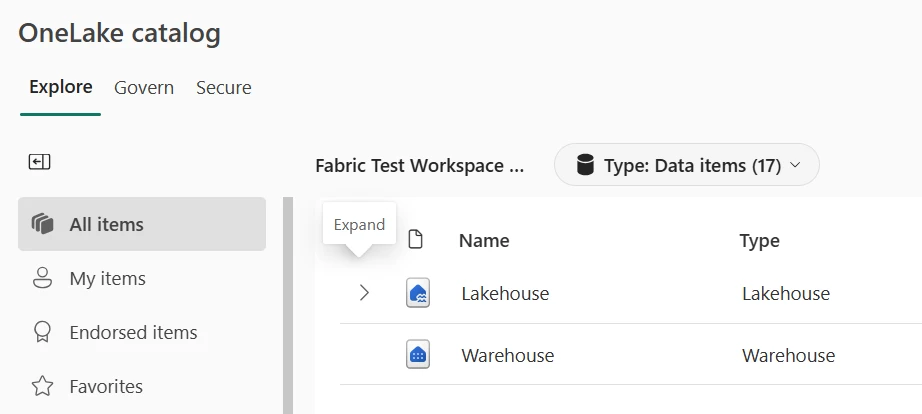
The OneLake catalog is the single entry point for all governance work in Microsoft Fabric. It is accessible from the Fabric navigation bar and presents the entire data estate across three experiences: Explore, Govern, and Secure. Each experience serves a different governance role, and together they replace the fragmented combination of workspace views, Purview Hub reports, and admin portal screens that existed before.
Explore
Find what exists. Filter by domain, item type, workspace, endorsement, sensitivity label, and tags. Shows only items you have permission to access — with one exception: semantic models explicitly marked as discoverable appear even without access, allowing users to request access through the standard approval process.
Govern
Understand health. Surfaces governance posture metrics — items without descriptions, stale datasets, endorsement coverage, sensitivity label coverage, DLP policy status. For Fabric admins, the full Admin Report spans three tabs: estate inventory, capacity and domain details, and the Protect/Secure/Comply view. Refreshes automatically every time you open the tab.
Secure
Control access. Shows which users and groups have which roles across workspaces and items. Operational control centre for day-to-day access management — assign roles, apply labels, manage OneLake security. Replaces the need to check each workspace individually for permissions.
Admin-level governance insights in the Govern tab are driven by Admin Monitoring Storage in the Admin Monitoring workspace and refresh daily. This means insights you see today reflect yesterday’s state — not real-time. When diagnosing an urgent access issue, use the Secure tab for current permissions. Use the Govern tab for trend analysis and governance posture tracking, not instant state.
The Explore tab has a permission scope limitation that surprises new Fabric administrators: it shows only what you can already access. If you are trying to understand the full data estate across all workspaces, you need Fabric Admin rights. A Workspace Member opening Explore sees only their workspaces, which creates a false picture of the estate — they may create a duplicate Lakehouse simply because the existing one is not visible to them. Domain owners need at least read access to all workspaces in their domain to use the catalog effectively for governance discovery.
Govern Tab — Discovering and Reducing Data Debt
Data debt is the accumulation of stale, undocumented, duplicate, or untrusted items that confuse users and drain capacity costs. The Govern tab makes that debt visible rather than requiring manual audit. The Admin Report inside Govern gives Fabric admins three tabs: Manage your data estate (inventory overview, capacities and domains, feature usage), Protect, secure and comply (sensitivity label coverage, DLP policy status and scan freshness), and the broader governance insights view available to all users for their own items.
Recommended Actions — Governance as a Backlog
Metrics without action steps are decoration. The Govern tab pairs each insight with Recommended Actions — concrete tasks such as “Add descriptions to these high-impact items”, “Review datasets that have not refreshed in 90 days”, or “Apply sensitivity labels to unlabeled items in this domain”. These recommendations become your governance backlog. Work through them highest-impact domain first: stale Lakehouses in production domains before experimental workspaces, sensitive unlabeled items before general tables.
As you complete recommended actions and return to the Govern tab, the posture metrics update. That feedback loop — act, refresh, see improvement — is what turns governance from a one-time audit into a recurring habit.
DLP Policy Status in Govern
The Protect, secure and comply tab in the Admin Report includes Data Loss Prevention (DLP) state: which workspaces and items have been evaluated by DLP policies, which are pending evaluation, and when the last DLP scan ran. This allows admins to identify gaps in DLP coverage — items that have not been scanned are potential sensitive data exposure risks. Drilling into DLP status shows a breakdown by item type and location, and whether sensitive information types (credit card numbers, social security numbers) were detected and what labels were applied.
- Sensitivity label coverage by workspace, domain, and item type
- DLP policy activation status and scan freshness
- Items scanned vs. items not yet evaluated by DLP
- Breakdown of data classified by sensitive information type
- Security posture view across the full tenant — previously only in Purview Hub
Secure Tab & OneSecurity — Access Control in Fabric
The Secure tab in the OneLake catalog is the operational access control view. It shows which users and groups hold which roles across workspaces and items from a single interface — no more opening each workspace individually to audit permissions. From here, admins can identify workspaces where old contractor accounts still hold Admin rights, domains where everyone is a Member with no Viewer-level segregation, or items with overly broad access that should be locked down to item-level permissions.
The Four Access Layers
| Layer | Mechanism | Scope | Where to Configure |
|---|---|---|---|
| Workspace RBAC | Admin, Member, Contributor, Viewer roles via Entra ID groups | All items in the workspace | Workspace Settings → Manage access |
| Item permissions | ReadAll, ReadData, Build permissions per specific item | One Lakehouse, Warehouse, or Report | Item → Share / Manage permissions |
| OneLake security (OneSecurity) Preview | Folder, table, row, and column access roles defined in OneLake directly | Enforced across all Fabric engines — Spark, SQL endpoint, Direct Lake, KQL | Lakehouse → OneLake data access roles |
| SQL RLS / Column masking | Row-level security and dynamic data masking in SQL analytics endpoint or semantic model | Specific tables or views | SQL analytics endpoint → Security |
OneLake data access roles (OneSecurity preview) are not compatible with Power BI Direct Lake semantic models on the same Lakehouse. Enabling OneSecurity on a Lakehouse causes Direct Lake models to fail with an access error and fall back to DirectQuery. This is documented as a known limitation as of June 2026. For Lakehouses serving Power BI Direct Lake models, manage RLS at the semantic model level — do not enable OneSecurity on those Lakehouses until Microsoft resolves this incompatibility. Source: Microsoft Learn — OneLake security.
The practical pattern that works in most Fabric tenants: keep workspace roles lean and mapped to actual teams (not individuals). Use item-level permissions for datasets that specific external teams or service accounts need to access without workspace membership. Use OneSecurity for Lakehouses where multiple Fabric engines need consistent row and column security — but only after validating that no Direct Lake semantic models are attached.
Microsoft Purview — When and How It Extends Fabric Governance
You do not need Purview to govern Fabric. The Govern tab, OneSecurity, sensitivity labels, and Domains work natively inside Fabric for Fabric-specific governance. Purview becomes necessary when your requirements extend beyond a single platform: when data flows through multiple services and you need lineage across all of them, when DLP policies must span Fabric, SharePoint, Exchange, and Teams simultaneously, or when regulatory compliance requires centralised audit across the entire Microsoft 365 estate.
What Purview Adds to Fabric Governance
Cross-Platform Lineage
Trace data from an upstream Oracle database through an ADLS Gen2 landing zone, into a Fabric Lakehouse, through Materialized Lake Views, into a semantic model, and on to a Power BI report — all in one lineage graph. Without Purview, Fabric lineage stops at the Fabric boundary.
Automatic Classification and Labeling
Purview scans Lakehouses and Warehouses for sensitive data and automatically applies sensitivity labels — PHI, PII, financial data — based on content patterns. Labels from Microsoft 365 Information Protection inherit automatically across Fabric items with no extra configuration.
DLP for Structured Fabric Data
Purview DLP policies detect uploads of sensitive data into OneLake-supported items — Lakehouses, Warehouses, KQL databases, SQL databases, and semantic models — and enforce access restrictions. Policies evaluate sensitivity labels and sensitive information types. Configured to generate policy tips for users and alerts for security admins. Workspace admins can be granted override permissions on specific policies.
Unified Audit Log
All Microsoft Fabric user activities are logged in the Microsoft Purview audit log — who queried which table, who changed workspace permissions, who ran a pipeline. This is the audit trail for compliance teams and security incident response.
The decision on whether to deploy Purview alongside Fabric comes down to one question: does your compliance obligation stop at the Fabric boundary, or does it span the entire Microsoft estate? For organisations subject to GDPR, HIPAA, or FedRAMP where auditors want to see complete data lineage from source system to report, Purview is not optional — it is the only way to produce that evidence without manually assembling it from multiple system logs. For smaller Fabric-only deployments where all data originates in Azure, the OneLake catalog Govern tab plus sensitivity labels is often sufficient to satisfy internal governance requirements without the operational overhead of a full Purview deployment.
Domains, Workspaces, and Ownership
Advertisements
Domains in Fabric are the mechanism for federating governance to business units. A Domain (Finance, Sales, HR, Security) groups workspaces that belong to the same business function and assigns domain-level owners who are accountable for governance within that boundary. Without Domains, governance responsibility defaults to central IT — and central IT cannot effectively own every piece of data across a large organisation.
Domain Design Principles
- Align Domains to real business functions, not org chart hierarchiesFinance, Sales, Supply Chain, and Customer Data are functional Domains. “EMEA” or “Division 3” are org structures that change — functional domains are more stable and easier to govern long-term.
- Assign domain owners who can make data decisionsDomain owners approve schema changes, decide which datasets become certified gold sources, and own the posture metrics shown in the Govern tab. They need both the Fabric permissions and the organisational authority to make those decisions.
- Use workspaces for team-level collaboration within a domainA Finance Domain might contain a Finance Engineering workspace (for ETL pipelines), a Finance Reporting workspace (for certified semantic models), and a Finance Experiments workspace (for ad-hoc analysis). Each has different RBAC, but all belong to the Finance Domain for governance visibility.
- Keep the number of workspaces per domain manageableMore than 15–20 workspaces in a single Domain usually indicates that either the Domain is too broad or teams are creating workspaces for individual projects rather than for long-lived data products. Workspace proliferation is the most common cause of OneLake data sprawl.
When a semantic model is marked as Discoverable in Fabric settings, it appears in the OneLake catalog Explore tab for all users in the tenant — even those without existing access to the workspace. Users see the model name, description, and endorsement status, and can request access through the standard approval process. This is the correct pattern for Gold-layer certified datasets that should be findable across the organisation: mark them as Discoverable, certify them, and let the catalog surface them to users who need them.
Medallion Architecture Governance Gates
The Medallion Architecture (Bronze, Silver, Gold) is the standard pattern for organising Lakehouse data in Fabric. Without defined governance gates between layers, data quality erodes silently — engineers bypass Silver, analysts query Bronze directly, and nobody is sure which Gold table is the actual source of truth. Governance gates make the rules explicit.
| Layer | Access Policy | What Must Be True Before Data Moves Forward | Security Applied |
|---|---|---|---|
| Bronze (Raw) | Data engineers only. No reporting on this layer. | Data lands in OneLake. Sensitivity labels applied at ingestion. Source lineage recorded in Purview or pipeline logs. | Workspace RBAC — Contributor restricted to engineering team. Sensitivity labels on known-sensitive source tables. |
| Silver (Refined) | Analytics engineers and data product teams. Read access for approved downstream consumers. | Schema validated. Deduplication applied. Business keys defined. SLA documented. Quality checks passing (via Data Activator alerts or notebook assertions). | Item-level permissions for downstream consumers. OneSecurity row-level filters where needed — verify Direct Lake compatibility first. |
| Gold (Curated) | Report consumers, AI agents, Power BI semantic models. | Dataset certified in OneLake catalog. Endorsed by domain owner. RLS defined. Semantic model tested. DLP scan completed and clean. | Certified endorsement visible in catalog. RLS at semantic model level for Direct Lake models. Discoverable semantic models for cross-domain reuse. |
OneLake Shortcuts keep Gold layers lean without data duplication. Rather than copying a Silver table into multiple domain Gold workspaces, you create a shortcut from each Gold workspace pointing to the single certified Silver table. There is one “truth” to certify, one quality check to maintain, and one DLP scan to manage — the shortcuts expose it to each consuming domain without creating copies.
June 2026 Governance Updates
The June 2026 release continued a pattern of consolidating governance controls inside the OneLake catalog and Fabric itself, reducing dependency on separate administrative portals. Key governance-relevant changes:
Outbound Access Protection — GA for All Data Factory Items
Workspace-level outbound access protection (OAP) now applies to all Data Factory items — Pipelines, Copy Jobs, and Dataflows. When OAP is enabled on a workspace, cross-workspace event consumption is blocked by default. Access is only granted through explicit data connection rules. This closes a pipeline-level exfiltration risk that existed when pipelines could call any external endpoint. Source: June 2026 Feature Summary.
GitHub Enterprise Cloud with Data Residency — GA
Fabric Git integration now supports ghe.com Enterprise Cloud instances with data residency requirements. Notebooks, pipelines, semantic models, and other Fabric items version-controlled and stored within specific geographic boundaries for regulatory compliance. Source: June 2026 Feature Summary.
Data Agent Service Principal Authentication — Preview
Fabric Data Agents now authenticate via Entra ID service principals — no interactive sign-in required. All Data Agent queries run under the service principal identity, producing a clean audit trail in the Purview audit log. Rotation of credentials via Azure Key Vault. Relevant for compliance teams tracking which identity accessed which governed data source. Source: June 2026 Feature Summary.
OneLake Storage Tiers with Lifecycle Management — Preview
Hot, Cool, and Cold tiers with automatic lifecycle management policies. Governance-relevant: compliance archives that must be retained for years but rarely accessed move to Cold tier automatically, reducing storage cost without deleting data. Configure in Workspace Settings → OneLake → Lifecycle Management. Exclude _delta_log/ directories from any cooling rule.
Data Warehouse Monitor — Preview
Extends observability to SQL Warehouse operations, adding query performance tracking alongside pipeline run data in a unified monitoring view. Governance-relevant: trace which queries are consuming capacity, who is running them, and whether they are accessing governed Gold-layer tables or bypassing them to hit Silver directly.
Customer-Managed Keys — Key Vault Behind Firewall — Preview
Customer-managed encryption keys for OneLake now support Azure Key Vaults deployed behind a firewall. Previously, customer-managed key vaults had to be publicly accessible. This unblocks regulated industries that require CMK encryption with private networking for the key vault.
The Repeatable Governance Routine
Governance is not a project that ends. It is a recurring set of checks that keeps the estate healthy. The schedule below is a starting point — adjust the frequency based on how fast your Fabric estate grows and the sensitivity of the data it holds.
| Frequency | Task | Where | Goal |
|---|---|---|---|
| Daily | Review capacity metrics and bursting alerts. Check Data Factory pipeline failure alerts. | Capacity Metrics app, Monitor Hub | Cost control and performance reliability |
| Weekly | Work through Recommended Actions in Govern tab for highest-priority domains. Fix missing descriptions on high-impact items. | OneLake catalog → Govern tab | Discoverability and trust |
| Monthly | Audit workspace access via Secure tab. Remove stale Entra ID groups. Reduce overly broad Admin roles to Member or Contributor. Check DLP scan coverage for gaps. | OneLake catalog → Secure tab, Govern tab → Protect/Secure/Comply | Security hardening and compliance posture |
| Quarterly | Purge or archive Lakehouses with no refresh in 180+ days. Review domain ownership — are the right people still owners? Check OneLake storage tier costs via item-size reporting. | OneLake catalog → Govern tab, OneLake item-size reporting (Preview) | Waste elimination and cost control |
| Quarterly | Hold a governance review with domain owners. Show Govern tab posture by domain. Agree on which datasets get promoted to Certified this quarter. | OneLake catalog → Govern tab (domain filter) | Domain accountability and data product maturity |
End-to-End Cleanup — Sales Domain Example
Concrete scenario: you own governance for the Sales domain. Over the past 18 months, multiple teams created experimental Lakehouses, half-migrated Warehouses from Synapse, and ad-hoc semantic models. People do not know which Sales dataset to trust. Leadership wants one certified Sales data product before the next quarterly report.
- Open OneLake catalog, scope Govern insights to Sales domainFilter Govern tab by the Sales domain. Sort items by last refresh date and documentation quality score. Stale Lakehouses (no refresh in 90+ days) with no description become candidates for archival. High-usage but undocumented datasets get flagged immediately as risks.
- Work through Recommended Actions for Sales domainStart with “Items without description” for the most-used Sales tables. Add clear descriptions, apply tags (sales-transactions, customer-master, revenue-reporting), and note the business owner in the description field. This takes 2–4 hours for a typical Sales domain, not days.
- Identify the anchor Gold dataset and certify itPick the one Sales Gold table that should be the official source of truth. Verify schema, check for active DLP scan coverage, confirm RLS is applied, and ensure the Materialized Lake View refresh is scheduled and monitored. Then certify it in the OneLake catalog. Mark the semantic model built on it as Discoverable.
- Switch to Secure tab for Sales domainReview which Entra ID groups have Admin rights in Sales workspaces. Reduce to Member for teams that build, Contributor for service principals running pipelines, Viewer for report consumers. Identify and remove old contractor accounts.
- Coordinate with Purview team for the certified Gold datasetEnsure the Sales Gold dataset carries the correct sensitivity label (Internal or Confidential as appropriate). Verify it is included in DLP policy scope. Confirm it appears in Purview lineage if cross-platform tracing is required for compliance.
- Archive or delete the stale experimental LakehousesFor Lakehouses with no refresh in 180+ days and no active users, archive to Cold storage tier or delete after confirming with the domain owner. Removing noise from the estate is as important as certifying the good data.
The most common governance mistake in Fabric is trying to govern everything at once. Applying descriptions, tags, labels, and certifications across 400 items in a weekend produces inconsistent, low-quality metadata that is worse than none. The domain-by-domain approach — three or four weeks per domain, working through Recommended Actions methodically — produces governance that actually holds. Start with the domain that feeds the most important executive reports. Get that domain right. Then use it as the reference model for the next one.
Microsoft Fabric data governance tutorial – FAQ
Feature descriptions are based on official Microsoft Learn documentation and the Fabric June 2026 Feature Summary (published June 2, 2026). The Purview Hub retirement is confirmed as end of January 2026 in the official Microsoft Fabric blog. Preview features are subject to change. Verify current feature status at learn.microsoft.com/fabric/governance. UIG Data Lab is an independent publication, not affiliated with or endorsed by Microsoft Corporation.




