Medallion Architecture in Microsoft Fabric: Complete 2026 Implementation Guide
Medallion Architecture is Microsoft’s officially recommended design pattern for organizing data in OneLake. Most guides describe the three layer names and stop. This guide covers the actual implementation choices: which workspace pattern fits your team, which Fabric tools go in each layer, when to use Mirroring vs Pipelines for Bronze, when Materialized Lake Views replace pipeline code, and how Gold connects to Power BI via Direct Lake.
Medallion Architecture in Microsoft Fabric is the officially recommended design pattern for organizing data in OneLake across three progressive quality layers: Bronze (raw data stored exactly as it arrives — no changes), Silver (enriched data with errors fixed, formats standardized, duplicates removed), and Gold (curated data organized for reports, dashboards, and ML models). Microsoft recommends each layer in its own workspace for governance. All three layers store Delta tables in OneLake. (per Microsoft Learn — Implement Medallion Lakehouse Architecture)
Why Medallion Architecture is the Default Pattern for Microsoft Fabric
Before Medallion Architecture, the typical approach was: ingest data into one flat structure, run all transformations there, and let downstream consumers figure out what they need. That approach creates compounding problems at scale — schema changes break downstream queries, bad data propagates without detection, and nobody knows which version of a table to trust.
Medallion Architecture solves this by making data quality a first-class architectural property rather than an afterthought. Each layer has a contract. Bronze guarantees completeness — everything that arrived is there. Silver guarantees correctness — validated, deduplicated, schema-aligned records. Gold guarantees business usability — curated, aggregated, and structured for consumption.
Per Microsoft Learn, Medallion Architecture is the recommended design approach for Fabric because OneLake is the data lake for Fabric, and the pattern maps naturally onto the platform: raw data lands in Bronze Lakehouses, transformations happen in Silver via Spark or SQL, curated outputs land in Gold Lakehouses or a Data Warehouse, and Power BI connects to Gold via Direct Lake without duplicating data.
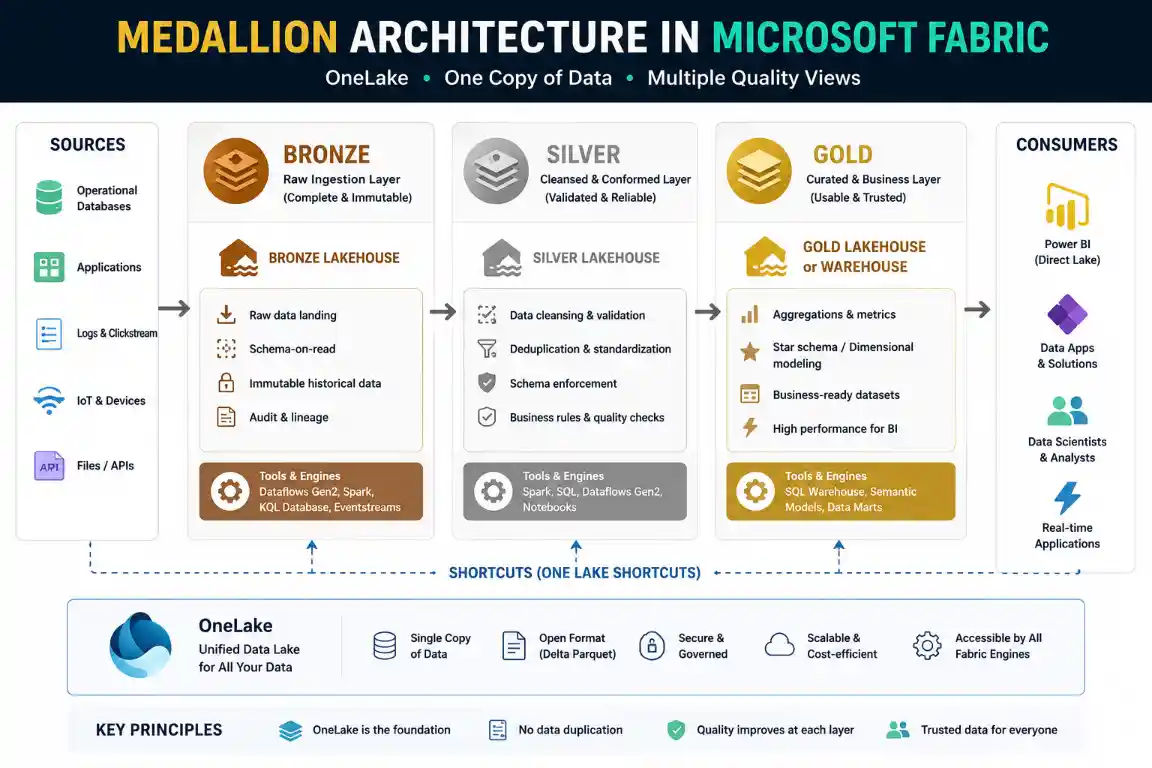
The Core Principle — One Copy of Data, Multiple Quality Views
OneLake is a single storage layer. Every Fabric engine — Spark, SQL Warehouse, Power BI Direct Lake, KQL — reads the same Delta files. Medallion Architecture doesn’t create data copies. It creates quality boundaries. The same bytes move from Bronze to Gold via transformation, not duplication. This is what makes it cost-efficient at scale.
Medallion Architecture also maps directly onto the DP-700 exam curriculum — Domain 2 (Ingest and Transform Data) explicitly tests knowledge of Bronze, Silver, and Gold layer design choices, which tools belong in each layer, and how OneLake Shortcuts connect layers across workspaces.
Three Workspace Patterns — Choose Based on Team Size and Governance Needs
The first real decision in Fabric Medallion Architecture is not which tools to use — it is how to organize workspaces. Microsoft provides three practical patterns, each suited to different organizational sizes and governance requirements.
Single Workspace, Three Lakehouses
One workspace hosts three separate Lakehouses — Bronze, Silver, Gold. Simplest to set up and manage. All workspace roles apply equally to all layers.
Best for: Small teams, MVPs, proof-of-concept deployments, organizations with fewer than 5 data engineers. Fast to build, easy to iterate.
Limitation: No access isolation between layers — if a user has Contributor access to the workspace, they can write to Bronze and Gold equally.
Three Workspaces, One Lakehouse Each
Each layer gets its own workspace — Bronze Workspace, Silver Workspace, Gold Workspace. Data moves between layers via OneLake Shortcuts or Deployment Pipelines.
Best for: Mid-to-large teams with separate ingestion, transformation, and analytics engineering roles. This is Microsoft’s recommended pattern per the official documentation.
Key benefit: Workspace-level role assignments per layer — data ingestion team has Contributor on Bronze only; business users have Viewer on Gold only; Gold is never directly writeable by analysts.
Bronze + Silver as Lakehouses, Gold as Data Warehouse
Bronze and Silver are Fabric Lakehouses. Gold is a Fabric Data Warehouse with T-SQL star schema, conformed dimensions, and enterprise measures.
Best for: Organizations where Power BI and SQL analytics are the primary consumption patterns. Business users query Gold via the Warehouse T-SQL endpoint. Power BI connects via Direct Lake or DirectQuery.
Trade-off: Higher engineering complexity in Gold (SQL DDL, distribution strategies) but maximum flexibility for BI workloads.
The single most common architecture mistake: choosing Pattern 1 for what turns out to be a Pattern 2 organization. A startup with 3 data engineers that grows to 15 — and now analysts have write access to Bronze because nobody changed the workspace roles. Build for the governance model you expect to need in 12 months, not the one you need today.
How OneLake Shortcuts Connect Layers Across Workspaces
In Pattern 2 and 3, data doesn’t move between workspaces as copies. Fabric uses OneLake Shortcuts — logical references that make Bronze Delta tables appear inside the Silver workspace without duplicating storage. The Silver Lakehouse reads directly from the Bronze Lakehouse’s physical storage location in OneLake. Zero extra storage cost, zero sync delay. See our Lakehouse Tutorial for Shortcut setup details.
OneLake Shortcuts — Trusted Workspace Access for Private ADLS
If your Bronze data lives in private Azure Data Lake Storage Gen2 (behind a VNet or private endpoint), Shortcuts require Trusted Workspace Access to be configured. Standard public ADLS Shortcuts work without additional configuration. This is a common DP-700 exam scenario: which access method is required when the ADLS account has public network access disabled?
Bronze Layer — Raw Data, Immutable, Complete
Layer Contract: Bronze
🥉 Everything that arrived. Nothing changed. Forever.
Bronze is your source of truth. Data lands exactly as it came from the source system — no type casting, no deduplication, no filtering. If the source sent bad data, Bronze stores bad data. That is intentional: Bronze gives you the ability to replay transformations if your Silver logic changes.
What you must add in Bronze: Audit metadata columns that don’t exist in the source.
- _ingestion_timestamp: When this record arrived in Fabric
- _source_system: Which source sent the data (useful in multi-source environments)
- _pipeline_run_id: Traceability back to the specific pipeline execution
- _source_file_path: For file-based ingestion — the exact file location in OneLake
Choosing Your Bronze Ingestion Tool
| Tool | Best For Bronze | Latency | Engineering Effort |
|---|---|---|---|
| Data Pipelines (Copy Activity) | Batch ingestion from any JDBC, REST API, file, or cloud storage source. Scheduled or triggered. | Minutes to hours (batch schedule) | Low — drag and drop in Data Factory UI |
| Data Mirroring | Operational databases (Azure SQL, PostgreSQL, MySQL, Snowflake, SAP, SharePoint). Zero-ETL CDC replication. | 30–90 seconds (continuous CDC) | Very low — configure source, select tables, start |
| Eventstream | High-volume real-time events — IoT sensors, clickstreams, application logs, Kafka topics. | Sub-second to seconds | Medium — configure source, routing, and destinations |
| OneLake Shortcuts | Data already in ADLS Gen2, AWS S3, or GCS that doesn’t need to move — just needs to be accessible in Fabric. | Zero — data stays in place | Very low — configure shortcut only |
For operational databases, Data Mirroring is the most efficient Bronze layer you can build — continuous CDC replication, zero custom pipeline code, and Delta tables land directly in OneLake. Each F-SKU includes 1 TB free mirroring storage per CU.
For the complete Lakehouse setup and Delta table creation, see our Fabric Lakehouse Tutorial. For Data Pipelines configuration, see our Data Pipelines Guide. For Eventstream sources, see our Eventstream Guide.
Silver Layer — Validated, Deduplicated, Schema-Aligned
Layer Contract: Silver
🥈 Trustworthy data. Domain-neutral. Production-quality records.
Silver applies all the data quality work that Bronze deliberately avoided. By the time a record leaves Silver, it has passed validation, been deduplicated, had its types cast correctly, and had its schema aligned across sources. Silver is domain-neutral — it doesn’t know about business logic. A customer is a row with validated columns. The business logic of what a “VIP customer” means happens in Gold.
- Remove duplicates: Use Delta MERGE or dedup logic on a natural key, not just row number
- Fix data types: Cast strings to dates, decimals, and integers where Bronze stored everything as strings
- Standardize formats: Country codes, phone numbers, currency, date formats — all normalized to one standard
- Handle nulls: Decide what null means for each column — fill with default, flag as invalid, or reject
- Validate ranges: A price column with a negative value or an age column with 200 should be flagged, not silently passed
Choosing Between Notebooks, Dataflow Gen2, and Materialized Lake Views for Silver
| Tool | When to Use for Silver | Skill Required | CU Cost Profile |
|---|---|---|---|
| Spark Notebooks (PySpark) | Complex transformations, ML feature engineering, large datasets (>1 TB), multi-source joins, custom deduplication logic | Python / PySpark | Medium — 1 CU = 2 Spark vCores, billed per session |
| Dataflow Gen2 | Structured relational data, Excel-style transformations, low-code teams, when Fast Copy is eligible | Power Query / M language | Low-Medium — CI/CD tiered: 12 CU/s first 10 min, 1.5 CU/s after |
| Materialized Lake Views | Declarative SQL-defined transformations with automatic refresh and dependency management | SQL | Automatically optimized — incremental or full refresh as needed |
For the full Spark Notebook transformation guide including session configuration and error handling, see our Notebooks Guide. For Dataflow Gen2 with Fast Copy and CI/CD tiered rates, see our Dataflow Gen2 Guide.
Silver Layer Quality Gate Pattern
Write rejected records to a quarantine table (silver_sales.customers_rejected) with a rejection reason column rather than dropping them silently. This gives your team a complete audit trail of every record that failed validation, enables root cause analysis, and allows manual review and reprocessing without going back to Bronze.
Gold Layer — Business-Curated, Consumption-Ready
Layer Contract: Gold
🥇 Business logic applied. Structured for consumers. Never edited by analysts.
Gold is where Silver data gets business meaning. A validated customer record from Silver becomes a dimension table in a star schema. Validated transactions become a fact table. Gold applies the business rules that Silver deliberately avoided: customer segments, product hierarchies, revenue attribution, fiscal year definitions.
Gold has two delivery mechanisms in Fabric, matching Pattern 2 and Pattern 3:
- Gold Lakehouse: Delta tables organized by subject area. Power BI connects via Direct Lake mode — no import refresh, near-instant report updates as data lands.
- Gold Data Warehouse: T-SQL star schema with conformed dimensions and enterprise measures. Power BI connects via DirectQuery or Direct Lake. Supports full T-SQL for business analyst self-service.
Gold as Fabric Data Warehouse — Star Schema Design
When Gold is a Fabric Data Warehouse (Pattern 3), the standard star schema pattern applies: fact tables hold measurable events, dimension tables hold descriptive context, and joins happen at query time via T-SQL. The Warehouse endpoint handles all the T-SQL serving — Power BI, Excel, and third-party BI tools all connect via the standard SQL endpoint.
Gold as Lakehouse + Power BI Direct Lake
When Gold is a Lakehouse (Pattern 2), Power BI connects via Direct Lake mode — the fastest possible connection. The semantic model reads Delta files directly from OneLake without importing data or running SQL queries at report load time. Report refreshes happen automatically as new Delta files land in Gold. No scheduled refresh needed.
Direct Lake has model size limits that vary by F-SKU. If the model exceeds these limits, Power BI falls back to DirectQuery. For identifying and fixing fallback scenarios, see our Direct Lake Performance guide.
The Gold Layer Ownership Rule
Gold tables are written by data engineering pipelines only. Business analysts and Power BI developers have read access to Gold — never write access. When a business user needs a new aggregation or view, they raise it as a data engineering request. The distinction sounds bureaucratic but prevents the most destructive pattern in data platform maintenance: undocumented ad-hoc transformations living in the reporting layer with no lineage.
For T-SQL optimization in the Fabric Warehouse including statistics management and query performance, see our Data Warehouse Optimization Guide. For the full warehousing tutorial, see our Data Warehousing Guide.
Materialized Lake Views — The 2026 Approach to Medallion Transformations
Materialized Lake Views (generally available 2026) are a declarative alternative to building Bronze → Silver → Gold pipeline code manually. You define each transformation layer as a SQL statement. Fabric handles dependency management, execution order, and refresh optimization automatically.
What They Replace
Without Materialized Lake Views, a typical Medallion pipeline looks like: Bronze Lakehouse → Spark Notebook (Silver transformation) → Silver Lakehouse → Spark Notebook (Gold aggregation) → Gold Lakehouse. Each hop is a scheduled job, a separate notebook, a separate pipeline trigger, and a separate monitoring concern. If Bronze updates, you manually trigger Silver, which manually triggers Gold.
With Materialized Lake Views, you define Silver as a SQL view with data quality constraints, and Gold as a SQL view that references Silver. Fabric resolves the dependency graph and refreshes everything in the correct order — automatically, on a schedule you configure once.
June 2026 — Cross-Lakehouse Materialized Views
The June 2026 Feature Summary confirmed that Materialized Lake Views now span Lakehouse boundaries. You can define all views in one Lakehouse while referencing source tables and upstream views in other Lakehouses — even across workspaces. Fabric resolves the dependencies and refreshes in the right order regardless of where each source lives. This makes the three-workspace pattern (Pattern 2) viable with Materialized Lake Views without rebuilding your workspace structure.
Materialized Lake Views vs Manual Pipelines — When to Use Each
Use Materialized Lake Views when your transformations are SQL-expressible, your dependency graph is relatively straightforward, and you want automatic refresh ordering. Use manual Spark Notebook pipelines when you need complex Python logic, multi-source joins across heterogeneous data types, ML feature engineering, or transformations that cannot be expressed in SQL alone. Most production Medallion implementations use both — SQL views for standard dimension and fact table builds, Notebooks for complex feature engineering and anomaly detection.
Complete Tool Selection Guide — Which Fabric Tool Goes Where
| Layer | Tool | Use Case | Guide |
|---|---|---|---|
| Bronze | Data Pipelines (Copy Activity) | Batch ingestion — files, databases, REST APIs, cloud storage | Pipelines Guide |
| Bronze | Data Mirroring | Zero-ETL CDC from Azure SQL, PostgreSQL, MySQL, Snowflake, SAP, SharePoint | Mirroring Guide |
| Bronze | Eventstream | Real-time events — IoT, Kafka, Event Hubs, MQTT, DeltaFlow CDC | Eventstream Guide |
| Bronze | OneLake Shortcuts | External data in ADLS, S3, GCS that doesn’t need to move | Lakehouse Tutorial |
| Silver | Spark Notebooks (PySpark) | Complex transformations, large datasets, multi-source joins, ML features | Notebooks Guide |
| Silver | Dataflow Gen2 | Structured data, low-code teams, Power Query transformations | Dataflow Gen2 Guide |
| Silver | Materialized Lake Views | Declarative SQL transformations with automatic dependency management and data quality rules | Microsoft Learn |
| Gold | Fabric Data Warehouse | T-SQL star schema, conformed dimensions, enterprise measures | Warehousing Guide |
| Gold | Spark Notebooks | Complex aggregations, Gold Delta tables for ML consumption | Notebooks Guide |
| Gold | Materialized Lake Views | Declarative Gold views that auto-refresh when Silver updates | Microsoft Learn |
| Consumption | Power BI Direct Lake | Reports connected directly to Gold Delta tables — no import, no refresh cycle | Direct Lake Guide |
| All Layers | Data Pipelines (Orchestration) | Scheduling, retry logic, error handling, cross-layer workflow management | Pipelines Guide |
Governance, Security, and CI/CD Across Medallion Layers
Access Control Per Layer
One of the primary reasons to use separate workspaces per layer is the ability to assign different roles at the workspace level:
- Bronze workspace: Data ingestion team — Contributor. Everyone else — no access or Viewer only. No analyst should be able to write to Bronze.
- Silver workspace: Data engineering team — Contributor. Data ingestion team — Viewer (read-only for debugging). Analysts — no access.
- Gold workspace: Data engineering team — Contributor for pipeline writes. Analytics engineers — Contributor for semantic model work. Business users and Power BI developers — Viewer.
For column-level and row-level security on Gold Delta tables, use OneLake data access roles (available on all mirrored and Lakehouse item types as of January 2026) rather than workspace roles. OneLake data access roles enforce security at the storage layer — not just at the SQL endpoint — meaning the restriction applies regardless of whether a user accesses the data via SQL, Spark, or Power BI.
Sensitivity Labels and Purview Integration
Bronze typically holds the most sensitive raw data — PII, financial records, healthcare data. Apply sensitivity labels at Bronze ingestion time so they propagate automatically through Silver and Gold. Per Fabric’s Purview integration, sensitivity labels travel with data when it moves across Fabric items and when it is exported. A Gold report exported to Excel carries the same sensitivity label as the Bronze source table. For the complete governance setup including the OneLake Catalog Govern tab (which replaced the Purview Hub in January 2026), see our Data Governance Tutorial.
Git Integration and CI/CD for Medallion Pipelines
As of April 2026, all new Fabric items — Notebooks, Dataflow Gen2, Pipelines, Warehouses — include Git integration by default. For a Medallion Architecture deployment, this means:
- Bronze ingestion pipelines committed to a repository with pull request review before production deployment
- Silver transformation notebooks versioned — rollback is possible if a Silver logic change causes downstream Gold failures
- Gold Warehouse DDL tracked in Git — schema changes are reviewed before they land in production
- Deployment Pipelines promoting Bronze → Silver → Gold across Dev, Test, and Production workspaces with environment-specific Variable Libraries for connection strings
For the complete CI/CD and deployment pipeline setup, see our Production Stability Guide.
Common Medallion Architecture Mistakes in Microsoft Fabric
- Applying business logic in Bronze Bronze must be immutable and unmodified. Filtering out “irrelevant” records, changing field names for readability, or casting data types in Bronze destroys its purpose as a replay source. If your Silver logic changes next year and you need to reprocess, you need Bronze exactly as it arrived. Save all transformation for Silver and Gold.
- Using a single workspace for all three layers in production Fine for a POC. Wrong for production. A single workspace means a single set of access controls — analysts end up with the ability to overwrite Bronze if their workspace role isn’t carefully restricted. More importantly, a deployment pipeline cannot promote Bronze changes independently of Gold changes when both live in the same workspace.
- Building Gold as a second Silver Gold should contain business-oriented tables — star schemas, aggregated subject areas, pre-calculated KPIs. If Gold looks like Silver with a different name (normalized, row-level, no business aggregation), Power BI is doing work at query time that Gold should have done at transformation time. Direct Lake performance degrades, report load times increase, and capacity CU costs rise.
- Scheduling Bronze and Silver refreshes independently without orchestration If Bronze runs at 2 AM and Silver runs at 2:30 AM independently, and Bronze takes 45 minutes, Silver reads stale data. Use Data Pipelines or Materialized Lake Views to orchestrate Bronze → Silver → Gold as a dependency chain, not independent schedules.
- Skipping data quality rules in Silver The most common shortcut that causes the most downstream problems. Skipping deduplication, null handling, and type validation in Silver passes bad data into Gold silently. Business users see wrong numbers. Trust erodes. The fix becomes a 3-month data quality project. Build the quality rules in Silver from day one — even a basic NULL check on primary keys prevents the majority of downstream failures.
- Not using Mirroring when the source is a supported database Building a custom Bronze ingestion pipeline for Azure SQL, PostgreSQL, or Snowflake when Data Mirroring exists is unnecessary engineering overhead. Mirroring gives you near-real-time CDC replication, zero pipeline code, and free Delta table landing in OneLake. The only reason to choose Pipelines over Mirroring for these sources is if you need transformation logic before Bronze — which violates the Bronze contract anyway.
Frequently Asked Questions
Official References and All Related UIG Guides
Official Microsoft Documentation
UIG Data Lab — Complete Guide Library by Layer
⚠️ Accuracy Disclaimer
Implementation patterns, workspace recommendations, and tool guidance are verified against Microsoft Learn — Medallion Lakehouse Architecture and Materialized Lake Views Tutorial as of June 2026. Materialized Lake Views cross-workspace capability confirmed from the June 2026 Feature Summary. Microsoft updates Fabric capabilities frequently — verify current feature availability before production architecture decisions. UIG Data Lab is an independent publication, not affiliated with or endorsed by Microsoft Corporation.