Microsoft Fabric Real-Time Intelligence
Interview Questions
Microsoft Fabric Real-Time Intelligence Interview Questions – Master Eventstreams, KQL Databases, Kusto Query Language, and Data Activator strategies for Senior Architects.
What are the top Fabric Real-Time interview questions?
The most common Microsoft Fabric Real-Time Intelligence interview questions focus on the architectural differences between Eventstreams (ingestion) and KQL Databases (storage/compute). Candidates are tested on optimizing KQL queries for time-series analysis, handling high-throughput ingestion from Event Hubs, configuring Data Activator triggers for real-time alerts, and — as of 2026 — publishing governed Business Events to Real-Time Hub.
If you are a Data Engineer or IoT Specialist, preparing for Microsoft Fabric Real-Time Intelligence interview questions is essential for landing a senior role. Fabric unifies streaming analytics by combining the ingestion power of Eventstreams with the analytical speed of Kusto (KQL). Therefore, to succeed in interviews, you must demonstrate how to build end-to-end streaming pipelines that ingest, process, and act on data in sub-seconds.
This comprehensive guide provides 40 in-depth questions organized into 7 modules, including a dedicated module on 2026 platform updates. We have integrated insights from our Eventstream Tutorial, our KQL Tutorial, and our Data Activator guide to help you master real-time scenarios. This module set also maps closely to Domain 2 of the DP-700 Fabric Data Engineer exam.
Module A: Real-Time Intelligence Architecture
Understanding the components of the Real-Time Intelligence workload is fundamental. These questions compare Fabric Real-Time to Azure Synapse and Stream Analytics.
Real-Time Platform Concepts
Beginner Q1: What is Real-Time Intelligence in Fabric?
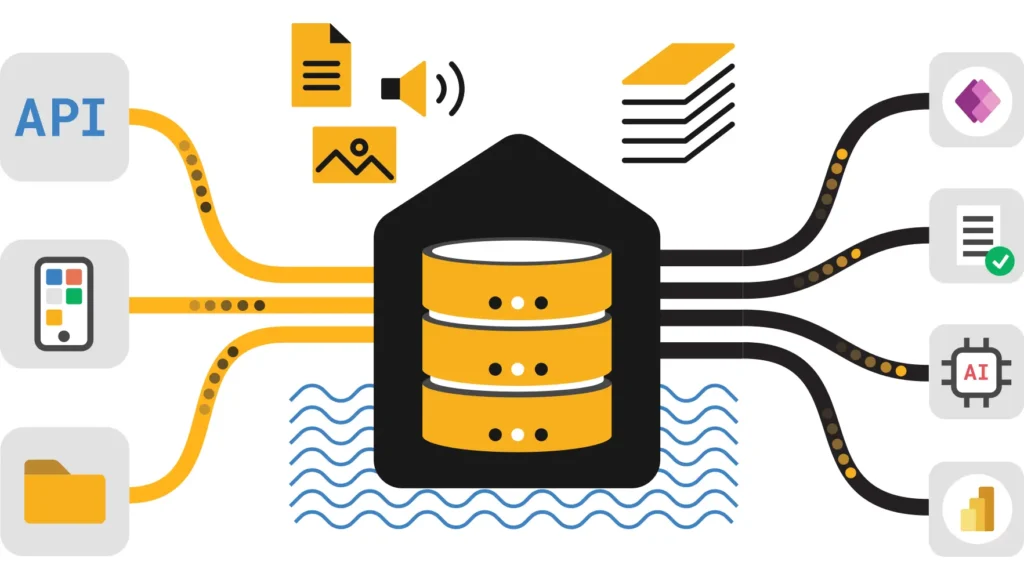
Real-Time Intelligence is a Fabric workload designed for high-volume, low-latency data streams (IoT, logs, telemetry). Specifically, it consists of three main artifacts: Eventstreams for ingestion and routing, KQL Databases (Eventhouse) for storage and querying, and Data Activator for automated actions (Reflex).
Intermediate Q2: KQL Database vs. Lakehouse?
Use a KQL Database for time-series data, logs, and telemetry where you need sub-second query performance on billions of rows. In contrast, use a Lakehouse for general-purpose batch analytics and data warehousing optimized for structured analytics with Delta Lake ACID support.
Advanced Q3: Fabric Real-Time vs. Azure Stream Analytics?
Azure Stream Analytics (ASA) is a PaaS offering primarily for stream processing logic. Fabric Real-Time Intelligence, however, integrates ingestion, storage, and analytics using the Kusto (ADX) engine. Therefore, Fabric is preferred for integrated analytics where data needs to be stored and queried immediately, whereas ASA focuses on in-flight processing.
Eventhouse & KQL Architecture
Intermediate Q4: What is an Eventhouse?
Specifically, an Eventhouse is a Fabric item that hosts one or more KQL databases and manages their compute and policies, similar to an Azure Data Explorer cluster. Consequently, it allows you to manage capacity and sharing policies efficiently across a group of related databases.
Advanced Q5: Does Real-Time Intelligence use OneLake?
Yes. KQL Databases persist data in OneLake and maintain a hot cache on local SSD compute for fast queries. They also expose this data through OneLake in Delta Parquet format, so Spark notebooks can read KQL tables directly and Power BI can query them in Direct Lake mode — without a separate copy or export step.
Intermediate Q6: What is the latency of ingestion?
Fabric Eventstreams and KQL Databases support Streaming Ingestion. This mechanism can make data available for query within seconds (often < 10s) of arrival. As a result, it is significantly faster than the batch ETL processes typically used in the Data Warehouse.
Module B: Fabric Eventstreams Ingestion
Eventstreams act as the nervous system. These Microsoft Fabric Real-Time Intelligence interview questions cover ingestion, routing, and processing.
Eventstream Ingestion Capabilities
Intermediate Q7: What sources can Eventstreams ingest from?
Eventstreams can ingest from a broad connector catalog, including Azure Event Hubs, Azure IoT Hub, Apache Kafka, Confluent Cloud, Amazon Kinesis, Amazon MSK, Google Cloud Pub/Sub, MQTT brokers, Custom Apps (via API), and database Change Data Capture (CDC) feeds. It creates a “no-code” pipe to route this data, so you can connect real-world data sources without writing complex integration code. Module G covers the full 2026 connector count and the newer Mirrored Database Change Feed connector specifically.
Intermediate Q8: What are the destinations for an Eventstream?
You can route data to multiple destinations simultaneously. These include a KQL Database (for analytics), a Lakehouse (for archival), or a Custom App. This fan-out capability is key for Lambda architectures where data needs to be both analyzed immediately and archived for later batch processing.
Advanced Q9: How to process data “in-flight”?
Eventstreams include a “Processing Editor” (Derived Streams). You can apply lightweight transformations like filtering, aggregation (Group By), or field renaming before the data lands in the destination. This helps reduce storage costs and improves data quality at the source.
Eventstream Configuration
Advanced Q10: Custom App vs. Azure Event Hub source?
Use the Azure Event Hubs source when you already have infrastructure sending data to an existing Hub. In contrast, use the Custom App source when you want Fabric to provide a connection string endpoint. This allows your application to send data directly, eliminating the need to manage a separate Azure Event Hub resource.
Intermediate Q11: What data formats are supported?
Eventstreams natively support JSON, Avro, and CSV formats. JSON is the most common for modern telemetry. However, if data arrives in a binary format, you may need a custom pre-processor before sending it to the Eventstream.
Intermediate Q12: Handling data formatting errors?
When an Eventstream encounters a malformed message (e.g., bad JSON), it can be configured to drop the message or route it to a “Dead Letter” destination. Configuring this is critical for production pipelines to ensure that one bad message does not block the entire stream.
Module C: KQL Database Storage
The KQL Database is the engine of Real-Time Intelligence. These questions cover retention, caching, and structure.
KQL Storage Policies
Beginner Q13: What is a KQL Database?
A KQL Database is a scalable store optimized for streaming data like logs and time-series. It uses the Kusto engine to index every column by default. Consequently, this enables extremely fast text search and aggregation over massive datasets without complex tuning.
Intermediate Q14: Hot Cache vs. Cold Storage?
Hot Cache stores data on local SSDs of the compute nodes for instant query performance but is more expensive. Cold Storage stores data in OneLake (Blob) for long-term retention, which is cheaper but slower. You define a “Caching Policy” to balance cost vs. speed effectively.
Advanced Q15: What is a Retention Policy?
The Retention Policy dictates how long data is kept before permanent deletion. For example, you can set a Soft Delete period of 365 days. After this period, data is removed to free up storage. Importantly, this is distinct from the Caching Policy, which only controls performance.
KQL Schema & Tables
Intermediate Q16: What is a “Dynamic” column?
The dynamic data type in KQL is used to store JSON objects or arrays. Unlike SQL `VARCHAR`, KQL can index the internal properties of a dynamic column. Therefore, you can query nested JSON fields (e.g., `Context.Device.ID`) directly without complex parsing logic.
Intermediate Q17: Update Policy function?
An Update Policy acts like a trigger. When data lands in a source table (e.g., RawLogs), the policy runs a KQL query to transform the data and insert it into a target table (e.g., ProcessedLogs). This is the primary mechanism for performing ELT transformations inside a KQL Database.
Advanced Q18: Materialized Views in KQL?
Materialized Views in KQL pre-compute aggregations (e.g., `summarize count() by Hour`) as new data arrives. They are essential for deduplicating data (`arg_max()`) and improving performance for dashboards that query massive historical datasets repeatedly.
Intermediate Q19: KQL vs. SQL?
SQL is optimized for transactional operations and relational joins. In contrast, KQL is optimized for append-only streams, time-series analysis, and free-text search. KQL syntax is pipe-based (`|`), making it more intuitive for exploratory data analysis than SQL.
Intermediate Q20: How does KQL data reach OneLake and Power BI?
KQL Databases automatically expose their data through OneLake in Delta Parquet format. This means you can open a Fabric Notebook and read KQL tables using Spark SQL, or open Power BI and use Direct Lake mode against KQL data, without any physical data movement or export step.
Module D: Kusto Query Language (KQL)
Interviews often include coding tests. These questions cover essential KQL operators and patterns.
Core KQL Operators
Beginner Q21: How to filter and sort in KQL?
Use the pipe operator `|`. Example: `Table | where State == ‘TX’ | sort by Timestamp desc`. This is the most basic pattern you must know. The `where` clause filters rows, and `sort by` orders them.
Intermediate Q22: Summarize vs. Project?
Project selects specific columns to keep in the output (like SQL SELECT). Summarize aggregates data (like SQL GROUP BY). Example: `| summarize count() by City` groups rows by city and counts them.
Advanced Q23: What is “make_series”?
The `make_series` operator converts discrete data points into a continuous time series array. It allows you to fill gaps (missing values) with default values (like 0). Consequently, it is essential for rendering charts that need a value for every time bucket.
Advanced KQL Querying
Intermediate Q24: How to parse JSON in KQL?
If a column is stored as a string but contains JSON, use `parse_json()`. Example: `extend Props = parse_json(PropertiesColumn) | project Props.DeviceID`. However, if the column is already `dynamic` type, you can access fields directly using dot notation.
Advanced Q25: Joining tables in KQL?
Use the `join` operator. Example: `TableA | join kind=inner (TableB) on ID`. However, in KQL, joins can be expensive. Therefore, for performance, it is often better to denormalize data during ingestion or use the `lookup` operator for small dimension tables.
Intermediate Q26: Time-window functions?
KQL excels at time analysis. You can use `bin(Timestamp, 1h)` inside a summarize clause to bucket data into 1-hour windows. This is the standard way to generate histograms or trend charts for IoT data.
Module E: Data Activator & Reflex
Data Activator turns data into action. These Microsoft Fabric Real-Time Intelligence interview questions focus on triggers and alerting.
Data Activator Concepts
Beginner Q27: What is Data Activator?
Data Activator is a “no-code” tool in Fabric designed to automatically take action when specific patterns are detected in data. It creates items called Reflexes that monitor data streams (from Eventstreams, KQL databases, or Power BI) and trigger alerts or workflows.
Intermediate Q28: How does a Reflex work?
A Reflex consists of Objects (what you monitor, e.g., “Freezers”), Properties (data fields, e.g., “Temperature”), and Triggers (conditions, e.g., “Temp > 30”). When a Trigger condition is met, it automatically fires an Action.
Advanced Q29: Triggers vs. Power BI Alerts?
Power BI Alerts are simple thresholds on dashboard tiles. In contrast, Data Activator Triggers are much more powerful; they run on the backend data stream independent of reports, support complex logic (e.g., “value stays high for 15 mins”), and can trigger external systems via Power Automate.
Reflex Actions
Intermediate Q30: What actions can be triggered?
Standard actions include sending an Email (Outlook) or a Teams message. For advanced integration, you can trigger a Custom Action which calls a Power Automate flow. Consequently, this allows you to perform virtually any task (e.g., create a Jira ticket, call an API).
Intermediate Q31: Monitoring Data Activator?
Reflex items have a built-in monitoring tab where you can see the history of trigger evaluations and successful/failed actions. This is crucial for debugging why an alert did not fire as expected during testing.
Advanced Q32: Latency of Activator?
Data Activator evaluates conditions in near-real-time as data arrives in the Eventstream, KQL database, or Power BI dataset. While fast, it is not a “hard real-time” system operating in microseconds — it’s designed for operational latencies, typically in the 5-second to 5-minute range depending on the source and evaluation frequency.
Module F: Real-Time Scenarios & Performance
Real-world architect decisions for high-scale streaming.
Real-Time Architect Decisions
Advanced Q33: IoT Architecture Design?
Scenario: 10,000 sensors sending temperature data every second.
Solution: Ingest via Event Hubs into Fabric Eventstreams. Route raw data to a KQL Database for time-series analysis. Create a Reflex to alert if temperature exceeds 50°C. Use Power BI Direct Lake on KQL for the dashboard.
Advanced Q34: Log Analytics Migration?
Scenario: Migrating application logs from Splunk/ELK to Fabric.
Solution: Use KQL Databases. KQL is highly optimized for text search and log patterns. It offers a cost-effective alternative with separate Hot/Cold caching policies compared to expensive index-heavy solutions.
Intermediate Q35: Cost Optimization in Real-Time?
Compute (KQL) and Storage (OneLake) are billed separately. To optimize, reduce the “Hot Cache” retention period (e.g., from 30 days to 7 days) for data that isn’t queried frequently. Additionally, ensure efficient encoding on ingestion to reduce storage size.
Advanced Q36: High Availability?
Fabric manages availability at the capacity level, and KQL compute for a given Eventhouse runs within the region tied to its home capacity. For multi-region resilience beyond what a single capacity provides, architect dual-ingestion — sending the same stream into Eventhouses in two separate regions/capacities — rather than assuming built-in cross-region failover for a single Eventhouse.
Intermediate Q37: Security in Real-Time?
KQL Databases support Row-Level Security (RLS) similar to SQL. You can define a policy function that filters data based on the `current_principal()` (user). This is critical when sharing IoT dashboards with different customers.
Advanced Q38: Integrating with ML?
KQL has built-in plugins for anomaly detection and forecasting (`series_decompose_anomalies`). You can run these functions directly in the query as part of the dashboard. This provides real-time predictive insights without moving data to Spark.
Module G: 2026 Platform Updates
Real-Time Intelligence ships new capability regularly. These two questions cover the most significant additions since this guide’s last major revision, and are the kind of current-platform knowledge that separates candidates who’ve kept up with Fabric from candidates reciting older documentation.
2026 Q39: What are Business Events, and how do they relate to Data Activator?
Business Events, introduced in 2026, let Activator — along with Power BI reports, Real-Time Dashboards, KQL queries, and Fabric Warehouse SQL queries — publish structured, governed signals to Real-Time Hub whenever a detected condition matters to the business, rather than just firing a private alert to one team. Every published event is automatically routed to Eventhouse and stored as a dedicated KQL table with no extra pipeline configuration, so any team can query historical patterns, correlate events from different publishers, or feed them into AI/ML workloads without coordinating directly with whoever published the event in the first place. The model is decoupled by design: new consumers can subscribe to an existing event at any time without the original publisher changing anything.
2026 Q40: How many source connectors does Eventstream support now, and what’s new?
As of 2026, Eventstream supports 25+ source connectors, spanning Azure Event Hubs, IoT Hub, Kafka, Confluent Cloud, Amazon Kinesis and MSK, Google Cloud Pub/Sub, MQTT brokers, Event Grid, Service Bus, HTTP endpoints, and database CDC feeds from Azure SQL, PostgreSQL, MySQL, MongoDB, Cosmos DB, and SQL Server. The newest addition worth knowing for an interview is the Mirrored Database Change Feed connector, which lets a Fabric Mirroring source feed directly into an Eventstream — combining CDC-based mirroring with real-time event processing without standing up a separate ingestion job. See our Data Mirroring guide for how the source side of that connection works.
References: Microsoft Learn | Delta Lake