Transform Data Using Notebooks in Microsoft Fabric
Build a small, repeatable PySpark transformation in Microsoft Fabric: validate a batch, merge into Delta, calculate features, and check the result. Updated against Microsoft Learn on 23 October 2026, with current runtime, scheduling, permissions, and billing guidance.
Use a Spark notebook for code-first transformations when it fits your workload. Runtime 2.0 is GA and the default for new workspaces and environment items. Contributors can create and run notebooks, and trials support evaluation. Schedule notebooks directly or orchestrate them with pipelines. A default Lakehouse simplifies table access, but authorized absolute paths are also supported. Validate cost and performance for your workload rather than assuming fixed savings.
Use a development workspace and a schema-enabled default Lakehouse with dbo. You need appropriate Fabric capacity and notebook/data permissions; Contributor is sufficient for ordinary authoring and execution. This exercise writes only to dbo.uig_notebook_demo_sales. The examples are documentation-reviewed, not claimed as executed in your tenant.
Executive Summary – Transform Data Using Notebooks
This guide covers Spark-based Fabric notebooks using PySpark. Fabric also offers Python notebooks; do not assume that a pure Python kernel has a Spark session. The examples below form one small, sequential learning notebook, not a production deployment template.
| Capability | Current guidance |
|---|---|
| Runtime | Runtime 2.0 is GA and the default for new workspaces and environment items: Spark 4.1, Delta Lake 4.2, Python 3.13. An existing environment can select a different runtime. |
| Spark languages | PySpark, Spark SQL, Spark (Scala), and SparkR. Use %%sql for Spark SQL and %%spark for Scala cells. |
| Access | Use a workspace assigned to an appropriate Fabric capacity, including a trial for evaluation. Admin, Member, and Contributor roles can create and run notebooks. |
| Storage | A default Lakehouse provides relative paths and table-name context. Authorized absolute OneLake paths can be used without attaching every source. |
| Scheduling | Native notebook scheduling, a pipeline Notebook activity, and the Job Scheduler API are supported routes. |
| Cost | Distinguish Spark consumption from the purchased Fabric capacity bill. Stopping a Spark session does not by itself pause the capacity. |
Microsoft reference: Fabric Runtime 2.0.
Microsoft reference: How to use Fabric notebooks.
Setup & First Run
Advertisements
What you will build
A synthetic six-row sales batch with three rejected rows, a three-row Delta table, and a two-customer feature summary. No source download or external credentials are needed. Allow roughly 20-30 minutes for the exercise, plus environment setup; this is a learning estimate, not a Spark startup SLA.
- Use a development workspace assigned to a Fabric capacity. A trial is suitable for evaluating this exercise, subject to tenant eligibility and trial limitations.
- Confirm Contributor, Member, or Admin access and permission to read and write the selected Lakehouse. Do not request Admin solely to run a notebook.
- Create or choose a schema-enabled Lakehouse, create a notebook, add the Lakehouse, and pin it as the default. This demo uses the
dboschema. Do not run it against production tables. - Check the notebook’s selected Environment and runtime. New workspaces default to Runtime 2.0; test library compatibility before changing an existing environment. Restart the session after changing the default Lakehouse.
- Add the following first cell and select its ellipsis menu, then Toggle parameter cell. Run subsequent cells in order as PySpark.
run_date = "2026-10-01"The demo creates or updates only dbo.uig_notebook_demo_sales. Use a dedicated demo Lakehouse so this name does not overlap existing work. It does not delete or overwrite an entire table. The test assertions deliberately stop if the table contains unrelated data.
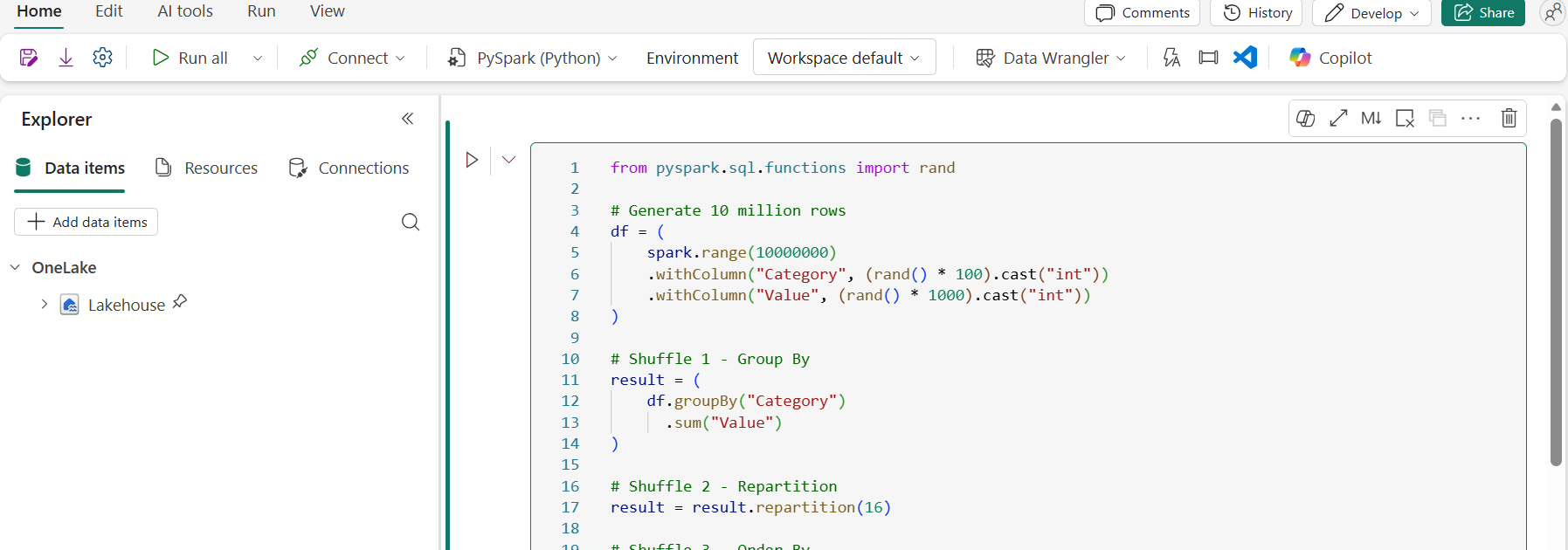
Attachment is a convenience, not a universal storage requirement. A permitted Delta location can also be accessed with spark.read.format("delta").load(absolute_abfss_path) or written with a path-based writer. Copy the actual ABFS path from Fabric instead of inventing workspace or Lakehouse identifiers. The default Lakehouse supplies the catalog context used by this demo.
Microsoft reference: Lakehouse schemas.
Microsoft reference: Workspace role capabilities.
Microsoft reference: Fabric trial.
Five Production Patterns
These are learning patterns to adapt, not a promise that every write is automatically idempotent. Production pipelines also need replay handling, source-key rules, appropriate identities, monitoring, and recovery tests.
Pattern 1 – Explicit schema and quality checks
Use typed values so amounts are decimal, not CSV strings. Nullable fields let this exercise inspect invalid rows explicitly. With real files, distinguish parse failures from business-rule failures: a FAILFAST parser can abort before a quarantine step. Persist rejected rows with a stable batch identifier if you need a replay-safe quarantine table.
from datetime import date
from decimal import Decimal
from pyspark.sql import functions as F
from pyspark.sql.types import (
    StructType, StructField, LongType, DateType, DecimalType
)

batch_date = date.fromisoformat(run_date)
TARGET = "dbo.uig_notebook_demo_sales"
print(f"Spark: {spark.version}; run_date: {batch_date}")

schema = StructType([
    StructField("order_id", LongType(), True),
    StructField("customer_id", LongType(), True),
    StructField("sale_date", DateType(), True),
    StructField("amount", DecimalType(12, 2), True),
])
rows = [
    (1001, 10, batch_date, Decimal("125.00")),
    (1002, 10, batch_date, Decimal("75.00")),
    (1003, 20, batch_date, Decimal("50.00")),
    (1004, 20, batch_date, Decimal("-5.00")),
    (None, 30, batch_date, Decimal("25.00")),
    (1006, 30, batch_date, None),
]
df_raw = spark.createDataFrame(rows, schema)
invalid = (
    F.col("order_id").isNull()
    | F.col("customer_id").isNull()
    | F.col("sale_date").isNull()
    | F.col("amount").isNull()
    | (F.col("amount") < 0)
)
bad_rows = df_raw.filter(invalid)
df_clean = df_raw.filter(~invalid)
assert bad_rows.count() == 3
assert df_clean.count() == 3
bad_rows.show(truncate=False)

if df_clean.groupBy("order_id").count().filter("count > 1").count():
    raise ValueError("Duplicate source order_id values; resolve before MERGE")
Pattern 2 – Deterministic Delta MERGE
Initialize the target schema, reject duplicate source keys, and then merge. This demo is repeatable for identical input because the source values and merge assignments are deterministic. MERGE is not a blanket guarantee: nondeterministic timestamps, duplicate keys, additive updates, competing writers, or out-of-order changes need explicit handling. Real change feeds should use a defined sequence or modification-time policy.
from delta.tables import DeltaTable

spark.sql("""
CREATE TABLE IF NOT EXISTS dbo.uig_notebook_demo_sales (
    order_id BIGINT,
    customer_id BIGINT,
    sale_date DATE,
    amount DECIMAL(12, 2)
) USING DELTA
""")

def upsert_sales(batch):
    if batch.groupBy("order_id").count().filter("count > 1").count():
        raise ValueError("Source contains duplicate business keys")
    (DeltaTable.forName(spark, TARGET).alias("t")
        .merge(batch.alias("s"), "t.order_id = s.order_id")
        .whenMatchedUpdateAll()
        .whenNotMatchedInsertAll()
        .execute())

upsert_sales(df_clean)
first = spark.table(TARGET).orderBy("order_id").collect()
upsert_sales(df_clean)
second = spark.table(TARGET).orderBy("order_id").collect()
assert first == second, "Identical input changed the table on rerun"
assert len(second) == 3, "Use a dedicated demo table with no unrelated rows"
spark.table(TARGET).orderBy("order_id").show()
Pattern 3 – Calendar-aware windows
rowsBetween(-6, 0) means seven rows, not necessarily seven calendar days. This example aggregates to a customer-day grain, then uses a numeric day range. The average is over observed days; join a complete calendar and fill missing days with zero if zero-sales days must count. Likewise, lag(value, 365) means 365 rows back, not a reliable year-over-year date match.
from pyspark.sql.window import Window

daily = (spark.table(TARGET)
    .groupBy("customer_id", "sale_date")
    .agg(F.sum("amount").alias("daily_amount")))
daily = daily.withColumn(
    "day_number", F.datediff("sale_date", F.lit("1970-01-01"))
)
seven_days = (Window.partitionBy("customer_id")
    .orderBy("day_number")
    .rangeBetween(-6, 0))
result = daily.withColumn(
    "avg_observed_daily_amount_7d",
    F.avg("daily_amount").over(seven_days)
)
result.orderBy("customer_id", "sale_date").show()
Pattern 4 – Parameterized incremental selection
Use the run_date parameter from Cell 1. In production, apply a date or watermark predicate while reading the source and advance a watermark only after a successful write. This in-memory demo selects one date but does not demonstrate physical partition pruning. That requires a suitably laid-out source and an execution plan showing filters or pruning. Deduplicating with dropDuplicates is not a deterministic latest-record policy.
incremental = df_clean.filter(
    F.col("sale_date") == F.lit(run_date).cast("date")
)
upsert_sales(incremental)
assert spark.table(TARGET).count() == 3
Pattern 5 – Reproducible feature calculations
Use an explicit as-of date rather than current_date() when a historical rerun must reproduce a result. The demo reads only its synthetic batch table, so these are batch features, not a complete customer-history feature store. Persist production feature snapshots with documented grain and replay semantics.
features = (spark.table(TARGET)
    .groupBy("customer_id")
    .agg(
        F.count("*").alias("order_count"),
        F.sum("amount").alias("total_spend"),
        F.max("sale_date").alias("last_purchase_date"),
    )
    .withColumn("as_of_date", F.lit(run_date).cast("date"))
    .withColumn(
        "days_since_purchase",
        F.datediff("as_of_date", "last_purchase_date")
    ))
features.orderBy("customer_id").show()
Microsoft reference: Notebook development and parameter cells.
Performance Optimization
Measure the actual workload before applying settings. There is no universal file size, broadcast threshold, shuffle count, or percentage speedup that is correct for every Fabric job.
| Area | What to do |
|---|---|
| Data layout | Filter early and select only needed columns. Choose partitions or clustering based on table size and access patterns; avoid high-cardinality partitioning and unnecessary small files. |
| Joins and shuffle | Inspect the execution plan, skew, and Spark job metrics. Broadcast only when the dimension is small enough for executor memory; a fixed 100 MB rule is not safe. Check adaptive query execution before hard-coding shuffle settings. |
| V-Order | V-Order is disabled by default in newly created workspaces. Enable it selectively for read-heavy scenarios after benchmarking the write/read tradeoff. Check the session or table setting rather than assuming an old default. |
| Runtime acceleration | Runtime 2.0 includes the Native Execution Engine. Confirm supported operations and fallback behavior. Published benchmark gains are not a speed or cost guarantee for your notebook. |
| Table maintenance | OPTIMIZE compacts files. VACUUM removes unreferenced data files older than its retention threshold; it can make older snapshots unreadable. Validate retention against long-running readers, recovery, and streaming dependencies before deleting anything. |
| Clustering | Use the documented API and feature support for your runtime. Do not assume a generic writer option such as clusteringColumns configures clustering correctly, or combine incompatible layout features. |
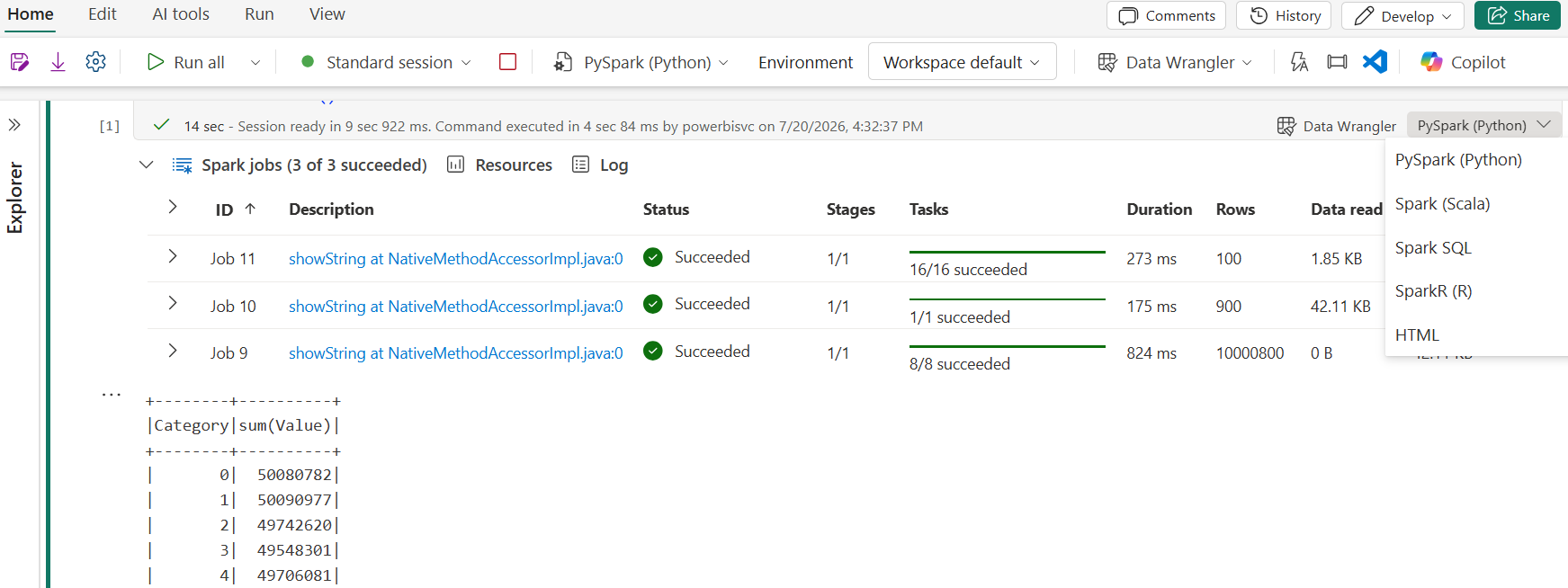
Spark consumption is not the whole capacity bill
Under standard capacity billing, Spark shares the workspace’s Fabric capacity. Spark usage is reported separately from the underlying capacity purchase. Active-session runtime can continue until you stop the session or it expires; Microsoft documents a default session expiration of 20 minutes for starter and custom pools. Stop sessions you no longer need.
When Spark autoscale billing is enabled, Spark uses separately metered serverless resources and the configured CU limit. This is a different billing mode, not a reason to claim that all Fabric compute is free between notebook cells. Capacity pause, reservations, storage, and other workloads have their own billing implications.
Use the Capacity Metrics app for consumption and Azure Cost Analysis for the bill. Remove assumptions such as “notebooks always cost 90% less than Dataflow Gen2”; compare representative workload runs with the same output, freshness, and operational requirements.
Microsoft reference: Delta optimization and current V-Order defaults.
Microsoft reference: Spark billing and utilization.
Microsoft reference: Your Fabric capacity Azure bill.
Orchestration & Scheduling
Notebooks can be scheduled directly. Choose a native notebook schedule for an independent recurring job; use a pipeline when you need dependencies, activity policies, parameters, and failure branches; use the Job Scheduler API for external automation.
Pass parameters through a pipeline
- Save the notebook with Cell 1 designated as its parameter cell.
- Create a Data Factory pipeline and add a Notebook activity.
- Select the notebook and review the Connection authentication method. Under Base parameters, review the detected parameter and supply
run_dateas a string such as2026-10-01. - Set retries, timeout, and failure handling according to the workload. Retries do not make a non-repeatable write safe.
- Save, run, and inspect the activity output before scheduling the pipeline.
The engine inserts an override cell after the parameter cell. Do not use the old article’s mssparkutils.runtime.getParameterValue pattern; it is not the documented pipeline parameter mechanism used here.
Do not assume back-to-back runs share a session
The Notebook activity supports session tags when high-concurrency mode for pipeline notebooks is enabled. Configure that feature deliberately and check its constraints; putting activities beside each other does not itself guarantee session reuse or a fixed startup time.
Git and deployment
Version notebooks using Fabric-supported Git integration and use a controlled dev/test/prod release process. A folder tree in a blog post is not Fabric’s actual exported item definition. Review environment, Lakehouse bindings, and connection settings when promoting between workspaces.
Microsoft reference: Notebook activity settings, parameter discovery, and session tags.
Microsoft reference: Native scheduling and Job Scheduler API support.
Security & Governance
Advertisements
Authorize the actual execution identity for both the notebook and its data sources. Interactive execution normally uses the current user; a native scheduled run uses the identity of the user who created or last updated the schedule. Microsoft’s general notebook guidance describes the pipeline’s last modifying user as the user-context execution identity. The Notebook activity also supports explicit connection authentication, including configured workspace identity. Inspect the activity’s selected Connection rather than assuming every pipeline automatically runs as a service principal.
- Use least-privilege workspace and item permissions. Contributor is sufficient for ordinary notebook authoring and execution; it does not eliminate the need for source authorization.
- For workspace identity, follow the documented setup, tenant setting, and workspace permission requirements. Validate downstream connector support under that identity.
- Do not assume SQL endpoint row-level security or masking automatically governs Spark reads. Check the supported access controls for the specific OneLake, Spark, and SQL access paths.
- Use a managed secret store and supported credential helpers rather than putting credentials in source code or outputs.
- Dropping or masking a column in one DataFrame does not protect the original source. Ordinary Spark
hash()is not an anonymization guarantee; apply your organization’s approved privacy controls.
Lineage: verify what is actually captured
Fabric provides workspace lineage views, with documented scope and limitations. Do not promise automatic end-to-end column-level lineage for every arbitrary notebook write. Inspect the actual notebook/table relationships and verify any additional Microsoft Purview integration against its supported scenarios.
Microsoft reference: Notebook security contexts.
Microsoft reference: Connection authentication and workspace identity.
Microsoft reference: Fabric lineage and limitations.
Validation & Production Checklist
Complete the demo
Run Cells 1-6 sequentially, then run the checks below. The three accepted amounts are 125.00, 75.00, and 50.00. The target should contain three distinct orders totaling 250.00; features should contain two customers. Replaying the identical batch must preserve the result. These are expected results, not a claim that this notebook has been executed in your tenant.
sales = spark.table(TARGET)
assert sales.count() == 3
assert sales.select("order_id").distinct().count() == 3
assert sales.filter("amount IS NULL OR amount < 0").count() == 0
assert sales.agg(F.sum("amount")).first()[0] == Decimal("250.00")
assert features.count() == 2
assert features.filter("days_since_purchase <> 0").count() == 0
print("Demo quality, key, total, and feature checks passed")| Before production | Required decision or test |
|---|---|
| Input contract | Define file parsing behavior, required columns, decimal precision, allowed nulls, duplicate-key resolution, and rejected-row handling. |
| Replay and change ordering | Test retries after partial failure, repeated batches, late-arriving changes, updates, and deletes. Use a source sequence or timestamp when required. |
| Identity | Test the scheduled or pipeline identity against every data source and destination, not only your interactive account. |
| Operations | Measure runtime and consumption, test notifications and recovery, and set retention according to your recovery window. |
| Downstream serving | Writing a Delta table does not automatically refresh every Power BI semantic model or report. Validate refresh or Direct Lake framing behavior for the downstream model. |
| Demo cleanup | If you no longer need the sample, remove only the dedicated demo table after confirming its contents. This guide does not run cleanup or change other tables. |
Validation disclosure: this article is documentation-reviewed as of 23 October 2026. The examples are instructional; validate them in a development Fabric workspace before scheduling production work. They are not described as tenant-tested or benchmarked.
Notebooks vs. Alternatives
Select a tool by workload and team requirements, not by a fixed data-size cutoff or an unsupported cost multiplier.
| Workload | Options to evaluate | Decision factors |
|---|---|---|
| Custom batch transformations | Spark notebooks, Dataflow Gen2, or Warehouse SQL | Libraries, data volume, existing skills, supported transformations, operational overhead, and measured cost. |
| Low-code preparation | Dataflow Gen2 | Power Query experience, refresh behavior, connectors, and destination requirements. |
| SQL-centric analytics | Warehouse T-SQL or notebook Spark SQL | Serving latency, data layout, SQL features, orchestration, and governance requirements. |
| ML feature preparation | Notebooks and Fabric Data Science | Python/Spark libraries, reproducibility, experiment tracking, and training/serving interfaces. |
| Streaming | Eventstream, Eventhouse/KQL, or Spark Structured Streaming | Required latency, source connectors, state management, runtime support, recovery, and cost. |
No official source reviewed for this update establishes a universal “10 GB means notebook” rule or a guaranteed 90% saving over Dataflow Gen2. Benchmark equivalent outputs and include maintenance and operational effort.
Frequently Asked Questions
Can Contributors create and run Fabric notebooks?
Yes. The workspace roles matrix grants notebook authoring and execution to Admins, Members, and Contributors. Item sharing and data-source permissions also matter; do not confuse permission to view a notebook with permission to execute it.
Can I use a Fabric trial for this exercise?
Yes, eligible users can evaluate Fabric with a trial capacity, subject to tenant settings and trial limits. Plan a suitable paid capacity and licensing arrangement for ongoing production use rather than treating a trial as a permanent deployment.
Is Runtime 2.0 now the default?
Microsoft documents Runtime 2.0 as GA and the default for new workspaces and environment items. An existing notebook can use the runtime selected by its environment or workspace. Check the actual setting and test compatibility before migration.
Can a notebook run on its own schedule?
Yes. Native notebook scheduling is supported. Pipelines provide an additional orchestration route for dependencies and activity policies; the Job Scheduler API supports external automation. Check the run identity in each case.
Does Delta MERGE guarantee idempotency?
No. A deterministic merge with valid business keys and stable input can be repeatable. Duplicate keys, nondeterministic assignments, out-of-order changes, and concurrency require explicit policies and tests. The demo compares the table after two identical merges.
Is V-Order enabled by default?
Not in newly created workspaces: Microsoft documents spark.sql.parquet.vorder.default as false. Inspect the current setting and benchmark read/write tradeoffs before changing it. Older workspaces can have different defaults.
Does stopping a notebook stop my Fabric capacity bill?
No. Stopping a Spark session stops that session activity, but it does not automatically pause the purchased Fabric capacity. Standard capacity billing and Spark autoscale billing are different models; storage and other services can also incur charges.
How do I add Python libraries?
For Spark notebooks, use supported session-scoped installation such as %pip for interactive work, or publish dependencies in a Fabric Environment and attach it for reproducible runs. Do not assume an inline install is persistent across future sessions.
Microsoft Sources & Next Steps
Documentation checked: 23 October 2026. Microsoft can update these pages and roll out features at different times. Check your tenant and selected runtime when following the steps.
- Notebook creation, lakehouses, execution identities, scheduling, and APIs
- Supported languages and pipeline parameter cells
- Runtime 2.0 components, defaults, and migration considerations
- Workspace roles, including Contributor permissions
- Fabric trial access and limitations
- Notebook activity, authentication connections, workspace identity, and session tags
- Spark utilization, active-session billing, and autoscale billing
- Fabric capacity Azure billing
- Current V-Order defaults and table optimization
- Schema-enabled lakehouses and table naming
- Fabric lineage scope and limitations
Continue the existing Fabric series
- Need the foundation? Build and explore a Fabric Lakehouse.
- Next: Orchestrate data work with Fabric pipelines.
- Browse Free Learning Resources or the existing Fabric tutorial series.
What changed in this review: updated runtime and V-Order defaults; corrected trial access, Contributor permissions, scheduling, parameter passing, execution identities, billing, and lineage claims; replaced inconsistent examples with a sequential synthetic-data exercise; removed unsupported cost and speed guarantees; and added two original explanatory diagrams. Existing article screenshots are retained and labeled as illustrations of the interface.
Feature descriptions were checked against the linked Microsoft documentation on 23 October 2026. Examples target Spark notebooks with a schema-enabled default Lakehouse. They require development-workspace testing before production use; no tenant execution or performance benchmark is claimed. Runtime, tenant policy, rollout, identity, and capacity configuration can affect behavior. UIG is independent and is not affiliated with or endorsed by Microsoft.