250+ Microsoft Fabric Interview Questions & Answers (2026)
The definitive resource for Data Engineers and Architects, organized into 7 pillars covering OneLake, Direct Lake, Spark, SQL, and Real-Time Intelligence. Every pillar includes complete answers on this page plus a dedicated deep-dive for the full question bank.
What are the top Microsoft Fabric interview questions?
The most common Microsoft Fabric interview questions focus on the unified SaaS architecture, specifically the “One Copy” feature of OneLake and the performance benefits of Direct Lake mode in Power BI. Candidates are expected to troubleshoot Spark OOM errors, explain F-SKU capacity smoothing, and demonstrate knowledge of T-SQL Warehouse limitations compared to Azure Synapse.
If you are preparing for a role in modern data analytics, mastering Microsoft Fabric interview questions is no longer optional—it is essential. As organizations aggressively migrate from Azure Synapse and Databricks to this unified SaaS ecosystem, they need professionals who understand more than just basic SQL. They need architects who can design cost-effective, scalable solutions.
This guide is not a random list of questions. It is a comprehensive syllabus designed to take you from basic definitions to advanced, scenario-based troubleshooting. We integrate real-world fixes found in our Microsoft Fabric Tutorial Series to ensure you aren’t just memorizing definitions, but learning how to solve production issues. Each pillar below includes a few complete questions and answers directly on this page — for the full question bank on that pillar, follow the link into the dedicated guide.
What You Will Master
We have structured this hub into 7 strategic pillars. By the end of this guide, you will be able to answer scenarios regarding:
- Core Architecture: Explaining OneLake, Shortcuts, and Domains to C-level executives.
- Data Engineering: Troubleshooting Spark OOM errors and optimizing shuffle partitions.
- Data Warehousing: Migrating T-SQL stored procedures from Synapse to Fabric.
- Real-Time Analytics: Using Eventstreams and KQL for sub-second reporting.
- Power BI: Managing Direct Lake fallback and optimizing semantic models.
- Governance: Securing data with OneLake roles and managing F-SKU capacity costs.
1. Architecture & OneLake
Architecture is the foundation. Recruiters will test your understanding of how Fabric virtualizes storage to eliminate silos. Articulate the difference between physical data movement and logical data virtualization.
🟢 Fundamentals
- OneLake: Explain the “OneDrive for Data” concept and unification.
- Shortcuts: When to use a Shortcut versus a Pipeline?
- Domains: Organizing data mesh architectures using Domains.
🔴 Scenarios
- Mirroring: Mirroring Snowflake without ETL tax.
- Multi-Cloud: Reporting on AWS S3 data without egress fees.
- Migration: Fabric vs. Databricks comparison.
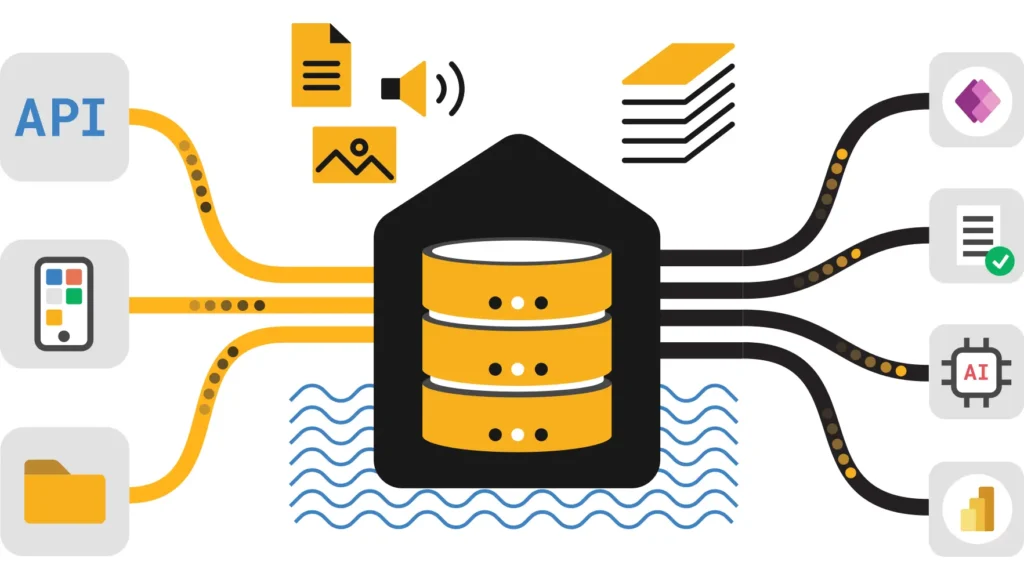
A: OneLake is a single, tenant-wide data lake built into every Fabric capacity and automatically provisioned with every tenant. Every workload — Lakehouse, Warehouse, Power BI, Real-Time Intelligence — stores data in Delta Parquet format inside OneLake by default, so data created by one workload is immediately readable by another without copying it. It’s commonly described as “OneDrive for data”: one location, one copy, accessible from every engine.
A: Use a shortcut when you need to reference data that already exists elsewhere — a different Fabric workspace, ADLS Gen2, S3, or Dataverse — without duplicating storage or maintaining a sync schedule. A shortcut is a virtual reference; queries against it read the source data directly. Use a pipeline instead when the data needs to be transformed, land in a different format, or be governed and versioned independently of the source.
2. Spark & Data Engineering
Data Engineers face strict scrutiny on PySpark optimization and memory management. Understand Spark Shuffle Partitions tuning.
🟢 Fundamentals
- Lakehouse vs Warehouse: The definitive decision matrix.
- Spark Pools: Starter Pools vs Custom Pools.
- Notebooks: Using `mssparkutils` for orchestration.
🔴 Scenarios
- V-Order: Optimizing for Direct Lake performance.
- OOM Errors: Fixing Py4JJavaError and memory crashes.
- Environments: Managing private PyPI libraries.
A: The most common cause is data skew — one partition holding disproportionately more rows than the others, so a single executor runs out of memory while the rest sit idle. Diagnose it in the Spark UI by checking task duration and shuffle-read size across partitions; a small number of tasks taking dramatically longer than the rest is the signature. The fix is usually repartitioning on a higher-cardinality key or salting a skewed join key before the join executes.
A: A Starter Pool is a pre-warmed Spark cluster Fabric provisions automatically, optimized for fast session startup with a fixed node configuration. A Custom Pool lets you define node size, autoscale limits, and Spark configuration explicitly — needed when a job has non-default library requirements or needs executor memory tuned beyond the Starter Pool profile.
3. Data Warehouse (SQL)
Transitioning from Synapse? Understand the separation of compute and storage and T-SQL limitations in the Fabric Warehouse.
🟢 Fundamentals
- T-SQL Surface: Unsupported commands (e.g., Identity Columns).
- SQL Endpoint: Read-Only Endpoint vs Full Warehouse.
- Loading: Using `COPY INTO` for speed.
🔴 Scenarios
- Performance: Warehouse Optimization via Result Set Caching.
- Cross-Querying: Joining Lakehouse and Warehouse tables.
- Migration: Synapse to Fabric migration steps.
A: No. The SQL analytics endpoint on a Lakehouse is read-only — it’s generated automatically from the Delta tables for T-SQL querying and reporting, but you cannot INSERT, UPDATE, DELETE, or run stored procedures against it. Full read-write T-SQL, including DDL, DML, and stored procedures, requires a Fabric Warehouse item instead of a Lakehouse.
A: COPY INTO is a high-throughput T-SQL command for bulk-loading data into a Warehouse table directly from files in a Lakehouse, ADLS Gen2, or Azure Blob Storage. It’s significantly faster than row-by-row INSERT statements for large files and is the standard pattern for landing raw files into a Warehouse without staging through a pipeline first.
4. Data Factory (ETL)
Master the choice between Data Pipelines (orchestration) and Dataflow Gen2 (low-code transformation).
🟢 Fundamentals
- Decision: Pipelines vs Dataflow Gen2.
- Fast Copy: Accelerated ingestion architecture.
- Gateways: Using Data Gateways for on-prem access.
🔴 Scenarios
- Dynamic Pipelines: Parameterization and notebooks.
- Troubleshooting: Fixing Error 20302 and CSV BOM issues.
- Deployment: CI/CD for pipelines.
A: Use a Pipeline when the task is primarily orchestration — moving data as-is with Copy Activity, chaining steps, triggering notebooks, or scheduling. Use Dataflow Gen2 when the task needs low-code, Power Query-style transformation before the data lands. A common production pattern uses a Pipeline to orchestrate the overall flow and calls a Dataflow Gen2 as one step inside it for the transformation-heavy portion.
A: Fast Copy is an alternate execution path that bypasses the standard Power Query mashup engine for simple, large-volume copy operations, routing the data through Fabric’s scalable copy infrastructure instead. It activates automatically when a query qualifies — a straightforward source-to-destination copy without complex transformations — and can be dramatically faster than the default engine for large files.
5. Real-Time Intelligence
Streaming data is essential. Learn Eventstreams, KQL Databases, and Data Activator for sub-second analytics.
🟢 Fundamentals
- Eventstreams: Ingestion without code.
- KQL: Basic Kusto query syntax.
- Reflex: Data Activator triggers.
🔴 Scenarios
- Storage Policy: Managing Hot Cache vs Cold Storage.
- Derived Streams: In-flight aggregations.
- Architecture: Fabric vs Azure Stream Analytics.
A: Direct Ingestion routes events straight from the source to a destination with minimal added latency and no transformation. Event Processing routes events through a visual, node-based editor first, where you can filter, aggregate, or reshape the stream before it reaches its destination. Choose Direct Ingestion for the fastest raw path to storage; choose Event Processing when the destination needs a cleaned or aggregated shape instead of the raw stream.
A: The hot cache keeps a recent, configurable window of data on fast local storage for near-instant query response, while the full dataset remains queryable but at lower performance once data ages out of the cache. Size the hot cache window based on how far back your dashboards and alerts genuinely need sub-second response versus acceptable-but-slower historical queries.
6. Power BI & Direct Lake
Direct Lake allows Power BI to query OneLake files directly. Learn to prevent Direct Lake fallback.
🟢 Fundamentals
- Direct Lake: “Zero Copy” architecture explained.
- Semantic Models: Default vs Custom models.
- Migration: Premium to Fabric strategy.
🔴 Scenarios
- Optimization: Reducing column cardinality.
- Composite Models: Mixing storage modes.
- AI: AI-Ready data modeling.
A: Common triggers include the underlying Delta table exceeding Direct Lake’s size guardrails, RLS DAX expressions using functions like LOOKUPVALUE or iterators, certain relationship configurations, and the model being framed against the SQL analytics endpoint instead of OneLake directly. Fallback is silent and preserves correctness, but it trades Direct Lake’s performance advantage for DirectQuery’s query-time cost against the source.
A: High-cardinality columns — a GUID or a raw timestamp — consume disproportionately more memory when paged into Direct Lake’s cache and are far more expensive to encode than low-cardinality columns like a status flag. Removing unnecessary high-cardinality columns, or splitting a raw timestamp into separate date and time-of-day columns, is one of the most effective Direct Lake performance levers available.
7. Governance & Security
Understand the layered security model: RBAC, Item Permissions, and Purview integration.
🟢 Fundamentals
- Security Layers: Workspace Roles vs OneLake Roles.
- Lineage: Tracking flow with Purview.
- Domains: Federated governance organization.
🔴 Scenarios
- CI/CD: Deployment Pipelines and Git.
- Network: Managed Private Endpoints.
- Costs: Capacity Optimization.
A: A workspace role (Admin, Member, Contributor, Viewer) controls what a user can do at the item level — create, edit, or view items inside a workspace. A OneLake data access role controls what a user can see inside the data itself — specific rows, columns, or tables in a Lakehouse — independent of their workspace role. A workspace Viewer with no editing ability can still have granular OneLake data access roles determining exactly which rows they’re allowed to query.
A: Purview automatically catalogs Fabric items — Lakehouses, Warehouses, semantic models, reports — and captures lineage showing how data flows between them, largely without separate configuration. It also enforces sensitivity labels applied in Fabric, and the OneLake Catalog’s Govern tab surfaces Purview’s classification and lineage data directly inside the Fabric portal.
🧪 How to Answer Scenario-Based Questions (STAR Method)
Senior roles often require you to troubleshoot live production issues. Use the STAR framework:
💰 Fabric Capacity & Pricing Strategy
One of the most complex topics in interviews is estimating F-SKU costs vs. Legacy Power BI Premium. Architects must calculate the required CU (Capacity Units) and understand Bursting vs. Smoothing.
We have built a dedicated tool to help you model these costs:
Fabric vs. The Competition: Technical Comparison
Architects must justify platform choices. Here is a quick reference for comparison questions.
| Feature | Microsoft Fabric | Snowflake | Databricks |
|---|---|---|---|
| Architecture | Unified SaaS (OneLake) | Decoupled Storage | Lakehouse |
| Power BI | Direct Lake (Zero Copy) | DirectQuery (Slower) | DirectQuery (Slower) |
| Pricing | Unified Capacity (F-SKU) | Credits | DBUs |
| Sharing | OneLake Shortcuts | Secure Sharing | Delta Sharing |
| Review | View Analysis | View Analysis | View Analysis |
Note: Also consider how Fabric compares to Google’s offering in our Fabric vs BigQuery review.
Frequently Asked Questions
Is Microsoft Fabric replacing Azure Synapse Analytics?
Fabric is the evolution of Synapse. While Synapse is not being “killed” immediately, all new innovation (Copilot, Mirroring, Direct Lake) is exclusive to Fabric. Most enterprises are actively planning migration strategies. See our Fabric vs Synapse comparison.
Do I need to know Spark to work in Fabric?
It depends on your role. Fabric supports a “No-Code” path via Dataflow Gen2 and a “Low-Code” SQL path via the Warehouse. However, for advanced data engineering and complex transformations, Python/Spark is highly recommended.
Are these questions relevant for the DP-600 Exam?
Yes. The DP-600 “Implementing Analytics Solutions Using Microsoft Fabric” exam covers all 7 pillars mentioned here. Our “Intermediate” and “Advanced” questions are specifically aligned with the exam’s case study format. See our full DP-600 Exam Guide for a structured study plan.
How many Microsoft Fabric interview questions does this guide cover?
Across all 7 pillar pages linked from this hub, this guide covers 250+ questions spanning fundamentals, scenario-based troubleshooting, and architecture decisions. Each pillar page is updated as Fabric ships new features, so question coverage grows over time rather than staying fixed at publish.
Ready to Start Your Preparation?
Begin with the most fundamental topic that appears in 80% of interviews.
Start Architecture Questions →