Fabric Power BI Interview Questions
40 questions across Direct Lake architecture, semantic modeling, performance tuning, and governance. Updated June 2026 — includes the two-variant Direct Lake distinction most candidates miss cold.
Senior Power BI + Fabric interviews test whether you know the two Direct Lake variants — most candidates who learned Direct Lake in 2023-2024 don’t. The other high-signal questions: composite models mixing Direct Lake + Import (public preview 2026), why calculated columns are now in Preview for the OneLake variant, what the DirectLakeBehavior property controls, and what Translytical Task Flows (GA March 2026) actually do. Get those five right and you’re ahead of 90% of candidates.
Direct Lake Architecture
The differentiator of every Fabric Power BI conversation. The two-variant split is the single most important 2025-2026 update — get it precise.
Q1
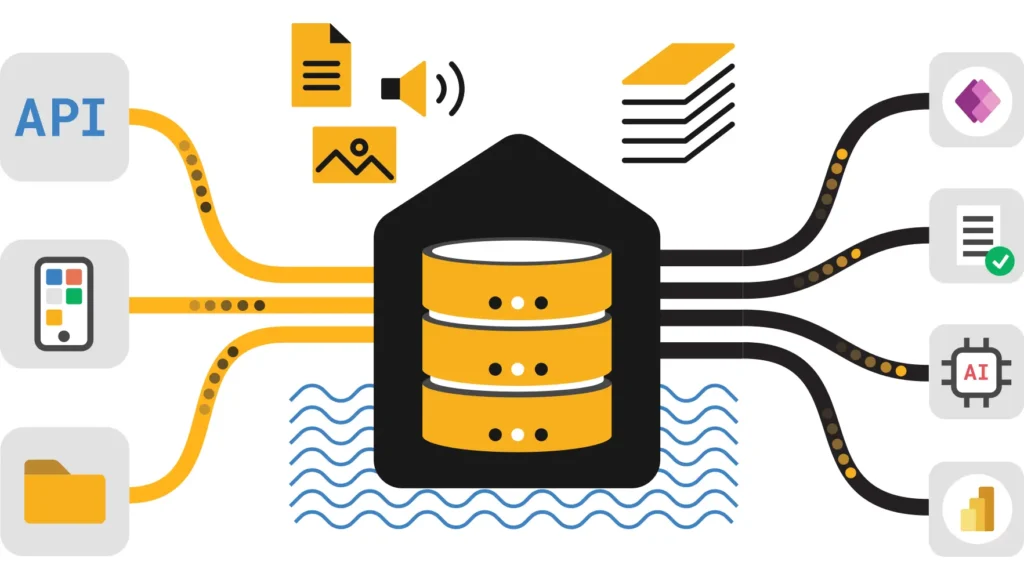
Direct Lake reads Delta Parquet files from OneLake directly into the VertiPaq engine’s memory — no scheduled data copy (unlike Import), no per-query SQL translation (unlike DirectQuery). The result is Import-like speed with near-real-time freshness from OneLake.
| Mode | How data is accessed | Performance | Freshness |
|---|---|---|---|
| Import | Full copy into semantic model; scheduled refresh | Fastest (all in memory) | Scheduled (stale between refreshes) |
| DirectQuery | Per-query SQL translation to source | Slowest (network + SQL execution) | Real-time |
| Direct Lake | Parquet columns loaded on-demand from OneLake | Import-like for columnar queries | Near-real-time via framing |
Critically: Direct Lake only loads the columns actually queried, not the full table. This is “cold column” loading — a 50-column table with a query touching 5 columns loads only those 5 into VertiPaq memory.
Whether you understand the columnar on-demand loading mechanism — not just that it’s “fast.” The on-demand column loading is the architectural reason Direct Lake can handle larger data volumes than Import before hitting memory limits.
Q2
Two separate variants, different behavior on guardrail breach, different source support, different creation path. Direct Lake on SQL (the original, renamed April 2025): routes via SQL endpoint, falls back to DirectQuery, single Fabric item, web-first. Direct Lake on OneLake (GA March 2026): reads Delta directly via OneLake APIs, NO fallback, multi-source composite, Desktop-first.
| Dimension | Direct Lake on SQL | Direct Lake on OneLake |
|---|---|---|
| Data path | SQL analytics endpoint → Delta files | OneLake APIs → Delta files directly |
| Guardrail breach | Falls back to DirectQuery (silent, slower) | Query fails — no fallback, no degradation |
| Source support | Single Lakehouse or Warehouse | Multiple Lakehouses, Warehouses, SQL DBs, mirrored DBs |
| Composite models | Not available for multi-item | Mix tables from multiple Fabric items + Import tables |
| Security | RLS/CLS/OLS at SQL layer (delegated identity) | OneLake Security (user identity) |
| Primary creation | Fabric web interface | Power BI Desktop (OneLake catalog) |
| Status | GA since Fabric launch (renamed Apr 2025) | GA March 2026 |
Use Direct Lake on OneLake when: you need tables from multiple Fabric items, you want OneLake Security (no SQL-layer dependency), you want strict fail-fast behavior instead of silent fallback degradation. Use Direct Lake on SQL when: your security is defined at the SQL layer (RLS/CLS in the warehouse), you need queries against SQL views, or you want fallback as a safety net rather than a hard fail.
Knowing these are two distinct variants with different behavior on guardrail breach. Most 2024-trained candidates know only one variant. The no-fallback behavior of OneLake is the most important operational difference — it changes how you size SKUs and design models.
Q3
Fallback ONLY applies to Direct Lake on SQL. When a query can’t be served via Direct Lake (guardrail exceeded, SQL view queried, SQL-layer security enforced), it silently switches to DirectQuery against the SQL analytics endpoint — full performance penalty, invisible to the report user. Direct Lake on OneLake has NO fallback: guardrail breach causes the query to fail.
The DirectLakeBehavior property on the semantic model gives you control. Set to DirectLakeOnly to disable fallback entirely on a Direct Lake on SQL model — this mimics the no-fallback behavior of the OneLake variant and forces you to design within guardrail limits rather than relying on a silent degradation path.
Common fallback triggers for Direct Lake on SQL:
- Table row count exceeds the SKU’s Max Rows per table guardrail
- Query targets a SQL view (views always fall back in Direct Lake on SQL)
- RLS or CLS defined at the SQL analytics endpoint layer
- OLS (Object Level Security) applied to the model
- Model size on disk exceeds the Max model size guardrail
Use Performance Analyzer in Power BI Desktop — a query showing “Direct query” in the timing breakdown means it fell back. In the Fabric Capacity Metrics App, DirectQuery activity from a Direct Lake model signals fallback is occurring regularly and costing you performance.
Whether you know fallback only applies to one variant, and whether you know the DirectLakeBehavior property exists. Candidates who describe fallback without naming the variant reveal outdated knowledge.
Q4
No data refresh (no row copying). But a metadata refresh (framing) is required to notify Power BI of new Delta table versions in OneLake. During framing, Power BI identifies which Parquet files constitute the current snapshot. Queries during framing remain consistent via Delta’s snapshot isolation.
For Direct Lake on SQL, framing is triggered by the SQL analytics endpoint polling the Delta log. For Direct Lake on OneLake, framing uses OneLake APIs directly. The framing process can be scheduled, triggered via the Power BI REST API, or set to automatic. Excessive small Parquet files (from streaming micro-batches) slow framing because more files must be enumerated — this is why running OPTIMIZE on Gold tables before framing matters.
Whether you distinguish data refresh vs framing — these are commonly confused. And whether you know framing can be a bottleneck, and that the number of Parquet files is the lever the data engineer controls to keep framing fast.
Q5
Guardrails define the maximum number of rows per table, columns per table, and total model size that a given F-SKU can serve in Direct Lake mode. Exceeding them has completely different outcomes depending on the variant: Direct Lake on SQL falls back to DirectQuery silently; Direct Lake on OneLake fails the query outright.
| SKU | Max rows per table | Max columns per table | Max model size |
|---|---|---|---|
| F2 | 300M | 25,000 | 10 GB |
| F4 | 300M | 25,000 | 10 GB |
| F8 | 300M | 25,000 | 10 GB |
| F16 | 300M | 25,000 | 20 GB |
| F32 | 1B | 25,000 | 40 GB |
| F64 | 5B | 25,000 | 180 GB |
Verify current values at Microsoft Learn — Direct Lake overview. Values may update with SKU refreshes.
Whether you know the guardrail behavior differs between variants — and whether you use the guardrail limits to make SKU sizing decisions. Knowing the F64 row limit (5B) vs F32 (1B) is the kind of specific number that signals production experience.
Q6
Spark (Linux) is case-sensitive: “Apple” and “apple” are distinct values. VertiPaq (Power BI) is case-insensitive: they’re the same value. This collapses distinct rows in Direct Lake without warning — aggregations can produce wrong results if the data hasn’t been normalized in the Lakehouse first.
The fix belongs upstream — normalize string casing (e.g., UPPER() or LOWER()) in the Silver→Gold transformation step before data reaches the Lakehouse tables that Direct Lake reads. This is a data quality issue, not a Power BI configuration issue, so the solution is in the engineering layer, not the report layer.
Whether you know the fix lives in the ETL layer, not in Power BI. Candidates who suggest a Power BI DAX workaround reveal they don’t understand where the boundary between the data layer and the reporting layer should be.
Q7
In public preview as of 2026: Direct Lake on OneLake models can now include Import tables from any Power Query data source (hundreds of connectors) alongside Direct Lake tables in the same semantic model. Large fact tables stay in Direct Lake; small dimension tables or reference data can be in Import — allowing calculated columns, Analyze in Excel hierarchies, and any connector’s data without a separate ETL pipeline.
The practical pattern: a Sales fact table (10B rows) stays in Direct Lake on a Lakehouse. A Targets CSV from SharePoint is added as an Import table in the same model. The model refreshes the Import table on a schedule while the Direct Lake fact table updates via framing. No ETL pipeline needed to land the CSV in OneLake first.
The semantic-link-labs Python library (SemPy) has a function to convert an individual Direct Lake table to Import mode in place — useful when a specific dimension needs a calculated column that Direct Lake doesn’t yet support.
Whether you know this capability is limited to Direct Lake on OneLake (not the SQL variant), and whether you can name a practical use case for the hybrid approach rather than just reciting the feature name.
Q8
Direct Lake supports paging — cold column segments can be evicted from memory and reloaded from OneLake when accessed again. The Max Memory guardrail is not a hard cap but a performance threshold: exceeding it causes paging latency, not failures. This is why Max Memory is not listed as a hard guardrail in the docs.
The design implication: Direct Lake can technically handle datasets larger than the SKU’s memory limit because it loads columns on demand and evicts cold ones. The cost is latency when evicted columns are re-accessed — a query that hits many columns in a rarely-accessed table will feel slower than a query on frequently-accessed columns that stay warm in memory.
Whether you understand paging as a performance threshold, not a hard failure. Candidates who say “the model fails if it exceeds memory” confuse the Max Memory behavior (paging) with row-count guardrail behavior (fallback/failure). The two have very different operational implications.
Power BI Semantic Models
Default models decoupled in October 2025, calculated columns in Preview for the OneLake variant, Semantic Link for data science integration, XMLA for ALM tooling.
Q9
In October 2025, Default Semantic Models were decoupled from Lakehouses and Warehouses. They now exist as independent items in the workspace rather than being automatically tied to the parent Fabric item. This changes how they are governed, versioned, and shared.
Previously, the Default Semantic Model was effectively an append to the Lakehouse — delete the Lakehouse, lose the model. As an independent item, it has its own lifecycle, can be independently shared, certified, and Git-versioned. The recommendation is still to build Custom Semantic Models for production reporting (curated tables, specific business domains) and use the Default model for ad-hoc exploration.
Whether you know about the October 2025 decoupling. Candidates with current knowledge will mention this change; candidates who learned Fabric in 2023-2024 may still describe Default models as “attached to the Lakehouse.”
Q10
Default: all tables, auto-synced from Lakehouse schema, good for ad-hoc exploration and discovery. Custom: curated subset of tables, domain-specific (Sales Model, Finance Model), purpose-built for production reporting with correct relationships, measures, and business logic.
The governance advantage of Custom models: a Sales analyst doesn’t need access to HR tables even if they’re in the same Lakehouse. A Custom Sales Semantic Model exposes only Sales tables. This also limits the surface area for RLS and governance policies — you’re securing a well-defined perimeter rather than managing security on every table in the Lakehouse.
Whether you understand Custom models as a governance and access control boundary, not just a “use fewer tables for performance.” The semantic boundary is the main architectural justification.
Q11
As of 2026: calculated columns and calculated tables that reference Direct Lake tables are in Preview for the OneLake variant. This is a significant change from the original limitation where calculated columns were discouraged and caused fallback. They are still not available for Direct Lake on SQL without causing fallback.
Best practice remains: create computed columns physically in the Lakehouse using Spark or SQL whenever possible. Parquet-stored computed columns are faster because they’re compressed and read directly, with no runtime computation. Reserve calculated columns in the model for genuinely dynamic logic that can’t be pre-computed.
If you need a calculated column on a Direct Lake on SQL model: convert that specific table to Import mode using the SemPy convert_table function. The large fact table stays in Direct Lake; the small dimension table with the needed calculated column switches to Import. This is the composite model pattern.
Whether you know the current 2026 status (Preview for OneLake variant) and whether you still recommend the “push to Lakehouse” best practice as the preferred path even though the limitation is relaxing. The best practice answer hasn’t changed; the status of the limitation has.
Q12
The original restriction: Direct Lake on SQL could only use a single Fabric item and couldn’t be combined with Import tables from external sources. Now: Direct Lake on OneLake supports multi-source tables from multiple Lakehouses, Warehouses, SQL DBs, and mirrored databases, plus Import tables from any Power Query connector.
The “chaining” problem from DirectQuery for Power BI Datasets (where perf degraded through layers) doesn’t apply the same way here — the Direct Lake tables still load from OneLake directly; it’s the Import tables that add a refresh requirement. The performance impact is isolated to the Import table portion of the model.
Whether you know the restriction was specific to the SQL variant and that the OneLake variant resolves it. Candidates who say “you can’t combine Direct Lake with Import” are giving a 2023 answer.
Q13
Semantic Link (SemPy library) lets Python/Spark notebooks query Power BI Semantic Models directly — accessing measures, hierarchies, and DAX calculations — so data science teams use the same business logic as BI consumers rather than rebuilding it in Python.
A practical example: a data scientist building a churn prediction model wants to use the “Customer Revenue” measure defined in the corporate semantic model rather than reimplementing the complex DAX logic in Python. With Semantic Link, they call that measure from a Spark notebook and get a consistent number. This prevents the “two different revenue numbers” problem that plagues organizations where BI and DS teams calculate things independently.
Whether you understand Semantic Link as a single source of truth mechanism between BI and data science — not just a technical connector. The business problem it solves (duplicate logic in different tools producing different numbers) is the answer that earns points.
Q14
Fabric workspaces expose an XMLA endpoint for read/write access to semantic models. This enables Tabular Editor (for complex model management), DAX Studio (query optimization and profiling), ALM Toolkit (deployment comparison and merging), and SSMS for scripting.
For Direct Lake models specifically, XMLA reveals the mode: directLake partition property and shows whether the model is the OneLake variant (expression points to OneLake storage location) or the SQL variant (expression points to SQL analytics endpoint). This is the programmatic way to verify which variant a model is using. The compatibilityLevel is 1604 or higher for Direct Lake models.
Whether you know XMLA is required for enterprise ALM (not optional nice-to-have) and whether you can name specific tools. Also whether you know compatibilityLevel 1604 as the Direct Lake identifier in XMLA metadata.
Q15
Direct Lake on SQL: created in Fabric web, can then be edited in Desktop. Direct Lake on OneLake: created in Power BI Desktop (OneLake catalog), live-edits in Desktop, web modeling for adding Import tables (Get Data) and editing OneLake table selection. Desktop live edit means no local data download — the model stays in the service.
Features only in web modeling: Edit Tables (change which OneLake tables the model uses), Transform Data (Power Query online for Import tables). Features only in Desktop: create a new Direct Lake on OneLake model, multi-artifact table selection, PBIP export. Authoring is increasingly Desktop-first for the OneLake variant — Fabric web is the previous generation’s primary surface.
Whether you know the authoring split between the two variants. Desktop-first for OneLake vs web-first for SQL is a practical production concern — developers hitting the web interface to create the OneLake variant won’t find the option there.
Q16
As of 2026, when you add an Import table to a Power BI semantic model in Fabric, the imported data is automatically written to OneLake as Delta Parquet — no separate copy process, no manual migration. This means Import tables become first-class OneLake citizens automatically.
The architectural implication: the old pattern of “Import = data locked in a .pbix blob, disconnected from the data platform” is gone. Import tables in Fabric semantic models are now Delta tables in OneLake, accessible by Spark, T-SQL, and other Fabric engines — closing the historic gap between BI storage and the data platform.
Awareness of this architectural shift. Many candidates still think of Import as a separate, isolated copy. In Fabric, Import and Direct Lake both ultimately live in OneLake, just with different refresh and loading semantics.
Performance Tuning
V-Order, cardinality, framing optimization, the DirectLakeBehavior property, and how to debug slow reports with the right tools.
Q17
V-Order is a write-time sorting and compression optimization on Parquet files that speeds up VertiPaq reads by 2–3×. It adds ~15% write overhead. Apply to Gold tables that Power BI Direct Lake reads. Disable on Bronze/staging tables where write speed matters and BI reads are rare.
V-Order is enabled by default in Fabric Spark. It optimizes Parquet’s encoding for VertiPaq’s dictionary encoding — reducing the transcoding work VertiPaq does when loading column segments. For tables not read by Direct Lake (Bronze raw, Silver staging), the write overhead is pure cost with no read payoff. See the Direct Lake Optimization Guide for layer-by-layer configuration.
Whether you understand V-Order is a write/read tradeoff and should be applied selectively by layer, not globally. The ability to recommend “disable on Bronze, enable on Gold” with a specific reason demonstrates real architecture thinking.
Q18
High cardinality columns (GUIDs, DateTime with milliseconds, free-text) consume massive dictionary memory because VertiPaq can’t compress unique values effectively. In Direct Lake, oversized column dictionaries increase framing time and can push the model toward the Max Memory threshold, causing paging.
Fix upstream in the Lakehouse: truncate DateTime to minute-level (not millisecond) for reporting tables, replace GUID primary keys with integer surrogate keys in the model-facing layer, and avoid exposing raw transactional IDs as dimensions. These are Star Schema best practices that become Direct Lake performance requirements.
Whether you understand cardinality as a memory problem, not a query design problem. The fix is upstream data modeling (in the Lakehouse), not a Power BI setting. Candidates who suggest DAX filters or model-level workarounds miss where the problem lives.
Q19
DirectLakeBehavior is a semantic model property that controls how the model behaves when Direct Lake mode can’t serve a query. Set to DirectLakeOnly to disable fallback entirely on a Direct Lake on SQL model — queries fail rather than degrading silently. This matches the behavior of Direct Lake on OneLake and forces correct model design within SKU guardrails.
Why you’d set it: in production, silent fallback to DirectQuery means users get inconsistent performance without warning. A report that runs in 200ms under Direct Lake and 8 seconds under DirectQuery fallback delivers a confusing user experience. Setting DirectLakeOnly makes the failure explicit and detectable, which forces the engineering team to fix the root cause rather than working around it.
Knowledge of this property (introduced with the two-variant distinction) and the architectural reasoning for when to prefer fail-fast over graceful degradation. Candidates who don’t know this property exists haven’t engaged with the two-variant documentation.
Q20
Four-step sequence: (1) Performance Analyzer to check if queries show “Direct query” — if yes, fallback is occurring. (2) Capacity Metrics App to check CU consumption per report and DirectQuery activity. (3) DAX Studio to profile individual measure execution time. (4) Spark data layer — check Parquet file count (framing slowdown) and V-Order status (cold column loading).
The split is critical: if Performance Analyzer shows “Direct query,” the problem is a fallback configuration issue (fix: DirectLakeBehavior or resolve the fallback trigger). If it shows “Direct Lake” but is still slow, the problem is the VertiPaq engine — cardinality, missing relationships, or inefficient DAX. If the model loads quickly but initial framing takes long, the problem is too many Parquet files in the source table — run OPTIMIZE.
Whether you have a structured diagnostic sequence rather than random guessing. Separating “is this a fallback problem?” from “is this a VertiPaq problem?” from “is this a framing problem?” is the triage skill that distinguishes senior-level debugging.
Q21
Measures are always preferred in Direct Lake — they compute at query time and have no storage cost. Calculated columns in the semantic model add stored values that must be loaded into memory with every framing. The best pattern: push computed columns to the Lakehouse using Spark or SQL so they’re stored as compressed Parquet.
The updated 2026 nuance: calculated columns that reference Direct Lake tables are now in Preview for the OneLake variant. But even when available, the best-practice recommendation doesn’t change — Parquet-stored columns (created in the Lakehouse) are still faster because they’re compressed at rest and load directly. Model-level calculated columns add runtime computation at framing time. Use them when the logic genuinely can’t be pre-computed.
Whether you give the updated 2026 answer (calculated columns in Preview for OneLake variant) without abandoning the underlying best practice. The principle hasn’t changed; the limitation has relaxed.
Q22
Typically 5–15 minutes. Eventstreams writes to the Lakehouse continuously (seconds latency to OneLake). But Direct Lake requires framing to update the metadata pointer — framing is typically triggered on a schedule or via API, not continuously. Auto-refresh of framing every 5–15 minutes is the practical ceiling for most setups.
For true sub-second real-time, Real-Time Intelligence (KQL Databases + Eventhouses) is the right Fabric tool — not Direct Lake semantic models. Direct Lake’s strength is “fresh enough” for business reporting, not streaming telemetry dashboards. Understanding this distinction prevents over-engineering Direct Lake for use cases it’s not designed for.
Whether you know the practical ceiling of Direct Lake freshness and can redirect to the correct Fabric tool (KQL/Eventhouse) for genuinely real-time scenarios. Candidates who say “Direct Lake is real-time” are misrepresenting the framing dependency.
Advanced Modeling
Calculation Groups, RLS nuances across the two variants, Translytical Task Flows (GA March 2026), Copilot prerequisites, and AI-ready modeling.
Q23
Calculation Groups reduce measure proliferation — instead of creating YTD, MTD, and YoY variants of every base measure, one Calculation Group applies those time intelligence patterns dynamically on top of any base measure. Created via Tabular Editor (XMLA) or natively in the web modeling view.
A model with 50 base measures and 5 time intelligence patterns would require 250 measures without Calculation Groups. With them: 50 base measures + 1 Calculation Group with 5 items. Maintenance reduces dramatically — update the time intelligence logic once, not 50 times.
Whether you understand Calculation Groups as a maintenance and governance tool, not just a “fancy feature.” The 250 → 55 measure count reduction is the practical business case.
Q24
For Direct Lake on SQL: RLS/CLS/OLS defined in the SQL analytics endpoint (delegated identity mode) is honored — but triggers fallback to DirectQuery when enforced. RLS defined in the semantic model (DAX roles) works without fallback for most scenarios. For Direct Lake on OneLake: use OneLake Security for data-level controls; semantic model DAX roles for report-level RLS.
The common production mistake: defining RLS in the Warehouse’s SQL security and connecting a Direct Lake on SQL model — every secured query falls back to DirectQuery, negating the performance benefit of Direct Lake. The right pattern: define RLS at the semantic model layer (DAX roles) for Direct Lake on SQL, or use OneLake Security for Direct Lake on OneLake.
Object Level Security (hiding tables or columns from certain roles) in a Direct Lake on SQL model can trigger fallback. If you need strict object-level access control without fallback, Direct Lake on OneLake with OneLake Security is the correct architecture.
Whether you can map security requirements to the correct variant. “RLS triggers fallback” is true only for SQL-layer RLS in the Direct Lake on SQL variant — not for semantic model DAX roles, and not for the OneLake variant at all.
Q25
Translytical Task Flows (GA March 2026) allow actions to be performed directly within Power BI reports — approve a record, update a value, trigger a workflow — rather than just reading data. Reports become bi-directional: they show analytics and accept operational inputs, closing the loop between insight and action.
The architectural significance: historically, a Power BI report told you what to do, and you’d then open a different system to do it. Task Flows embed the action into the report surface. Example: a manager viewing a procurement report can approve a purchase order directly in the visual — the approval writes back to the source system via a Fabric Data Agent or API connection, without leaving the report.
Translytical combines “transactional” and “analytical” — systems that support both reading aggregated insights and writing operational changes in the same interface. It’s a recognized pattern in enterprise software; Fabric’s implementation is Power BI-native, connected to the broader Fabric ecosystem.
Awareness that reports in Fabric 2026 are no longer read-only surfaces. Candidates who know GA March 2026 and can describe a concrete use case signal they’re tracking the platform’s direction, not just its past.
Q26
Requires F64 or P1+ capacity, tenant admin Copilot setting enabled. Does well: generating DAX measures from natural language, creating report pages from a prompt, narrative summaries of data. Doesn’t do well: complex multi-hop business logic, models with poor metadata (unexplained columns, no descriptions, technical naming).
Copilot’s quality ceiling is directly determined by the semantic model’s metadata quality. A model where every column is named with business terms, every measure has a description, technical ID columns are hidden, and relationships are clean (star schema) gives Copilot the context it needs to generate accurate DAX. A model with columns named col_7_b will produce confusing outputs regardless of prompt quality.
Whether you understand that Copilot quality is a semantic model quality problem, not just a prompt engineering problem. “Make the model AI-ready” is the operational answer — improving descriptions, synonyms, and naming conventions is your lever, not better prompting.
Q27
Field Parameters let report consumers dynamically switch the measures or dimensions displayed in a visual from a dropdown slicer — without publishing a new report. They work in Direct Lake identically to Import mode. A single report with Field Parameters can replace dozens of variants of the same report.
From a governance perspective, Field Parameters are a significant maintenance tool: fewer report versions to publish, fewer semantic models to manage, less surface area for RLS configurations. One certified, well-governed semantic model + a Field Parameter-enabled report can serve a broad self-service audience safely.
Whether you frame Field Parameters as a governance and maintenance tool (fewer reports to maintain) rather than just a UX feature. The connection to certified dataset strategy is what separates an architect answer from a developer answer.
Q28
AI-ready means: business-friendly column and measure names, hidden technical IDs, synonyms defined on measures and dimensions, descriptions on every measure (what it calculates, not just its name), clean star schema relationships, and Fabric IQ semantic layer configured so AI agents and Copilot have structured business context to reason from.
With Fabric IQ (announced FabCon 2026), the semantic model’s business context extends beyond Power BI to Copilot in Microsoft 365 and external AI agents via the OneLake MCP server. A well-described semantic model with synonyms and descriptions becomes the interface through which AI agents understand your business data — making metadata quality a first-order architecture concern, not documentation housekeeping.
Whether you connect AI-readiness to Fabric IQ and the broader agentic layer — not just “Copilot works better.” The semantic model as an AI agent’s business interface is the 2026 frame for this question.
Governance & CI/CD
PBIP format, deployment pipelines, endorsement, lineage, Domains, and the OneLake Catalog for data discoverability.
Q29
Fabric workspaces sync with Azure DevOps or GitHub. Reports are stored as PBIP (Power BI Project) format — not binary .pbix. PBIP breaks the report into human-readable JSON files (model definition, report layout, settings), enabling diff-based code review, merge conflict resolution, and branch-per-feature development.
For Direct Lake models specifically, the PBIP format stores the model definition including the directLake partition mode and the OneLake/SQL endpoint expression. This means the entire model — structure, measures, relationships, storage mode — is versionable and deployable as code. Combined with Deployment Pipelines (Dev → Test → Prod), it’s a complete CI/CD story for Power BI.
Whether you understand PBIP as enabling code review for Power BI changes. Binary .pbix files made team development impractical — you couldn’t review a colleague’s measure change in a PR. PBIP makes that possible.
Q30
Deployment Pipelines can swap the semantic model’s Lakehouse connection during promotion from Dev to Prod using deployment rules. The report structure (visuals, measures, relationships) promotes unchanged; only the data source connection updates from “Dev Lakehouse” to “Prod Lakehouse” automatically.
This is the critical pattern for environment management: parameterize the Lakehouse reference in the semantic model so Deployment Pipelines can apply environment-specific rules without manual reconnection. Without this, promoting a Direct Lake model to production requires manually repointing the data source — error-prone and unscalable.
Whether you know the deployment rule mechanism specifically and can explain how it connects to environment isolation. Candidates who describe Deployment Pipelines without mentioning connection swapping for Direct Lake models haven’t used them in a multi-environment setup.
Q31
Promoted: self-service — any data owner can mark their item as promoted, no approval needed. Certified: governance-controlled — typically restricted to a central IT or governance team, signals fully validated, enterprise-trusted data. Certified items appear first in the OneLake Data Hub.
In practice, Certified = “this is the single source of truth for this metric.” In large organizations, having multiple teams build their own “Sales” semantic models leads to different revenue numbers across dashboards. Certification with enforced discovery (only Certified models appear in team-level report creation workflows) solves this.
Whether you connect certification to single-source-of-truth enforcement — not just as a badge. The operational policy that restricts non-certified models from being shared in certain contexts is the governance mechanism that makes certification meaningful.
Q32
Before renaming, removing, or restructuring a Lakehouse table, open the Lineage View in the workspace or OneLake Catalog. It shows every downstream dependent — semantic models, reports, dashboards — so you can assess blast radius before making the change.
In a large Fabric deployment, a single Lakehouse Gold table might feed 3 semantic models, 15 reports, and 40 dashboard tiles. Dropping or renaming a column without checking lineage breaks all of them silently — Direct Lake fallback or errors appear only when reports are loaded by users. The Lineage View is the pre-change risk assessment tool that prevents this.
Whether you have a pre-change checklist habit. Senior engineers don’t make schema changes without impact analysis. The connection between Lineage View and production report breakage is what demonstrates operational maturity.
Q33
Domains group workspaces by business unit (Finance, Sales, HR). In the OneLake Data Hub inside Power BI Desktop, analysts filter items by Domain to find their business unit’s certified models rather than searching a flat list of every item in the tenant. This solves the “data swamp” discovery problem at scale.
Without Domains in a 500-workspace tenant: an analyst searching for “Sales” semantic models finds items from every team that named something “Sales.” With Domain-filtered discovery: the Finance analyst sees only Finance Domain items; they build reports on Finance-certified models rather than accidentally using a dev/test model with wrong numbers.
Whether you connect Domains to solving discovery at scale — not just organizational tidiness. The ability to quantify the problem (500 workspaces, 2,000 items) and explain how Domain filtering resolves it signals enterprise-scale experience.
Q34
Fabric supports External Sharing via Azure AD B2B. Guest users access shared apps or reports using their own credentials — authentication is handled by their home tenant. But the compute is charged to the host (sharing) tenant’s Fabric capacity, not the guest’s. This is a critical cost modeling point.
Security implication: guest users see only what the host’s RLS/OLS allows. But if the host model has no RLS, a guest sees everything the shared item exposes. Before sharing externally, audit the semantic model’s security — especially Direct Lake models where fallback to DirectQuery can sometimes bypass model-level security unexpectedly depending on the variant and configuration.
Whether you know the “host pays compute” model — a common gotcha in contracts and cost management. And whether you audit security before sharing, not after.
Migration & Scenarios in Power Bi Interview Questions
Premium Gen2 migration, historical data patterns, SKU sizing, XMLA backup, and multi-developer team management.
Q35
Phase 1 (capacity): repoint the workspace to a Fabric F-SKU — reports continue working unchanged with no re-deployment required. Phase 2 (Direct Lake): migrate storage from Import/DirectQuery to OneLake (Lakehouse), then create a Direct Lake semantic model. Phase 1 is low risk; Phase 2 requires data engineering effort.
Most organizations complete Phase 1 quickly (a single admin action) and then evaluate Phase 2 table by table. Import tables that are under the guardrail limits and not requiring frequent refresh are candidates for conversion to Direct Lake. Large Import tables with complex transformations may stay as Import during a transition period.
F64 is the functional equivalent of Power BI Premium P1 for capacity features. If migrating from P1, F64 is the starting point. For teams on P3 or P4, the sizing math changes significantly — contact Microsoft licensing for the specific mapping before committing to SKU selection.
Whether you separate the two migration steps rather than presenting them as a single big-bang migration. Phase 1 (capacity repoint) and Phase 2 (Direct Lake adoption) have very different risk and timeline profiles.
Q36
Use a composite model: Direct Lake for the “hot” window (e.g., last 3 years, within F64’s 5B row guardrail) and DirectQuery via the SQL analytics endpoint for historical data. Or partition the historical data and shortcut it into the Lakehouse as a separate table, queried via DirectQuery when needed.
The hot/cold architecture: the Gold Lakehouse holds 3 years of data in well-optimized Delta tables — this is the Direct Lake layer. A separate “Archive” Lakehouse holds everything older, accessible via a Shortcut in the same workspace. Report visuals that need historical depth switch to DirectQuery against the Archive; day-to-day dashboards run entirely on Direct Lake. The semantic model uses both in a single composite model.
Whether you can design a practical hot/cold architecture within guardrail constraints, rather than just saying “buy a bigger SKU.” The composite model combining Direct Lake + DirectQuery for historical data is the correct architectural solution.
Q37
Capacity Metrics App — filter by “Semantic Model” and “Power BI” item types to isolate BI workload CU consumption. Look for reports that consistently spike CU usage and investigate using Performance Analyzer + DAX Studio to find expensive measures or queries triggering fallback-induced DirectQuery bursts.
A “noisy neighbor” pattern in Power BI: one heavily-used executive dashboard with multiple expensive calculated measures runs at 9 AM and consumes 60% of the F-SKU, causing throttling for everyone else. The Capacity Metrics App surfaces this. The fix: optimize the dashboard’s DAX (simplify measures, pre-aggregate in Lakehouse), move it to off-peak scheduling if results don’t need to be live, or isolate the workspace to a dedicated capacity.
Whether you know the specific Capacity Metrics App filter workflow for Power BI workloads and can describe the noisy neighbor scenario with a resolution. Generic “use the Metrics App” answers earn no points without the specific diagnostic path.
Q38
Each developer creates a feature branch from main. Local PBIP files are edited in Desktop. PRs merge changes via diff review of the JSON definitions — measure changes, relationship changes, and visual changes are all human-readable and reviewable. Branch protection on main prevents direct pushes.
The workflow for semantic model changes specifically: Tabular Editor via XMLA can script out and apply measure changes as code (BIM files or TMDL), which can be reviewed in a PR without needing to open Desktop. For large teams, TMDL (Tabular Model Definition Language) in the PBIP format enables truly collaborative model development without overwriting each other’s changes.
Whether you know TMDL as the enabler of granular model change review — not just that PRs exist. Candidates who describe PBIP without TMDL haven’t used it for semantic model co-development.
Q39
Three variables: (1) table row counts vs per-SKU guardrails, (2) expected concurrent users vs SKU smoothing capacity, (3) model size on disk vs Max model size per SKU. Start with the largest table row count — if it exceeds F32’s 1B row limit, F64 is the minimum for Direct Lake on OneLake (no fallback).
For viewer licensing: F64 removes the per-viewer Power BI Pro license requirement. If you have 200 report consumers, the F64 capacity cost may be cheaper than 200 × $10/month Pro licenses plus a smaller F-SKU. This is often the financial trigger for choosing F64 over F32 regardless of the technical guardrail calculation.
F64 is functionally equivalent to P1 Premium for Power BI capabilities (Direct Lake memory, Copilot, unlimited viewers). If you’re migrating from P1, the SKU comparison that matters is F64 vs P1, not F32 or F16. Below F64, many Copilot and AI features are unavailable regardless of other configuration.
Whether you know all three sizing variables and the viewer licensing threshold at F64. Candidates who only discuss technical guardrails miss the business case for F64 that often drives the actual decision.
Q40
Semantic model metadata (measures, relationships, model definition) is backed up via XMLA endpoint to .abf files stored in ADLS Gen2. Data in OneLake is not backed up via XMLA — it’s covered by OneLake’s ZRS/GRS redundancy and retention policies on the Delta table. These are two separate backup strategies for two separate layers.
For a complete recovery strategy: (1) Semantic model definition → XMLA backup + PBIP in Git (Git is often sufficient and more granular), (2) OneLake data → Fabric’s BCDR (ZRS/GRS) + Delta time travel within the retention window, (3) Lakehouse notebooks and pipelines → Git integration. All three must be covered; any one gap leaves a recovery hole.
Whether you separate model metadata recovery from data recovery — they use different mechanisms. Candidates who say “back up the semantic model” without specifying that this only covers the metadata layer (not the underlying OneLake data) reveal they’ve never thought through a full recovery scenario.
Power BI done. Microsoft Purview, OneLake Security, Domains, and compliance are next.
Start Governance Questions →